
WakaLightgallery
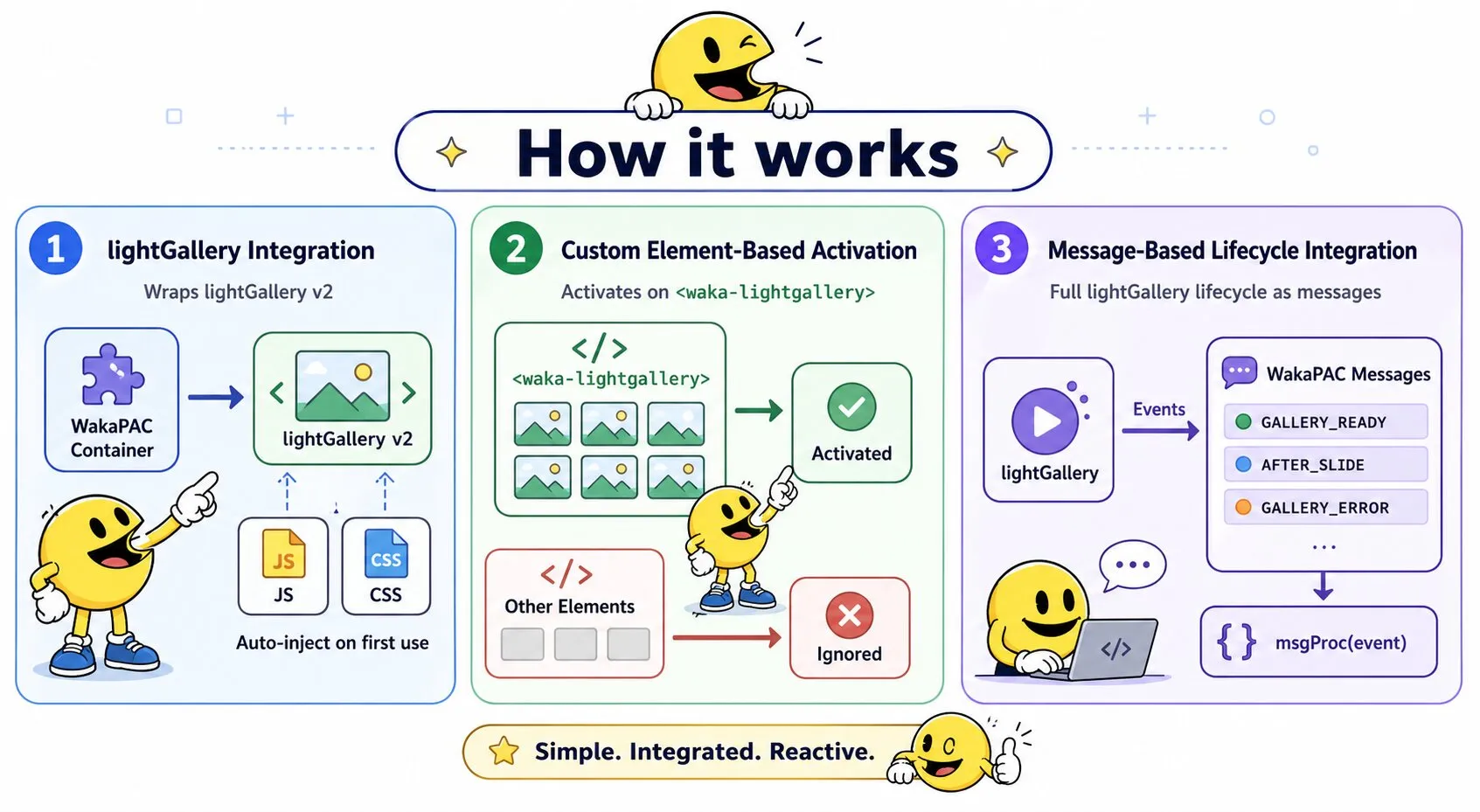
WakaLightGallery is a lightbox gallery plugin for wakaPAC. It wraps lightGallery v2 inside a PAC container, injecting the required JS and CSS automatically on first use. The plugin activates on <waka-lightgallery> elements and exposes the full lightGallery lifecycle as WakaPAC messages.
On this page:
Getting Started
Include the script after wakaPAC and register the plugin:
<script src="https://cdn.jsdelivr.net/gh/quellabs/wakapac@main/wakapac.min.js"></script>
<script src="https://cdn.jsdelivr.net/gh/quellabs/wakapac@main/plugins/wakalightgallery.min.js"></script>

<script>
    wakaPAC.use(wakaLightGallery); // must be called before any wakaPAC() calls
</script>
The plugin activates automatically for components whose root element is a <waka-lightgallery> custom element. The lightGallery JS and CSS are fetched from cdnjs the first time a gallery component is created and shared across all instances on the page.
Basic gallery
Place <a> elements inside <waka-lightgallery>. Each href points to the full-size image; the nested <img> serves as the thumbnail:
<waka-lightgallery id="photoGallery">
    <a href="img/photo1.webp"><img src="img/thumb1.webp" alt="Photo 1" /></a>
    <a href="img/photo2.webp"><img src="img/thumb2.webp" alt="Photo 2" /></a>
    <a href="img/photo3.webp"><img src="img/thumb3.webp" alt="Photo 3" /></a>
</waka-lightgallery>

<script>
    wakaPAC('#photoGallery', {});
</script>
With sub-plugins
lightGallery sub-plugins (zoom, thumbnails, autoplay, etc.) must be loaded by the host page separately. Pass the resulting globals in the plugins option:
<script src="https://cdnjs.cloudflare.com/ajax/libs/lightgallery/2.8.3/plugins/zoom/lg-zoom.umd.min.js"></script>
<script src="https://cdnjs.cloudflare.com/ajax/libs/lightgallery/2.8.3/plugins/thumbnail/lg-thumbnail.umd.min.js"></script>

<script>
    wakaPAC.use(wakaLightGallery, { plugins: [lgZoom, lgThumbnail] });
</script>
Per-instance configuration
lightGallery options can be passed per component under the lightgallery key in the third argument to wakaPAC(). These are merged with the plugin-level defaults:
wakaPAC('#photoGallery', { msgProc }, { lightgallery: { speed: 500, mode: 'lg-fade' } });Usage
Receiving Gallery Events
The plugin dispatches WakaPAC messages for the full lightGallery lifecycle. Handle them in msgProc:
wakaPAC('#photoGallery', {
    msgProc(event) {
        switch (event.message) {
            case WakaLightGallery.MSG_GALLERY_READY: {
                console.log('Gallery initialized');
                break;
            }
            case WakaLightGallery.MSG_AFTER_SLIDE: {
                // Slide index from wParam/lParam
                const index     = event.wParam;
                const prevIndex = event.lParam;

                // Or from the extended object
                console.log(event.detail.index, event.detail.prevIndex);
                break;
            }
            case WakaLightGallery.MSG_GALLERY_ERROR: {
                console.error(event.detail.message);
                break;
            }
        }
    }
});
Opening the gallery programmatically
Use wakaLightGallery.openGallery() to open the lightbox from outside the component, for example from a button click:
// Open at the first slide
wakaLightGallery.openGallery('photoGallery');

// Open at a specific slide (0-based index)
wakaLightGallery.openGallery('photoGallery', 2);
Refreshing after DOM changes
When gallery items are added or removed — for example after a reactive foreach update — call refresh() to synchronize lightGallery with the new set of children:
wakaLightGallery.refresh('photoGallery');Self-hosted assets
By default the plugin loads lightGallery JS and CSS from cdnjs. To use self-hosted or custom builds, pass src and cssSrc options:
wakaPAC.use(wakaLightGallery, {
    src:    '/vendor/lightgallery/lightgallery.umd.min.js',
    cssSrc: '/vendor/lightgallery/lightgallery.min.css'
});
If lightGallery is already present on the page when the first component is created (window.lightGallery exists), the plugin skips script injection entirely and uses the existing instance.
API
wakaPAC.use(wakaLightGallery, options?)
Registers the WakaLightGallery plugin with the wakaPAC runtime. Must be called before any wakaPAC() calls.
| Parameter | Type | Description |
|---|---|---|
wakaLightGallery | object | The wakaLightGallery plugin object |
options.src | string | Custom URL for the lightGallery JS bundle. Default: cdnjs 2.8.3 |
options.cssSrc | string | Custom URL for the lightGallery CSS. Default: cdnjs 2.8.3 |
options.plugins | Array | Pre-loaded lightGallery plugin objects (e.g. [lgZoom, lgThumbnail]). Default: [] |
options.speed | number | Default transition speed in ms. Default: 400 |
Returns void | ||
wakaLightGallery.openGallery(pacId, index?)
Opens the lightbox overlay at the given slide index.
| Parameter | Type | Description |
|---|---|---|
pacId | string | The data-pac-id of the gallery component |
index | number | Slide index to open at (0-based). Default: 0 |
Returns void | ||
wakaLightGallery.closeGallery(pacId)
Closes the lightbox if it is currently open.
| Parameter | Type | Description |
|---|---|---|
pacId | string | The data-pac-id of the gallery component |
Returns void | ||
wakaLightGallery.slide(pacId, index)
Jumps to a specific slide while the lightbox is open.
| Parameter | Type | Description |
|---|---|---|
pacId | string | The data-pac-id of the gallery component |
index | number | Slide index to jump to (0-based) |
Returns void | ||
wakaLightGallery.refresh(pacId)
Refreshes lightGallery with the current set of child elements. Use this after adding or removing gallery items without destroying the component.
| Parameter | Type | Description |
|---|---|---|
pacId | string | The data-pac-id of the gallery component |
Returns void | ||
wakaLightGallery.destroy(pacId)
Destroys the lightGallery instance for the given component. Equivalent to onComponentDestroyed but callable from application code.
| Parameter | Type | Description |
|---|---|---|
pacId | string | The data-pac-id of the gallery component |
Returns void | ||
Messages
WakaLightGallery delivers the following messages to msgProc. Only <waka-lightgallery> components receive them.
Gallery Ready (MSG_GALLERY_READY)
Sent once lightGallery has fully initialized the component. Equal to MSG_PLUGIN + 0x300.
Message Parameters
| Parameter | Type | Description |
|---|---|---|
wParam | number | Always 0. |
lParam | number | Always 0. |
Gallery Error (MSG_GALLERY_ERROR)
Sent when the lightGallery script fails to load. Equal to MSG_PLUGIN + 0x301.
Message Parameters
| Parameter | Type | Description |
|---|---|---|
wParam | number | Always 0. |
lParam | number | Always 0. |
Detail Properties
| Property | Type | Description |
|---|---|---|
detail.message | string | Human-readable error description including the URL that failed to load. |
Before Open (MSG_BEFORE_OPEN)
Sent immediately before the lightbox overlay begins to open. Equal to MSG_PLUGIN + 0x302.
Message Parameters
| Parameter | Type | Description |
|---|---|---|
wParam | number | Always 0. |
lParam | number | Always 0. |
After Open (MSG_AFTER_OPEN)
Sent once the lightbox overlay has fully opened. Equal to MSG_PLUGIN + 0x303.
Message Parameters
| Parameter | Type | Description |
|---|---|---|
wParam | number | Always 0. |
lParam | number | Always 0. |
Before Close (MSG_BEFORE_CLOSE)
Sent immediately before the lightbox overlay begins to close. Equal to MSG_PLUGIN + 0x304.
Message Parameters
| Parameter | Type | Description |
|---|---|---|
wParam | number | Always 0. |
lParam | number | Always 0. |
After Close (MSG_AFTER_CLOSE)
Sent once the lightbox overlay has fully closed. Equal to MSG_PLUGIN + 0x305.
Message Parameters
| Parameter | Type | Description |
|---|---|---|
wParam | number | Always 0. |
lParam | number | Always 0. |
Before Slide (MSG_BEFORE_SLIDE)
Sent immediately before each slide transition. Equal to MSG_PLUGIN + 0x306.
Message Parameters
| Parameter | Type | Description |
|---|---|---|
wParam | number | Index of the slide being transitioned to (0-based). |
lParam | number | Index of the slide being transitioned from (0-based). |
Detail Properties
| Property | Type | Description |
|---|---|---|
detail.index | number | Index of the slide being transitioned to. |
detail.prevIndex | number | Index of the slide being transitioned from. |
After Slide (MSG_AFTER_SLIDE)
Sent once each slide transition is complete. Equal to MSG_PLUGIN + 0x307. The new index is available as wParam, and as event.detail.index alongside the previous index in event.detail.prevIndex.
Message Parameters
| Parameter | Type | Description |
|---|---|---|
wParam | number | Index of the slide that is now active (0-based). |
lParam | number | Index of the slide that was previously active (0-based). |
Detail Properties
| Property | Type | Description |
|---|---|---|
detail.index | number | Index of the slide that is now active. |
detail.prevIndex | number | Index of the slide that was previously active. |
Notes
-
The plugin activates only on
<waka-lightgallery>elements. All other element types are silently ignored, sowakaPAC.use(wakaLightGallery)can be called once at application startup without affecting unrelated components. -
The lightGallery JS and CSS are each injected once and shared across all gallery instances on the page.
If
window.lightGalleryis already defined when the first component is created, injection is skipped entirely. - Components created before the lightGallery script has finished loading are queued internally and initialized automatically once the script is ready. No special handling is needed in application code.
-
destroy()calls lightGallery's own destroy method, which closes the overlay if open and removes all DOM modifications. It returns a Promise internally (for the close animation), but WakaPAC teardown is synchronous — the component is removed from the registry immediately. -
lightGallery sub-plugin scripts must be loaded by the host page before
wakaPAC.use()is called. The plugin accepts the resulting globals via thepluginsoption and passes them directly to lightGallery'spluginsconfig key.
Best Practices
- Register before creating components — call
wakaPAC.use(wakaLightGallery)before anywakaPAC()calls so the plugin hooks are in place when components are created. - Prefer
event.wParamfor the slide index — it is always an integer and requires no object destructuring. Useevent.detailwhen named access improves readability. - Use
refresh()instead of destroy-and-reinitialize — when gallery items change,refresh()synchronizes lightGallery with the updated DOM without tearing down the instance or losing event listeners. - Load sub-plugin scripts before
wakaPAC.use()— thepluginsoption is read once during plugin registration. Sub-plugin globals must already be defined at that point.