
WakaForm
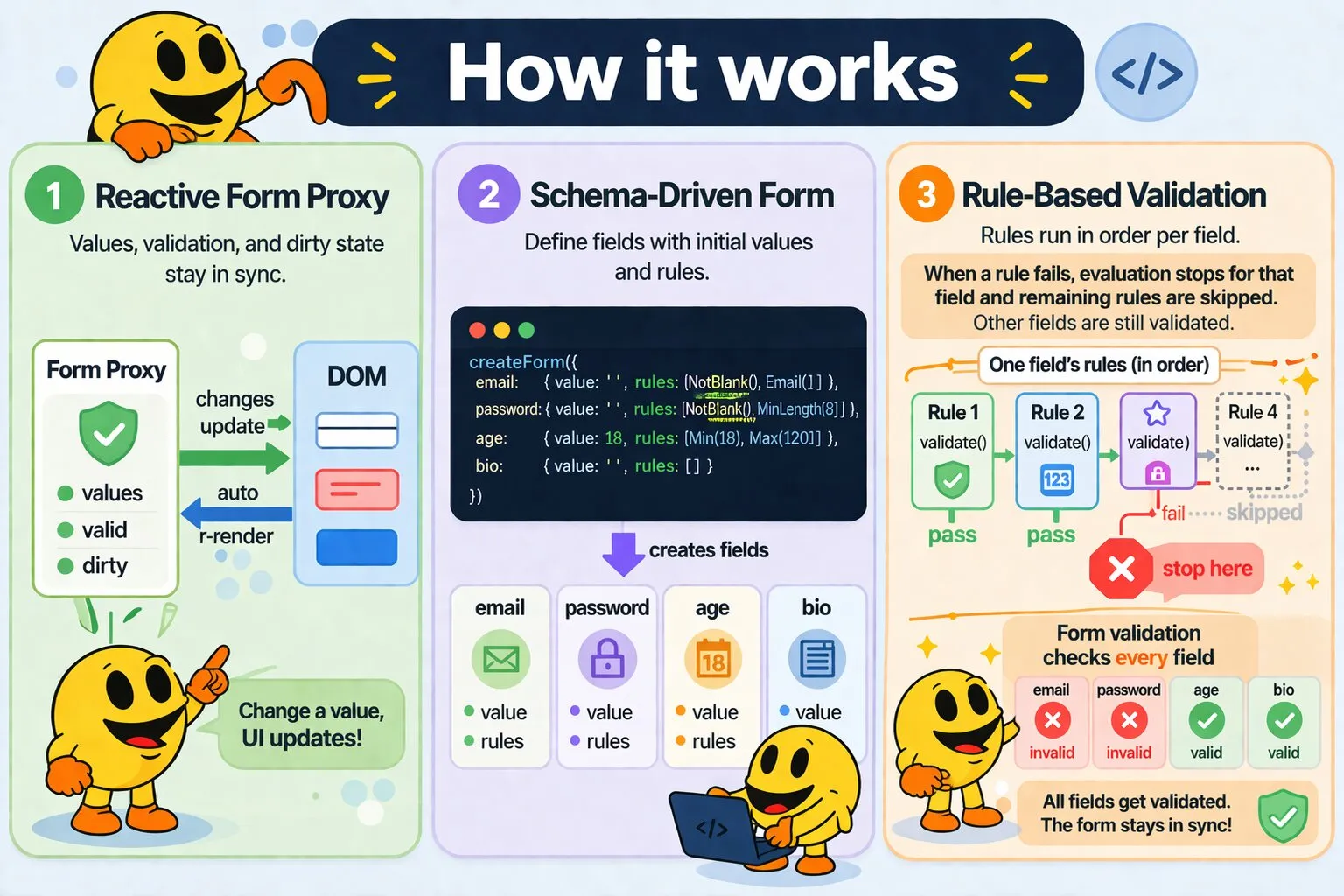
WakaForm is a reactive form plugin for wakaPAC. It wraps a field schema in a reactive proxy that tracks values, validation state, and dirty state. Validation is driven by composable rule objects. Error visibility and message copy are owned by the template — bind against field.valid directly and write your error messages in HTML.
On this page:
Getting Started
Include the script after wakaPAC, register the plugin, then create a form:
<script src="https://cdn.jsdelivr.net/gh/quellabs/wakapac@main/wakapac.min.js"></script>
<script src="https://cdn.jsdelivr.net/gh/quellabs/wakapac@main/plugins/wakaform.min.js"></script>

<script>
    wakaPAC.use(wakaForm); // must be called before any wakaPAC() calls
</script>
Mount the form on a component under any key name. The key becomes the binding prefix in the template — error messages live in the template, shown or hidden by binding against field.valid:
<form id="login">
    <input data-pac-bind="value: loginForm.username.value">
    <span data-pac-bind="visible: !loginForm.username.valid">Valid email required</span>

    <input type="password" data-pac-bind="value: loginForm.password.value">
    <span data-pac-bind="visible: !loginForm.password.valid">At least 8 characters required</span>

    <button data-pac-bind="click: submit">Login</button>
</form>
const loginForm = wakaForm.createForm({
username: { value: '', rules: [new NotBlank(), new Email()] },
password: { value: '', rules: [new NotBlank(), new MinLength(8)] }
});
wakaPAC('#login', {
loginForm,
submit() {
if (!loginForm.validate()) return;
this._http.post('/api/login', loginForm.values());
}
});The form proxy is reactive — any change to a field value, valid flag, or dirty flag automatically re-renders the bound DOM nodes. The same form instance can be mounted on multiple components simultaneously; all subscribers stay in sync.
Usage
Defining a Schema
Pass a plain object to createForm(). Each key becomes a field name. Each field definition requires a value (the initial value) and an optional rules array of rule objects:
const form = wakaForm.createForm({
    username: { value: '',  rules: [new NotBlank(), new Email()] },
    password: { value: '',  rules: [new NotBlank(), new MinLength(8)] },
    age:      { value: 18,  rules: [new Min(18), new Max(120)] },
    bio:      { value: '' } // no rules — field is always valid
});
Fields with no rules array are always valid and do not affect form.valid.
An initial valid state can be passed alongside value and rules. This is used by Loom to pre-mark fields as invalid when server-side validation has already failed — the error span is visible immediately on page load without requiring a submit attempt:
const form = wakaForm.createForm({
    email: { value: 'bad-input', valid: false, rules: [new NotBlank(), new Email()] },
    name:  { value: 'Floris',   valid: true,  rules: [new NotBlank()] }
});
Field State
Each field exposes three reactive properties:
| Property | Type | Description |
|---|---|---|
field.value |
any | The current value of the field. Bind to this with data-pac-bind="value: form.fieldName.value". Setting it triggers dirty tracking and live re-validation. |
field.valid |
boolean | true when all rules pass for this field. Starts true on creation unless overridden in the schema. Updated reactively whenever a field value changes, and refreshed for all fields by form.validate(). Use this to show or hide error messages in the template. |
field.dirty |
boolean | true when the current value differs from the initial value passed in the schema. Resets to false after form.reset(). |
Form State
Two reactive properties reflect the overall form state:
| Property | Type | Description |
|---|---|---|
form.valid |
boolean | true when every field passes all its rules. Starts true on creation unless overridden in the schema. Updated reactively on field changes and by form.validate(). Use in a submit guard rather than to disable a button on load. |
form.dirty |
boolean | true when at least one field's current value differs from its initial value. Useful for enabling or disabling a Save button. |
Showing and Hiding Errors
Error messages live in the template. Bind the visible: attribute against field.valid to show or hide them. Because field.valid is always accurate, errors update whenever a value changes without any additional configuration:
<input data-pac-bind="value: form.email.value">
<span data-pac-bind="visible: !form.email.valid">A valid email address is required</span>
You can show different messages for different conditions by using multiple spans, each with its own expression:
<input data-pac-bind="value: form.age.value">
<span data-pac-bind="visible: !form.age.valid">Must be between 18 and 120</span>
Enabling the Submit Button
Bind the button's enabled: attribute to form.valid to prevent submission while any field fails validation. Because form.valid is always accurate this works correctly from the first render:
<button data-pac-bind="click: submit, enabled: form.valid">Submit</button>Submit Pattern
form.validate() recomputes all fields and returns form.valid as a boolean, making it convenient to use directly in a guard:
wakaPAC('#login', {
    form,

    submit() {
        if (!form.validate()) {
            return;
        }

        this._http.post('/api/session', form.values());
    }
});
After a successful submission, call form.reset() to restore the form to its initial state and clear all dirty flags:
submit() {
    if (!form.validate()) {
        return;
    }

    this._http.post('/api/session', form.values()).then(() => {
        form.reset();
    });
}
Custom Rules
Any object with a validate(value) method that returns true (valid) or false (invalid) is a valid rule:
class StrongPassword {
    validate(value) {
        return /[A-Z]/.test(value) && /\d/.test(value);
    }
}

const form = wakaForm.createForm({
    password: { value: '', rules: [new NotBlank(), new MinLength(8), new StrongPassword()] }
});
Rules are evaluated in order for each field. If a rule fails, remaining rules for that field are not run. Combine NotBlank() with other rules when an empty value must be rejected — most built-in rules pass silently on empty input so they compose cleanly with optional fields.
Mounting on Multiple Components
The same form instance can be mounted on multiple components under any key name. The key determines the binding prefix in each template — different components can even use different keys for the same form instance:
const loginForm = wakaForm.createForm({
    email: { value: '', rules: [new NotBlank(), new Email()] }
});

wakaPAC('#login-fields',  { loginForm });
wakaPAC('#login-actions', { loginForm });
API
wakaPAC.use(wakaForm)
Registers the WakaForm plugin with the wakaPAC runtime.
| Parameter | Type | Description |
|---|---|---|
wakaForm | object | The WakaForm plugin object. Must be called before any wakaPAC() calls so form references in abstractions are picked up during component creation. |
Returns void | ||
wakaForm.createForm(schema)
Creates a new reactive form proxy from a field schema.
| Parameter | Type | Description |
|---|---|---|
schema | object | Plain object mapping field names to field definitions. Each definition must be a plain object with a value property and an optional rules array. Field values must be primitives (string, number, boolean, null, or undefined) — object values are not supported as dirty tracking uses strict equality. |
Returns FormProxy | Reactive form proxy with field accessors, form.valid, form.dirty, and form methods. | |
form.validate()
Recomputes all validation rules for every field, updates all field.valid flags and form.valid, and returns form.valid as a boolean. Use it directly in a submit guard:
if (!form.validate()) return;| Parameter | Type | Description |
|---|---|---|
Returns boolean | true when every field passes all its rules, false otherwise. | |
form.reset()
Restores all fields to their initial values and clears all dirty flags. Typically called after a successful submission to return the form to a clean state.
| Parameter | Type | Description |
|---|---|---|
Returns void | ||
form.values()
Returns a plain snapshot of all field values. The returned object is not reactive — mutations do not affect the form. Use it to pass form data to an HTTP call.
// → { username: 'floris@example.com', password: 'S3cret!' }
const payload = form.values();| Parameter | Type | Description |
|---|---|---|
Returns object | Plain object of { fieldName: currentValue } for all fields. Safe to serialize directly to JSON. | |
Built-in Rules
All built-in rules are exposed as globals (window.NotBlank, etc.) and as properties of the wakaForm instance for use without globals:
const { NotBlank, Email, MinLength } = wakaForm;| Rule | Description |
|---|---|
new NotBlank() |
Fails if the value is null, undefined, an empty string, or a whitespace-only string. Use this as the first rule on any required field. |
new Email() |
Fails if the value is not a valid email address. Empty values pass — combine with NotBlank() for required email fields. |
new Min(n) |
Fails if the numeric value is less than n. Non-numeric input also fails. Empty values pass. |
new Max(n) |
Fails if the numeric value is greater than n. Non-numeric input also fails. Empty values pass. |
new MinLength(n) |
Fails if the string length is less than n characters. Empty values pass. |
new MaxLength(n) |
Fails if the string length is greater than n characters. |
new Pattern(regex) |
Fails if the value does not match regex. Safe to use with stateful regexes (g or y flag) — lastIndex is reset before each test. Empty values pass. |
new Url() |
Fails if the value is not a valid URL. Validated using the browser's native URL constructor. Empty values pass — combine with NotBlank() for required URL fields. |
new In(allowed) |
Fails if the value is not in the allowed array. Uses loose equality (==) so numeric strings match numeric values. Empty values pass. |
Notes
Field values must be primitives — string, number, boolean, null, or undefined.
Object values are not supported because dirty tracking uses strict equality (===), which always
returns false for distinct object references regardless of content. createForm() throws
immediately if a non-primitive initial value is detected.
Form references must be placed at the top level of the abstraction passed to wakaPAC(). The key name you use becomes the binding prefix in the template. Nested references are not scanned and will not be subscribed:
// correct — form is a top-level key; bind against myForm.fieldName.value in the template
wakaPAC('#login', { myForm: loginForm });

// incorrect — form is nested and will not be found
wakaPAC('#login', { state: { myForm: loginForm } });
Deleting properties from a form proxy throws. The schema is fixed at creation time — fields cannot be added or removed after the fact.
WakaForm requires the same _externalProxy guard in wakaPAC's proxyGetHandler as WakaStore. If
WakaStore is already integrated, no additional changes to wakaPAC are needed. WakaForm is self-contained and
does not depend on WakaStore — include only what your project requires.
form.valid reflects the last computed validation state. It is accurate after form.validate() has been called, or after a field value changes and triggers reactive recomputation. On page load, all fields start with valid: true unless an explicit valid: false was passed in the schema. This means error spans are hidden on load and only appear after the first submit attempt or after a field change triggers validation — which is the intended UX.
Best Practices
- Register before creating components — call
wakaPAC.use(wakaForm)before anywakaPAC()calls so form references in abstractions are picked up correctly during component creation. - Always lead with
NotBlank()on required fields — most built-in rules pass silently on empty input so they compose cleanly with optional fields. Explicitly addNotBlank()when an empty value must be rejected. - Gate error visibility on a submitted flag — since fields start
valid: true, error spans bound only to!field.validwould stay hidden on load but show incorrectly once a value is typed and then cleared. Gate visibility on both asubmittedflag and!field.validto ensure errors only appear after the first submit attempt. Loom handles this automatically when using->useWakaForm(). - Use
form.values()for HTTP calls — it returns a plain snapshot of current values with no proxy overhead, safe to serialize directly to JSON. - Call
form.reset()after successful submission — this clears dirty flags and restores initial values, giving the user a clear visual signal that their submission was accepted. - Keep custom rules stateless — a rule's
validate(value)method receives only the field's current value. Cross-field validation (e.g. password confirmation) should be handled in the submit handler afterform.validate()returns. - Write error messages in the template —
field.validis a boolean; message copy belongs in HTML, not in rule objects. This keeps validation logic separate from presentation and makes copy changes a template-only concern.