msgProc: Paint
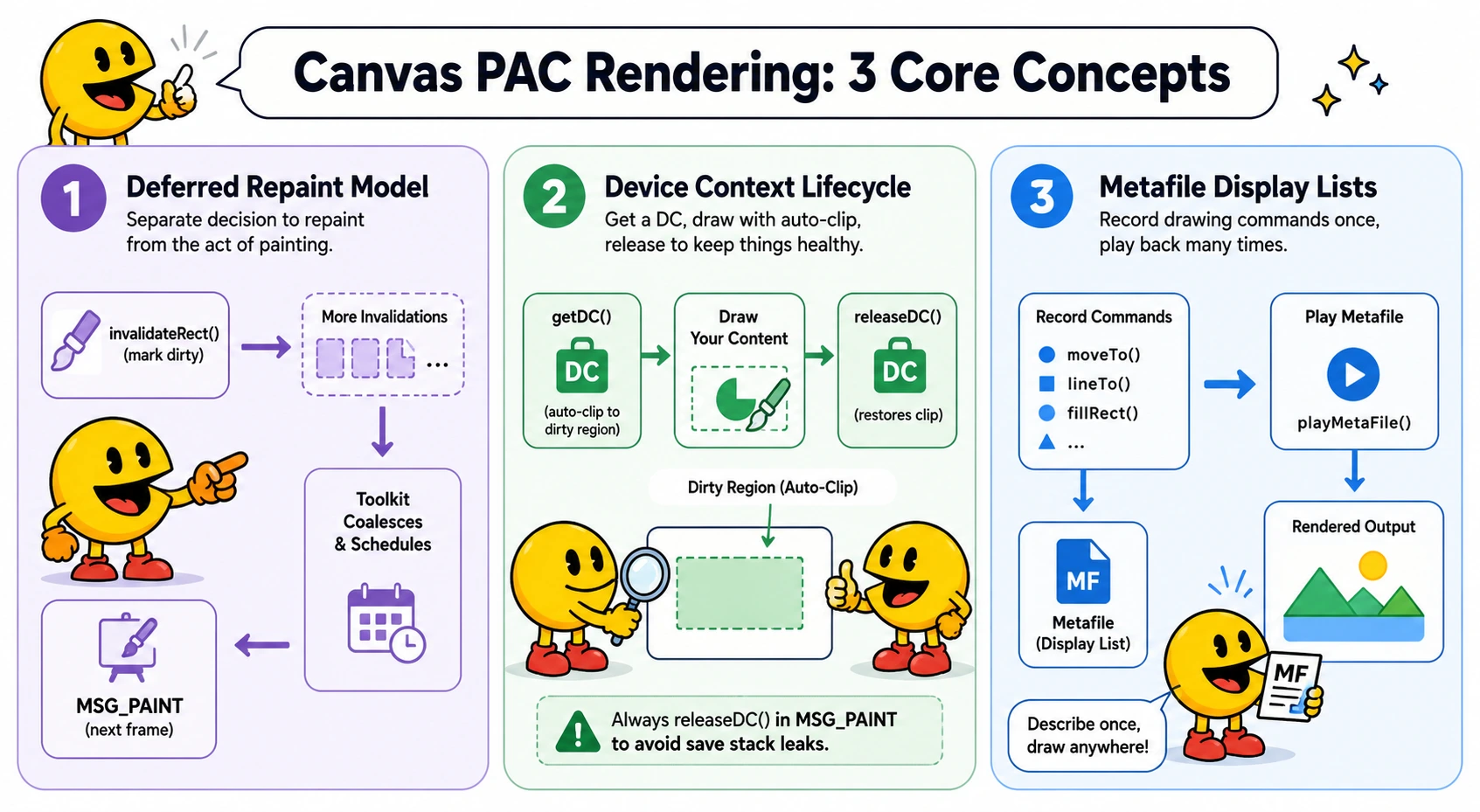
Canvas PAC components separate the decision to repaint from the act of painting. Rather than drawing directly in response to events or data changes, a component marks itself dirty via invalidateRect() and lets the toolkit schedule a single MSG_PAINT on the next frame — coalescing any number of invalidations into one draw pass. For a mapping of Win32 concepts to their underlying browser primitives, see Win32 Concepts Applied to the DOM in the msgProc Reference.
On this page:
Messages
MSG_PAINT
MSG_PAINT fires when a component calls wakaPAC.invalidateRect(). The toolkit defers the repaint to the next display refresh cycle, coalescing any further invalidations that arrive in the meantime into a single dispatch. MSG_PAINT is only dispatched to <canvas> containers — it will not fire for regular DOM elements.
Message Parameters
| Parameter | Type | Description |
|---|---|---|
wParam |
number | Reserved (always 0) |
lParam |
number | Reserved (always 0) |
Example: Basic Paint Handler
msgProc(event) {
    if (event.message === wakaPAC.MSG_PAINT) {
        const hdc  = wakaPAC.getDC(this.pacId);
        const size = wakaPAC.getCanvasSize(this.pacId);

        hdc.clearRect(0, 0, size.width, size.height);

        hdc.fillStyle = 'steelblue';
        hdc.fillRect(10, 10, size.width - 20, size.height - 20);

        wakaPAC.releaseDC(hdc);
    }
}
API
getDC()
Returns the device context (DC) for a canvas PAC container. The context type is determined by the
data-pac-context attribute on the canvas element — '2d' is the default and the
type core provides. The toolkit caches the DC internally — repeated calls return the same DC with no
overhead. The DC is released when the canvas is removed from the page. When called inside a MSG_PAINT
handler, getDC() automatically clips drawing to the dirty region — the set of rectangles
accumulated by invalidateRect() since the last paint. The clip is released by
releaseDC(). Outside of MSG_PAINT, the DC is returned unmodified.
wakaPAC.getDC(pacId)| Parameter | Type | Description |
|---|---|---|
pacId |
string | The data-pac-id of the target canvas container |
DC attributes are declared via the dcAttributes option at registration time and applied when the DC is first created. See dcAttributes below.
releaseDC()
Releases a device context previously obtained with getDC(). Must be called once for every
getDC() call made inside a MSG_PAINT handler. Omitting it leaves the canvas's save/restore
stack unbalanced — the dirty-region clip pushed by getDC() is never popped, so it keeps
restricting drawing on subsequent frames instead of being released. Outside of MSG_PAINT,
releaseDC() is a no-op and safe to call unconditionally.
wakaPAC.releaseDC(hdc)| Parameter | Type | Description |
|---|---|---|
hdc |
DC | The device context returned by getDC() |
createCompatibleDC()
Creates an off-screen compatible device context sized to match the current canvas backing store.
The context type matches the source canvas's data-pac-context attribute. The returned DC
behaves identically to the one returned by getDC() for drawing purposes. The component owns
the returned DC. Compatible DCs are not resized automatically — recreate them in MSG_SIZE after calling
resizeCanvas(). Returns null if the pacId does not refer to a canvas container.
wakaPAC.createCompatibleDC(pacId)| Parameter | Type | Description |
|---|---|---|
pacId |
string | The data-pac-id of the target canvas container |
deleteCompatibleDC()
Releases a compatible DC created by createCompatibleDC(). Zeroes the backing store dimensions so
the pixel buffer is reclaimed promptly. Safe to call with null.
wakaPAC.deleteCompatibleDC(dc)| Parameter | Type | Description |
|---|---|---|
dc |
compatible DC | DC returned by createCompatibleDC() |
Example: Cached Background
wakaPAC('#myCanvas', {
    init() {
        this.bgDC = null;
    },

    msgProc(event) {
        switch (event.message) {

            case wakaPAC.MSG_SIZE: {
                const width  = wakaPAC.LOWORD(event.lParam);
                const height = wakaPAC.HIWORD(event.lParam);

                wakaPAC.resizeCanvas(this.pacId, width, height);
                this.layoutWidth  = width;
                this.layoutHeight = height;

                // Recreate the compatible DC at the new size and redraw the background
                wakaPAC.deleteCompatibleDC(this.bgDC);
                this.bgDC = wakaPAC.createCompatibleDC(this.pacId);
                drawBackground(this.bgDC, width, height);
                break;
            }

            case wakaPAC.MSG_PAINT: {
                const hdc = wakaPAC.getDC(this.pacId);

                // Blit the cached background, then draw dynamic content on top
                wakaPAC.bitBlt(hdc, this.bgDC, 0, 0);
                drawForeground(hdc, this.layoutWidth, this.layoutHeight);

                wakaPAC.releaseDC(hdc);
                break;
            }
        }
    }
});
getDCFromElement()
Returns the rendering context for any <canvas> element — not tied to a PAC container.
Use this to obtain a drawing context for canvas elements inside foreach item templates or other
non-container canvases, where getDC() is not available. The context type is determined by
the element's data-pac-context attribute ('2d' by default). An optional
attributes argument is passed through to getContext().
wakaPAC.getDCFromElement(canvasElement, attributes?)| Parameter | Type | Description |
|---|---|---|
canvasElement |
HTMLCanvasElement | The canvas element to get a context for |
attributes |
object | Optional context attributes passed to getContext(). See dcAttributes |
Returns a CanvasRenderingContext2D, or null if the element is not a canvas.
invalidateRect()
Marks a canvas container as needing repaint. Multiple calls before the next frame are accumulated into a dirty region list — only a single MSG_PAINT fires. Incoming rectangles that are fully contained within an already-queued rectangle are dropped. Use getUpdateRgn() during MSG_PAINT to retrieve the discrete dirty rectangles.
wakaPAC.invalidateRect(pacId, rect?)| Parameter | Type | Description |
|---|---|---|
pacId |
string | The data-pac-id of the target canvas container |
rect |
object | null | Optional rectangle to invalidate in canvas-local pixel coordinates: { x, y, width, height }. Omit or pass null to invalidate the entire canvas surface |
Example: Invalidate on Data Change
wakaPAC('#myChart', {
    init() {
        // Fetch data, then request repaint
        fetchChartData().then(data => {
            this.data = data;
            wakaPAC.invalidateRect(this.pacId);
        });
    },

    msgProc(event) {
        if (event.message === wakaPAC.MSG_PAINT) {
            const hdc = wakaPAC.getDC(this.pacId);
            drawChart(hdc, this.data);
            wakaPAC.releaseDC(hdc);
        }
    }
});
getInvalidatedRect()
Returns the bounding rectangle of the current dirty region for a canvas container, or null if no
repaint is pending. The rect is the union of all rectangles accumulated by invalidateRect() since the
last paint — it is the coarsest possible bound and may include clean areas between discrete dirty rectangles.
Returns { x, y, width, height } or null. The returned object is a copy — mutating it
has no effect on internal state.
For partial clears and targeted redraws, prefer getUpdateRgn(), which returns the discrete dirty
rectangles rather than their bounding union.
wakaPAC.getInvalidatedRect(pacId)getUpdateRgn()
Returns the list of discrete dirty rectangles for a canvas container, or null if no repaint is
pending. Each entry is a rectangle in canvas-local pixel coordinates: { x, y, width, height }.
Unlike getInvalidatedRect(), which returns the bounding union of all dirty areas,
getUpdateRgn() gives you the individual rectangles that were passed to
invalidateRect(). This lets you skip clear and redraw work in the clean gaps between dirty
regions. The toolkit also clips drawing to these discrete rectangles — iterating the region and clearing
only each dirty rect avoids touching pixels that do not need to change.
Rectangles that are fully contained within an already-queued rectangle are not added to the list. The returned array is a shallow copy — mutating it has no effect on internal state.
wakaPAC.getUpdateRgn(pacId)Example: Partial Repaint
msgProc(event) {
    if (event.message === wakaPAC.MSG_PAINT) {
        const hdc   = wakaPAC.getDC(this.pacId);
        const rects = wakaPAC.getUpdateRgn(this.pacId);

        for (const rc of rects) {
            // Clear and redraw each discrete dirty rectangle
            hdc.clearRect(rc.x, rc.y, rc.width, rc.height);
            drawGridRegion(hdc, rc);
        }

        wakaPAC.releaseDC(hdc);
    }
}
resizeCanvas()
Resizes the backing store of a canvas PAC container, triggering a repaint automatically — MSG_PAINT fires on the next frame afterward.
wakaPAC.resizeCanvas(pacId, width, height)| Parameter | Type | Description |
|---|---|---|
pacId |
string | The data-pac-id of the target canvas container |
width |
number | New backing store width in pixels |
height |
number | New backing store height in pixels |
getCanvasSize()
Returns the current backing store dimensions of a canvas PAC container. These reflect the actual pixel dimensions of the canvas element, which may differ from the CSS layout size when display scaling is in use.
wakaPAC.getCanvasSize(pacId)| Parameter | Type | Description |
|---|---|---|
pacId |
string | The data-pac-id of the target canvas container |
Returns { width, height }, or null if the pacId does not refer to a canvas container.
bitBlt()
Blits a source DC or bitmap handle onto a destination DC at the given offset. If dw and dh
are omitted the source is copied at its natural dimensions — a straightforward drawImage()
pixel copy.
wakaPAC.bitBlt(destDC, srcDC, dx, dy, cx?, cy?, sx?, sy?)| Parameter | Type | Description |
|---|---|---|
destDC |
DC | Destination device context |
srcDC |
DC or bitmap handle | Source DC created by createCompatibleDC(), or a bitmap handle from loadBitmap() |
dx |
number | Destination X coordinate |
dy |
number | Destination Y coordinate |
cx |
number | Width of the rectangle to copy, in pixels. Applied to both source and destination — no scaling occurs. Defaults to the full source width |
cy |
number | Height of the rectangle to copy, in pixels. Applied to both source and destination — no scaling occurs. Defaults to the full source height |
sx |
number | X coordinate of the top-left corner of the source rectangle. Default: 0 |
sy |
number | Y coordinate of the top-left corner of the source rectangle. Default: 0 |
stretchBlt()
Blits a source DC onto a destination DC, scaling the source to fill the destination rectangle.
Unlike bitBlt(), which copies at the source's natural dimensions, stretchBlt()
always stretches the entire source to fit (dw, dh). Use this when the offscreen DC dimensions
differ from the target canvas — for example, when blitting a sparkline generated at one size onto a
canvas element of a different size.
wakaPAC.stretchBlt(destDC, srcDC, dx, dy, dw, dh)| Parameter | Type | Description |
|---|---|---|
destDC |
DC | Destination device context |
srcDC |
DC | Source device context — the full surface is used as the source rect |
dx |
number | Destination X coordinate |
dy |
number | Destination Y coordinate |
dw |
number | Destination width |
dh |
number | Destination height |
loadBitmap()
Loads a bitmap from a variety of sources, returning an opaque bitmap handle ready to pass to
bitBlt(), getBitmapSize(), saveBitmap(), and deleteBitmap().
The caller owns the returned handle and must call deleteBitmap() when done.
Returns null on failure — unsupported source type, network error, CORS block, or image not yet loaded.
await wakaPAC.loadBitmap(source)| Parameter | Type | Description |
|---|---|---|
source |
string | URL or data URI — fetched and decoded. CORS applies for cross-origin URLs. |
source |
<img> element | Must be fully loaded before passing. Returns null if the image is not yet decoded. |
source |
ImageBitmap | Used directly. Caller retains ownership and must call .close() themselves. |
source |
ImageData | Raw RGBA pixel buffer, drawn at its natural dimensions. |
source |
Blob | Decoded and drawn at its natural dimensions. |
source |
<canvas> element | Snapshot of the canvas at call time. |
source |
OffscreenCanvas | Snapshot of the offscreen canvas at call time. |
Example
// Load from URL
const hBitmap = await wakaPAC.loadBitmap('/assets/sprite.png');

// Load from an <img> element
const hBitmap = await wakaPAC.loadBitmap(img);

// Blit onto the canvas DC in MSG_PAINT
wakaPAC.bitBlt(hdc, hBitmap, x, y);

// Release when done
wakaPAC.deleteBitmap(hBitmap);
saveBitmap()
Saves the contents of a DC or bitmap handle to an image file, triggering a download.
Works with compatible DCs from createCompatibleDC(), bitmap handles from loadBitmap(),
and DCs from getDC(). The image format is derived from the filename extension:
.png, .jpg/.jpeg, or .webp.
Defaults to PNG if the extension is absent or unrecognised. Not available in Web Workers.
await wakaPAC.saveBitmap(dc, filename?)| Parameter | Type | Description |
|---|---|---|
dc |
DC or bitmap handle | The DC or bitmap handle to save |
filename |
string | Output filename. Defaults to 'bitmap.png' |
Returns true on success, false on failure.
Example
const hdc = wakaPAC.getDC(this.pacId);
await wakaPAC.saveBitmap(hdc, 'screenshot.png');   // PNG
await wakaPAC.saveBitmap(hdc, 'screenshot.jpg');   // JPEG
await wakaPAC.saveBitmap(hdc, 'screenshot.webp');  // WebP
wakaPAC.releaseDC(hdc);
getBitmapSize()
Returns the pixel dimensions of a bitmap handle created by loadBitmap().
Returns null if the handle is invalid.
wakaPAC.getBitmapSize(hBitmap)| Parameter | Type | Description |
|---|---|---|
hBitmap |
bitmap handle | Handle returned by loadBitmap() |
Returns { width, height }, or null if the handle is invalid.
deleteBitmap()
Releases a bitmap handle created by loadBitmap(). The handle must not be used after
calling this. Equivalent to deleteCompatibleDC() — provided as a semantically
matching counterpart to loadBitmap().
wakaPAC.deleteBitmap(hBitmap)| Parameter | Type | Description |
|---|---|---|
hBitmap |
bitmap handle | Handle returned by loadBitmap() |
Metafile API
A metafile is a display list — an array of drawing instruction objects produced by chart functions or other display list producers. Metafiles separate the description of drawing from its execution, enabling caching, hit testing, and compositing of multiple charts onto a single canvas. The concept mirrors Win32's Enhanced Metafile (EMF) format.
MetaFile
A fluent builder for constructing display lists without manually assembling raw op objects. Each method
appends one drawing instruction and returns this, so calls can be chained. The API mirrors
CanvasRenderingContext2D so sequences of drawing instructions read naturally. Call
build() to retrieve the completed array, which can then be passed to
playMetaFile() and metaFileHitTest() like any other display list.
const dl = new wakaPAC.MetaFile()
    .setFillStyle('#4e79a7')
    .beginPath()
    .arc(cx, cy, r, startAngle, endAngle)
    .fill()
    .build();
For conditional ops, break the chain — the builder accumulates state across separate statements and
build() can be called at any point afterward:
const dl = new wakaPAC.MetaFile();

dl.setFillStyle(color).beginPath().arc(cx, cy, r, startAngle, endAngle).closePath().fill();

if (o.gap > 0) {
    dl.setStrokeStyle('#ffffff').setLineWidth(o.gap).stroke();
}

return dl.build();
State setters
| Method | Description |
|---|---|
setFillStyle(value) | Sets fillStyle |
setStrokeStyle(value) | Sets strokeStyle |
setLineWidth(value) | Sets lineWidth |
setLineCap(value) | Sets lineCap |
setLineJoin(value) | Sets lineJoin |
setLineDashOffset(value) | Sets lineDashOffset |
setMiterLimit(value) | Sets miterLimit |
setGlobalAlpha(value) | Sets globalAlpha |
setGlobalComposite(value) | Sets globalCompositeOperation |
setFont(value) | Sets font |
setTextAlign(value) | Sets textAlign |
setTextBaseline(value) | Sets textBaseline |
setTextRendering(value) | Sets textRendering |
setLetterSpacing(value) | Sets letterSpacing |
setWordSpacing(value) | Sets wordSpacing |
No-argument methods
| Method | Description |
|---|---|
save() | Saves canvas state |
restore() | Restores canvas state |
beginPath() | Begins a new path |
closePath() | Closes the current path |
stroke() | Strokes the current path |
Drawing commands
| Method | Description |
|---|---|
fill(rule?) | Fills the current path. rule is 'nonzero' (default) or 'evenodd' |
clip(rule?) | Clips to the current path. Same fill rule options as fill() |
moveTo(x, y) | Moves the current point |
lineTo(x, y) | Draws a line to the given point |
arc(cx, cy, r, startAngle, endAngle, ccw?) | Appends an arc. ccw defaults to false |
arcTo(x1, y1, x2, y2, r) | Appends an arc defined by two tangent lines |
ellipse(cx, cy, rx, ry, rotation, startAngle, endAngle, ccw?) | Appends an ellipse |
rect(x, y, w, h) | Appends a rectangle subpath (does not fill or stroke) |
roundRect(x, y, w, h, r) | Appends a rounded rectangle subpath |
bezierCurveTo(cp1x, cp1y, cp2x, cp2y, x, y) | Appends a cubic Bézier curve |
quadraticCurveTo(cpx, cpy, x, y) | Appends a quadratic Bézier curve |
fillRect(x, y, w, h) | Fills a rectangle directly (no current path involved) |
strokeRect(x, y, w, h) | Strokes a rectangle directly |
clearRect(x, y, w, h) | Clears a rectangle to transparent |
fillText(text, x, y, maxWidth?) | Fills text at the given position |
strokeText(text, x, y, maxWidth?) | Strokes text at the given position |
drawImage(image, dx, dy, dw, dh) | Draws an image or DC onto the canvas |
Transforms
| Method | Description |
|---|---|
translate(x, y) | Translates the current transform |
rotate(angle) | Rotates the current transform by angle radians |
scale(x, y) | Scales the current transform |
transform(a, b, c, d, e, f) | Multiplies the current transform by the given matrix |
setTransform(a, b, c, d, e, f) | Replaces the current transform with the given matrix |
resetTransform() | Resets the transform to the identity matrix |
Miscellaneous
| Method | Description |
|---|---|
setLineDash(value) | Sets the line dash pattern. Pass an empty array to reset to a solid line |
setShadow(color, blur, offsetX?, offsetY?) | Sets shadow properties in one call. offsetX and offsetY default to 0 |
clearShadow() | Clears all shadow properties |
setImageSmoothing(enabled, quality?) | Controls image smoothing. quality is 'low', 'medium', or 'high' |
Hit areas
Hit area entries are not drawn — they are consulted by metaFileHitTest() to associate a region
of the canvas with a data payload. Two shapes are supported.
// Axis-aligned rectangle
dl.hitArea('rect', { x, y, w, h, data: { /* payload */ } });

// Pie/donut sector
dl.hitArea('sector', { cx, cy, r, innerR, startAngle, endAngle, data: { /* payload */ } });| Parameter | Type | Description |
|---|---|---|
shape |
string | 'rect' or 'sector' |
params |
object | Shape-specific geometry fields plus a data payload returned by metaFileHitTest() on a match |
Terminal
| Method | Description |
|---|---|
build() |
Returns the completed display list array. The builder should not be used after calling build(). |
playMetaFile()
Executes a display list onto a canvas context. Drawing instructions are translated directly to
CanvasRenderingContext2D calls. The offset is applied via ctx.translate so
all coordinates in the display list are naturally relative to (0, 0). State is saved and
restored around the entire playback — the caller's context is unaffected. Non-drawing instructions
(such as hitArea entries) are silently skipped.
wakaPAC.playMetaFile(ctx, dl, offsetX?, offsetY?)| Parameter | Type | Description |
|---|---|---|
ctx |
DC | The canvas context to draw onto |
dl |
Array | Display list returned by a chart or drawing function |
offsetX |
number | X offset applied to the entire display list. Default: 0 |
offsetY |
number | Y offset applied to the entire display list. Default: 0 |
playMetaFile is called inside a MSG_PAINT handler after
getDC(), drawing is automatically clipped to the dirty region set up by getDC().
The metafile's own save()/restore() wrapping sits inside that clip and does not
affect it.
metaFileHitTest()
Tests a point against the hitArea entries in a display list. Returns the data payload of
the first matching hit area, or null if no area was hit. Supported hit area shapes are
rect (axis-aligned rectangle) and sector (pie/donut slice). Pass the same
offsetX/offsetY that were passed to playMetaFile — coordinates
are adjusted internally so the caller works in container coordinates throughout.
wakaPAC.metaFileHitTest(dl, x, y, offsetX?, offsetY?)| Parameter | Type | Description |
|---|---|---|
dl |
Array | Display list to test against |
x |
number | X coordinate to test (container coordinates) |
y |
number | Y coordinate to test (container coordinates) |
offsetX |
number | X offset passed to playMetaFile. Default: 0 |
offsetY |
number | Y offset passed to playMetaFile. Default: 0 |
ptInMetaFile()
Returns true if the point falls within any hitArea entry in the display list.
Equivalent to ptInElement() but for metafile hit areas. Use this for hover detection and
cursor changes when you need to know whether a point hits anything but not what it hits.
For retrieving the hit data, use metaFileHitTest() instead.
wakaPAC.ptInMetaFile(dl, x, y, offsetX?, offsetY?)| Parameter | Type | Description |
|---|---|---|
dl |
Array | Display list to test against |
x |
number | X coordinate to test (container coordinates) |
y |
number | Y coordinate to test (container coordinates) |
offsetX |
number | X offset passed to playMetaFile. Default: 0 |
offsetY |
number | Y offset passed to playMetaFile. Default: 0 |
Returns true if the point is within any hit area, false otherwise.
Attribute: data-pac-context
Declares the rendering context type for a canvas PAC container. Set directly on the
<canvas> element. If absent, the container defaults to a 2D context.
The context type is locked on first use — it cannot be changed after getDC()
has been called.
| Value | Description |
|---|---|
2d |
Standard 2D canvas context (CanvasRenderingContext2D). Default if the attribute is absent. |
Option: dcAttributes
Declares the rendering attributes for a canvas PAC container's device context. These are applied when the DC is first created and cannot be changed afterward — they must be declared upfront at registration time.
2D context attributes
| Attribute | Type | Description |
|---|---|---|
alpha |
boolean | Set false if the canvas has no transparency, enabling compositing optimisations. Defaults to true |
colorSpace |
string | "srgb" (default) or "display-p3" |
colorType |
string | "unorm8" (default) or "float16" |
desynchronized |
boolean | Reduces latency by decoupling DC updates from the event loop |
willReadFrequently |
boolean | Optimises for frequent pixel readback by using a software renderer |
Example
wakaPAC('#myCanvas', {
    msgProc(event) {
        if (event.message === wakaPAC.MSG_PAINT) {
            const hdc = wakaPAC.getDC(this.pacId);
            // hdc was created with alpha: false, willReadFrequently: true
        }
    }
}, {
    dcAttributes: { alpha: false, willReadFrequently: true }
});
Resize and Repaint
When a canvas container is resized, MSG_SIZE fires first, followed automatically by MSG_PAINT on the same frame. Handle MSG_SIZE to update the canvas backing store dimensions and any layout-dependent state. MSG_PAINT will follow and redraw the content at the new size.
msgProc(event) {
    switch (event.message) {

        case wakaPAC.MSG_SIZE: {
            const width  = wakaPAC.LOWORD(event.lParam);
            const height = wakaPAC.HIWORD(event.lParam);

            // Sync canvas backing store to container size
            wakaPAC.resizeCanvas(this.pacId, width, height);

            // Update any layout state that depends on dimensions
            this.layoutWidth  = width;
            this.layoutHeight = height;
            break;
        }

        case wakaPAC.MSG_PAINT: {
            const hdc = wakaPAC.getDC(this.pacId);
            hdc.clearRect(0, 0, this.layoutWidth, this.layoutHeight);
            drawContent(hdc, this.layoutWidth, this.layoutHeight);
            wakaPAC.releaseDC(hdc);
            break;
        }
    }
}
Best Practices
- Never draw outside MSG_PAINT: Always call
invalidateRect()to request a repaint rather than drawing directly from event handlers, timers, or data callbacks. This ensures paints are coalesced and synchronised with the display refresh rate. - Keep MSG_PAINT handlers fast: MSG_PAINT runs inside the display refresh callback. Slow handlers will drop frames. Expensive calculations should happen outside MSG_PAINT — in
init(), event handlers, or data callbacks — and their results stored onthis. The MSG_PAINT handler should only draw pre-computed state, never compute it. - Set DC attributes at registration: Declare
dcAttributesin the options object when registering the component. They are applied on first DC creation and have no effect if set later. - Sync canvas dimensions in MSG_SIZE: Call
wakaPAC.resizeCanvas()in the MSG_SIZE handler, not in MSG_PAINT — MSG_PAINT then follows automatically. - Recreate compatible DCs on resize: A compatible DC is sized at creation time and does not resize automatically. In MSG_SIZE, call
resizeCanvas()first, thendeleteCompatibleDC()on the old DC andcreateCompatibleDC()to get a new one at the updated dimensions. - Always pair getDC() with releaseDC(): Every
getDC()call inside a MSG_PAINT handler must be balanced with a matchingreleaseDC(). Omitting it leaks the DC save stack. - Use getUpdateRgn() for partial clears: During MSG_PAINT the toolkit automatically clips drawing to the dirty region — you do not need
getUpdateRgn()to restrict rendering. Use it when you also want to limitclearRect()or other explicit operations to each discrete dirty rectangle, skipping the clean gaps between them.getInvalidatedRect()is available when only the bounding union is needed, butgetUpdateRgn()is preferred for targeted redraws.