
msgProc: Drag & Drop
Drag-and-drop messages let your container receive dragged content from the operating system, other browser tabs, or other elements on the page. WakaPAC wraps the HTML5 Drag and Drop API into five messages that flow through msgProc like any other event, with coordinates packed into lParam and transfer data in event.detail.
On this page:
Enabling Drop Targets
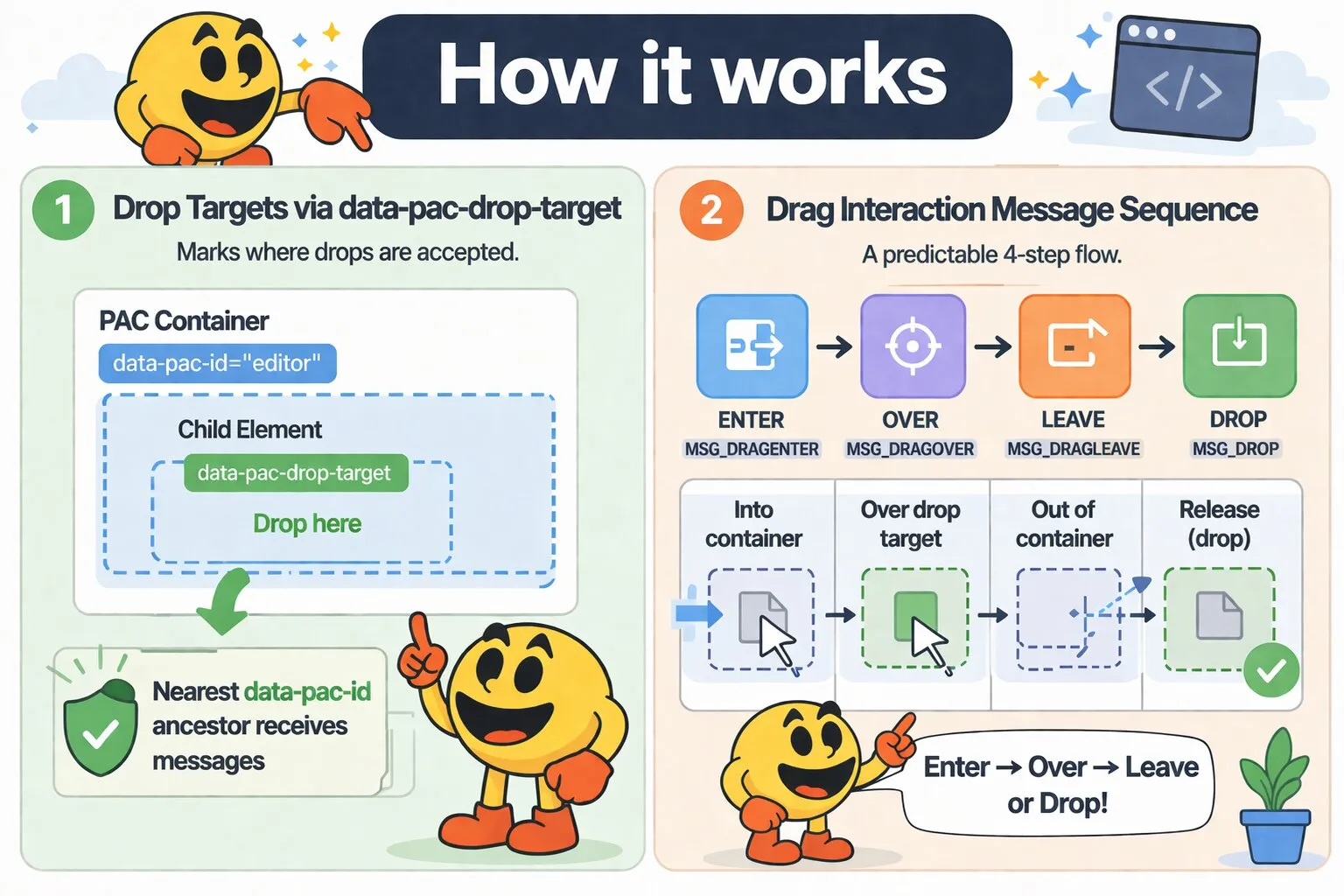
Add the data-pac-drop-target attribute to any element within or on a PAC container to accept drops. Without this attribute, drag events pass through to the browser's default behavior. The attribute value optionally sets the drop effect cursor — valid values are copy, move, and link. Defaults to copy if omitted or unrecognized.
<div data-pac-id="fileUploader" data-pac-drop-target>
    Drop files here
</div>

<!-- Explicit move cursor -->
<div data-pac-id="sortableList" data-pac-drop-target="move">
    Reorder items
</div>
The attribute can also be placed on a child element inside the container. The drop target attribute controls where drops are accepted; the nearest data-pac-id ancestor determines which container receives the messages.
<div data-pac-id="editor">
    <div class="toolbar">...</div>
    <div class="dropzone" data-pac-drop-target>
        Drop images here
    </div>
</div>
Message Flow
A complete drag-and-drop interaction produces this message sequence:
User drags item into container   → MSG_DRAGENTER        (once)
User hovers over a drop target   → MSG_DROPTARGET_ENTER  (once per drop target element)
User moves off that drop target  → MSG_DROPTARGET_LEAVE  (once, if the cursor moved to non-target space or another target)
User drags item out of container → MSG_DRAGLEAVE         (once)
Or if the user drops:
User drags item into container   → MSG_DRAGENTER        (once)
User hovers over a drop target   → MSG_DROPTARGET_ENTER  (once per drop target element)
User releases                    → MSG_DROP              (once)
MSG_DROPTARGET_LEAVE also fires when the cursor moves from one drop target straight onto another — the old target's leave message is dispatched before the new target's enter message — and when the drag exits the container entirely (right before MSG_DRAGLEAVE), so it's not fired again once MSG_DROP concludes the sequence.
Drag-and-drop messages are not cancellable. Returning false from msgProc has no effect — WakaPAC already prevents the browser's built-in drag handling internally. Your msgProc only needs to handle visual feedback and data processing.
Messages
MSG_DRAGENTER
Fires once when a drag operation first crosses the container boundary. Use this to show visual feedback such as highlighting the drop zone.
Message Parameters
| Parameter | Type | Description |
|---|---|---|
wParam |
number | Modifier key and button state flags, same as any other mouse message: MK_SHIFT, MK_CONTROL, MK_ALT, MK_META, MK_LBUTTON, MK_RBUTTON, MK_MBUTTON, MK_XBUTTON1, MK_XBUTTON2 |
lParam |
number | Packed cursor coordinates relative to the container. Extract using MAKEPOINTS() |
Detail Properties
| Property | Type | Description |
|---|---|---|
types |
string[] | Available data types in the drag operation (e.g., ['text/plain', 'Files']). Use this to determine what kind of content is being dragged before the drop occurs. See Common Type Values |
MSG_DROPTARGET_ENTER
Fires once when the cursor enters a new drop target element within the container. It does not fire continuously — it dispatches when the underlying target element changes. Use this to update positional feedback such as insertion markers or placement previews.
Message Parameters
| Parameter | Type | Description |
|---|---|---|
wParam |
number | Modifier key and button state flags, same as any other mouse message: MK_SHIFT, MK_CONTROL, MK_ALT, MK_META, MK_LBUTTON, MK_RBUTTON, MK_MBUTTON, MK_XBUTTON1, MK_XBUTTON2 |
lParam |
number | Packed cursor coordinates relative to the container. Extract using MAKEPOINTS() |
Detail Properties
| Property | Type | Description |
|---|---|---|
dropTarget |
HTMLElement | The drop target element (the element with data-pac-drop-target) that the cursor is currently over |
types |
string[] | Available data types in the drag operation. See Common Type Values |
MSG_DROPTARGET_LEAVE
Fires once when the cursor leaves the drop target element it was previously over — because it moved to non-drop-target space within the container, moved onto a different drop target, the drag exited the container, or the item was dropped elsewhere. Use this to remove positional feedback added during MSG_DROPTARGET_ENTER, such as insertion markers or placement previews.
Message Parameters
| Parameter | Type | Description |
|---|---|---|
wParam |
number | Modifier key and button state flags, same as any other mouse message: MK_SHIFT, MK_CONTROL, MK_ALT, MK_META, MK_LBUTTON, MK_RBUTTON, MK_MBUTTON, MK_XBUTTON1, MK_XBUTTON2 |
lParam |
number | Packed cursor coordinates relative to the container. Extract using MAKEPOINTS() |
Detail Properties
| Property | Type | Description |
|---|---|---|
dropTarget |
HTMLElement | The drop target element (the element with data-pac-drop-target) that the cursor just left |
types |
string[] | Available data types in the drag operation. See Common Type Values |
MSG_DRAGLEAVE
Fires once when the drag operation exits the container boundary. Use this to remove visual feedback added during MSG_DRAGENTER.
Message Parameters
| Parameter | Type | Description |
|---|---|---|
wParam |
number | Modifier key and button state flags, same as any other mouse message: MK_SHIFT, MK_CONTROL, MK_ALT, MK_META, MK_LBUTTON, MK_RBUTTON, MK_MBUTTON, MK_XBUTTON1, MK_XBUTTON2 |
lParam |
number | Packed cursor coordinates relative to the container. Extract using MAKEPOINTS() |
Detail Properties
| Property | Type | Description |
|---|---|---|
types |
string[] | Available data types in the drag operation. See Common Type Values |
MSG_DROP
Fires when the user releases a dragged item over a drop target within the container. This is the only point where full drag data — text content, HTML, URIs, file contents — is accessible. The browser's default behavior (navigating to dropped files) is always prevented.
Message Parameters
| Parameter | Type | Description |
|---|---|---|
wParam |
number | Modifier key and button state flags, same as any other mouse message: MK_SHIFT, MK_CONTROL, MK_ALT, MK_META, MK_LBUTTON, MK_RBUTTON, MK_MBUTTON, MK_XBUTTON1, MK_XBUTTON2 |
lParam |
number | Packed cursor coordinates relative to the container. Extract using MAKEPOINTS() |
Detail Properties
| Property | Type | Description |
|---|---|---|
dropTarget |
HTMLElement | The drop target element (the element with data-pac-drop-target) that received the drop |
text |
string | Plain text content from the drag operation. Empty string if not available |
html |
string | HTML content from the drag operation. Empty string if not available |
uri |
string | URI list from the drag operation (e.g., dragged links). Empty string if not available |
files |
object[] | Array of file metadata objects, each containing name (string), size (number, bytes), and type (string, MIME type). Same shape as MSG_PASTE files. Empty array if no files |
rawFiles |
FileList | The native FileList from DataTransfer for direct file access. Use this for reading file contents or uploading |
Example: File Upload Drop Zone
msgProc(event) {
    if (event.message === wakaPAC.MSG_DRAGENTER) {
        if (event.detail.types.includes('Files')) {
            this.dropHighlight = true;
        }
    }

    if (event.message === wakaPAC.MSG_DRAGLEAVE) {
        this.dropHighlight = false;
    }

    if (event.message === wakaPAC.MSG_DROP) {
        this.dropHighlight = false;

        const files = event.detail.rawFiles;
        for (let i = 0; i < files.length; i++) {
            this.uploadFile(files[i]);
        }
    }
}
Common Type Values
The types array in MSG_DRAGENTER, MSG_DROPTARGET_ENTER, MSG_DROPTARGET_LEAVE, and MSG_DRAGLEAVE identifies what kind of content is being dragged. Multiple values can be present at once — dragging a link from a web page typically produces ['text/plain', 'text/html', 'text/uri-list']. Drag sources can also set custom MIME types, which appear in the array as-is.
| Value | Source |
|---|---|
'Files' |
Files dragged from the OS (file manager, desktop) |
'text/plain' |
Plain text dragged from a text selection or input field |
'text/html' |
Rich text dragged from a web page or editor |
'text/uri-list' |
Links dragged from the browser address bar, bookmarks, or hyperlinks |
Best Practices
- Always provide visual feedback: Use MSG_DRAGENTER to highlight drop zones and MSG_DRAGLEAVE to remove the highlight. Users need to see where they can drop
- Check types in MSG_DRAGENTER: Use
event.detail.typesto determine if the container should accept the drag and show appropriate visual feedback before the drop occurs - Use files for validation, rawFiles for processing: The
filesarray provides lightweight metadata for type-checking and size validation. UserawFilesonly when you need to read actual file contents - Clean up on MSG_DRAGLEAVE: Any visual state added in MSG_DRAGENTER must be removed in MSG_DRAGLEAVE — the user may drag in and out multiple times before dropping
- Pair MSG_DROPTARGET_ENTER with MSG_DROPTARGET_LEAVE: Any per-target feedback added in MSG_DROPTARGET_ENTER (an insertion marker, a highlighted slot) must be removed in MSG_DROPTARGET_LEAVE, not just on MSG_DRAGLEAVE — the cursor can move off a drop target without leaving the container
- MSG_PASTE and MSG_DROP share a file shape: The
filesmetadata array uses the same{ name, size, type }structure in both messages — validation code works for both