
How Reactivity Works
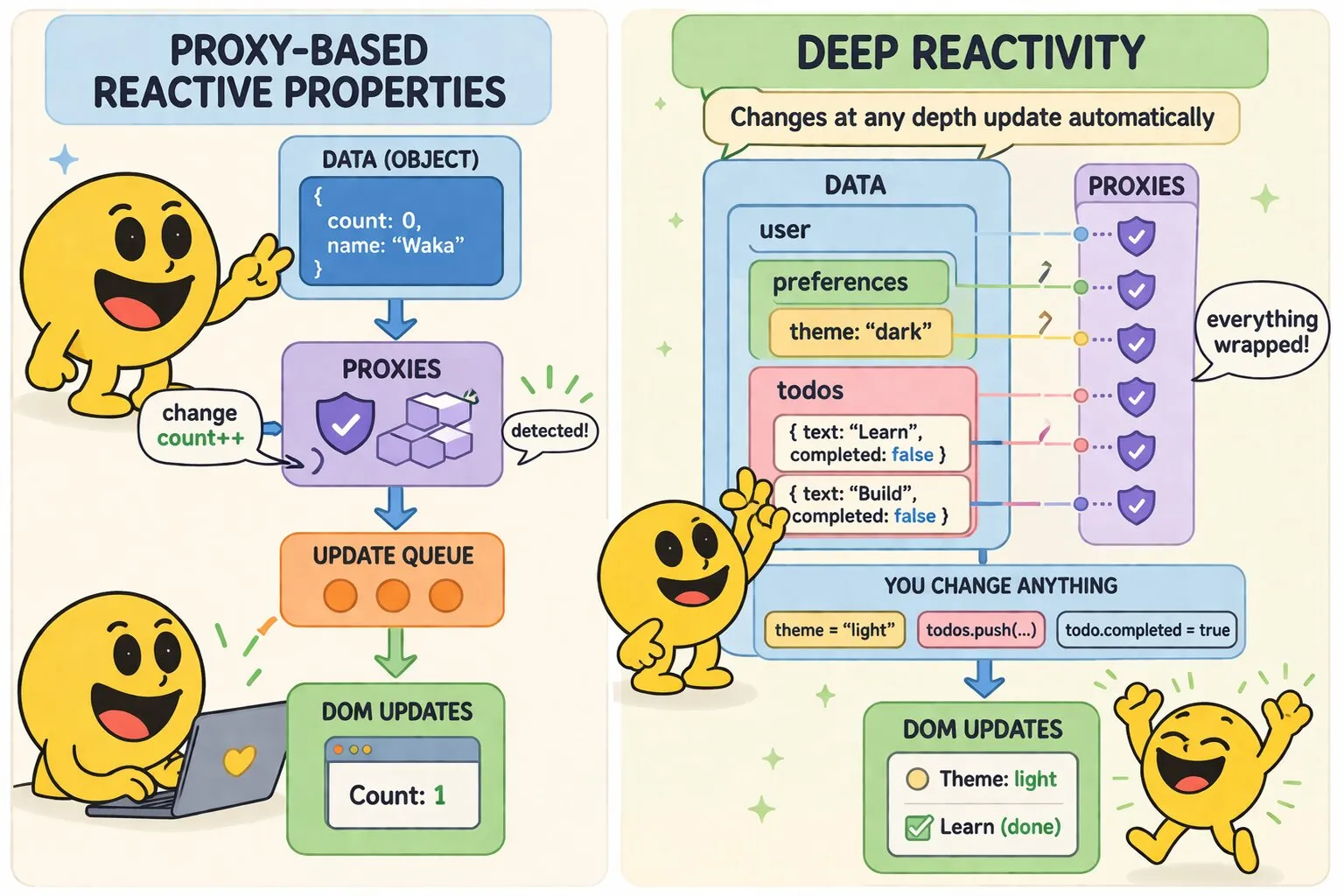
WakaPAC's reactivity system automatically synchronizes your data with the DOM. Change a property, and the UI updates - no manual DOM manipulation required.
The Basics
When you create a WakaPAC component, all properties in your abstraction object become reactive:
wakaPAC('#app', {
    count: 0,

    increment() {
        this.count++;  // Change is detected, DOM updates scheduled
    }
});
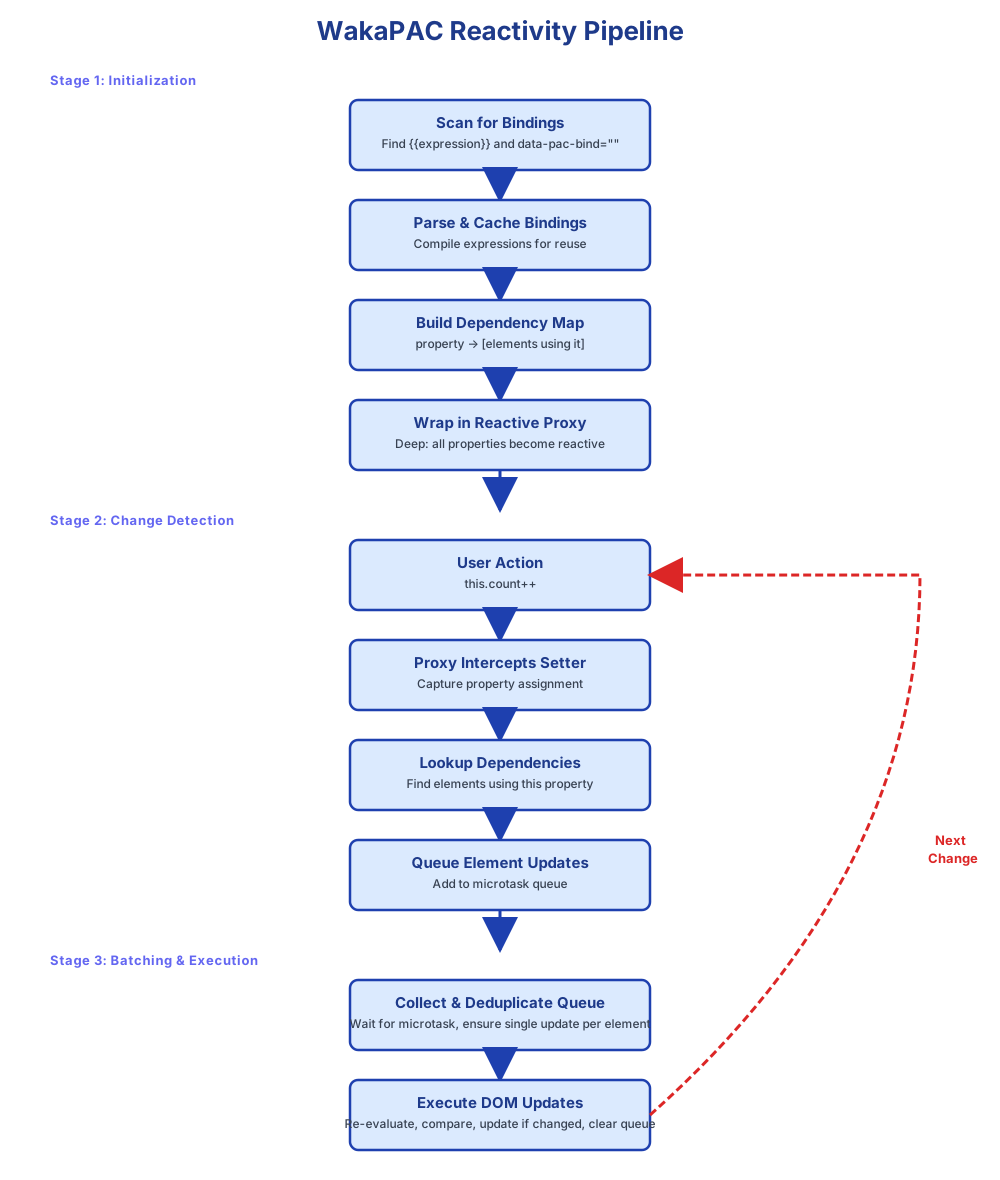
WakaPAC's reactivity engine:
- Creates proxies for all properties in your abstraction object
- Tracks dependencies - which DOM elements reference which properties
- Queues updates when properties change, avoiding redundant operations
- Batches DOM changes in microtasks for optimal performance
- Updates selectively - only affected DOM elements are modified
The Reactivity Pipeline
Deep Reactivity
WakaPAC recursively wraps nested objects, arrays, and the objects inside those arrays in proxies, so changes at any depth trigger a DOM update:
<div id="app">
    <p>{{user.name}}</p>
    <p>Theme: {{user.preferences.theme}}</p>
    <button data-pac-bind="click: changeTheme">Toggle Theme</button>

    <ul data-pac-bind="foreach: todos" data-pac-item="todo">
        <li>
            <input type="checkbox" data-pac-bind="checked: todo.completed">
            <span>{{todo.text}}</span>
            <button data-pac-bind="click: toggleTodo">Toggle</button>
        </li>
    </ul>
    <button data-pac-bind="click: addTodo">Add Todo</button>
</div>

<script>
    wakaPAC('#app', {
        user: {
            name: 'John',
            preferences: {
                theme: 'dark'
            }
        },
        todos: [
            { text: 'Learn WakaPAC', completed: false },
            { text: 'Build an app', completed: false }
        ],

        changeTheme() {
            // Nested property changes are reactive at any depth
            this.user.preferences.theme =
                this.user.preferences.theme === 'dark' ? 'light' : 'dark';
        },

        addTodo() {
            // Array mutator methods (push, pop, splice, shift, unshift, sort, reverse)
            // are intercepted automatically - no need to reassign the array
            this.todos.push({ text: 'New todo', completed: false });
        },

        toggleTodo(event, todo) {
            // Objects inside arrays are proxies too, so their properties are reactive
            todo.completed = !todo.completed;
        }
    });
</script>
Reactivity Caveats
Reading After a Write
A property write updates the abstraction immediately, but the DOM update it triggers is deferred to a microtask, not applied in the same line. Code that reads the DOM right after a write will see the old state:
this.editing = true;
this.container.querySelector('input').focus(); // ⚠️ input may not be rendered yet
Call wakaPAC.flushReactiveChanges(pacId) to force the pending DOM update to apply immediately:
this.editing = true;
wakaPAC.flushReactiveChanges(this.pacId);
this.container.querySelector('input').focus(); // ✅ input is rendered
Primitive Value Reassignment
When passing primitive values to child components or functions, changes to the original won't affect the copy:
let count = this.count;  // count is now a copy
count++;                 // this.count is unchanged
Always modify properties directly on this to maintain reactivity.
Escaping the Proxy
Every reactive value exposes an unwrap() method that returns the underlying raw object, useful when you need to compare or pass the original reference to code that shouldn't interact with the proxy — for example, a plugin performing identity comparisons. Calling unwrap() does not remove reactivity from the property; it just gives you the raw object for that call.
wakaPAC('#app', {
    item: { id: 1, name: 'Example' },

    check() {
        // this.item is a reactive proxy
        // this.item.unwrap() is the original plain object
        const raw = this.item.unwrap();
        console.log(raw === this.item); // false — proxy !== raw object
    }
});unwrap() for reading or identity comparisons, not for writing.