
msgProc: Keyboard Messages
Complete reference for keyboard-related msgProc events. Covers key presses, releases, and character input for implementing shortcuts, navigation, and custom text handling.
On this page:
Key Down (MSG_KEYDOWN)
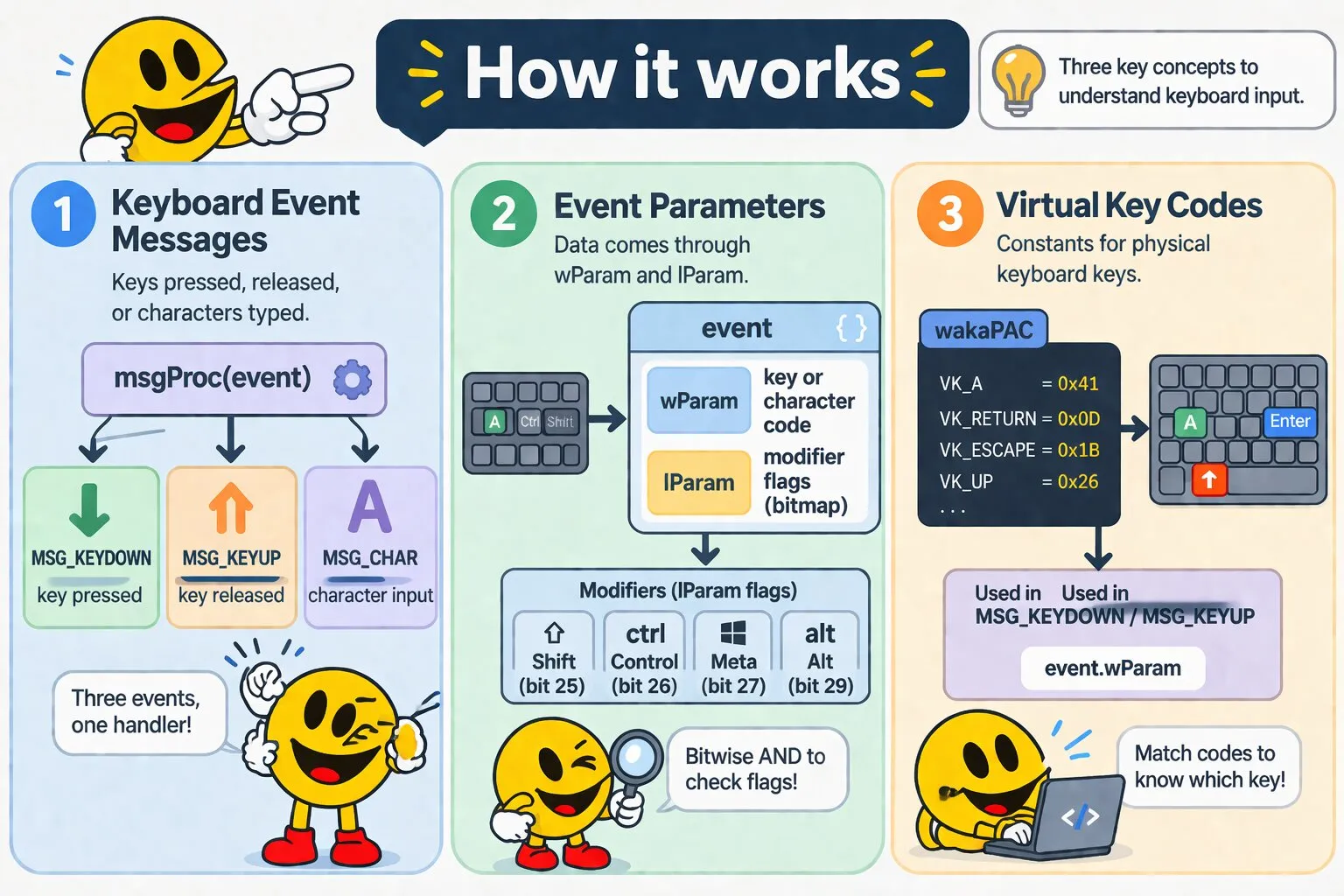
MSG_KEYDOWN fires when a key is pressed down. Use this for keyboard shortcuts, navigation, and game controls - actions triggered on press. This event fires for all keys including modifier keys (Shift, Ctrl, Alt) and special keys (Enter, Escape, Arrow keys).
Message Parameters
| Parameter | Type | Description |
|---|---|---|
wParam |
number | Virtual Key code (e.g., VK_A, VK_RETURN, VK_ESCAPE). See VK Codes section below |
lParam |
number | Modifier key flags: KM_SHIFT (bit 25), KM_CONTROL (bit 26), KM_META (bit 27), KM_ALT (bit 29). Use bitwise AND to check which modifiers are held |
Example: Keyboard Shortcuts
msgProc(event) {
    if (event.message === wakaPAC.MSG_KEYDOWN) {
        // Ctrl+S to save
        if (event.wParam === wakaPAC.VK_S && (event.lParam & wakaPAC.KM_CONTROL)) {
            this.save();
            return false;
        }

        // Escape to close
        if (event.wParam === wakaPAC.VK_ESCAPE) {
            this.close();
            return false;
        }

        // Arrow navigation
        if (event.wParam === wakaPAC.VK_UP) {
            this.selectPrevious();
            return false;
        }
    }
}
Key Up (MSG_KEYUP)
MSG_KEYUP fires when a key is released. Use this for toggle states, key release timing, or when the action should occur on release rather than press. This event fires for all keys including modifier keys and special keys.
Message Parameters
| Parameter | Type | Description |
|---|---|---|
wParam |
number | Virtual Key code (e.g., VK_A, VK_RETURN, VK_ESCAPE). See VK Codes section below |
lParam |
number | Modifier key flags: KM_SHIFT (bit 25), KM_CONTROL (bit 26), KM_META (bit 27), KM_ALT (bit 29). Use bitwise AND to check which modifiers are held |
Example: Toggle State
msgProc(event) {
    if (event.message === wakaPAC.MSG_KEYUP) {
        // Toggle fullscreen on F11 release
        if (event.wParam === wakaPAC.VK_F11) {
            this.fullscreen = !this.fullscreen;
            return false;
        }

        // Stop movement on key release (game controls)
        if (event.wParam === wakaPAC.VK_SPACE) {
            this._jumping = false;
            return false;
        }
    }
}Character Input (MSG_CHAR)
MSG_CHAR fires for printable characters only (not modifier keys or special keys like Enter, Escape, arrows). Use this to filter or validate character input in text fields, or implement custom text handling. This event respects keyboard layout and modifier keys (e.g., Shift+1 produces '!' on US keyboards).
Message Parameters
| Parameter | Type | Description |
|---|---|---|
wParam |
number | UTF-16 character code of the typed character. Use String.fromCharCode(event.wParam) to get the actual character |
lParam |
number | Not reserved — carries the same value as the preceding MSG_KEYDOWN's lParam (repeat count, extended-key flag, and Shift/Ctrl/Alt/Meta modifier state) |
Example: Numeric Input Only
msgProc(event) {
    if (event.message === wakaPAC.MSG_CHAR) {
        const char = String.fromCharCode(event.wParam);

        // Allow only digits 0-9
        if (event.wParam < 48 || event.wParam > 57) {
            return false; // Block non-digit characters
        }
    }
}
Example: Character Filtering
msgProc(event) {
    if (event.message === wakaPAC.MSG_CHAR) {
        const charCode = event.wParam;

        // Block special characters but allow letters, numbers, space
        const isLetter = (charCode >= 65 && charCode <= 90) || (charCode >= 97 && charCode <= 122);
        const isNumber = charCode >= 48 && charCode <= 57;
        const isSpace = charCode === 32;

        if (!isLetter && !isNumber && !isSpace) {
            return false; // Block the character
        }
    }
}Virtual Key Codes
WakaPAC exports Win32 Virtual Key codes as constants. These represent physical keys on the keyboard, not the characters they produce. Use them to check which key was pressed in MSG_KEYDOWN and MSG_KEYUP handlers.
Usage Pattern
msgProc(event) {
    if (event.message === wakaPAC.MSG_KEYDOWN) {
        switch(event.wParam) {
            case wakaPAC.VK_ESCAPE:
                this.close();
                return false;

            case wakaPAC.VK_RETURN:
                this.submit();
                return false;

            case wakaPAC.VK_TAB:
                this.nextField();
                return false;
        }
    }
}
Common VK Code Categories
| Category | Description | Examples |
|---|---|---|
| Letters | A-Z keys | VK_A through VK_Z |
| Numbers | 0-9 keys on main keyboard | VK_0 through VK_9 |
| Function Keys | F1-F12 keys | VK_F1 through VK_F12 |
| Navigation | Arrow keys, Page Up/Down, Home/End | VK_UP, VK_DOWN, VK_LEFT, VK_RIGHT, VK_HOME, VK_END, VK_PRIOR (Page Up), VK_NEXT (Page Down) |
| Numpad | Numeric keypad keys | VK_NUMPAD0 through VK_NUMPAD9, VK_MULTIPLY, VK_ADD, VK_SUBTRACT, VK_DECIMAL, VK_DIVIDE |
| Punctuation | Semicolon, comma, period, etc. | VK_OEM_1 (;:), VK_OEM_COMMA, VK_OEM_PERIOD, VK_OEM_MINUS, VK_OEM_PLUS |
| Media | Media control keys | VK_VOLUME_MUTE, VK_VOLUME_DOWN, VK_VOLUME_UP, VK_MEDIA_NEXT_TRACK, VK_MEDIA_PREV_TRACK, VK_MEDIA_PLAY_PAUSE |
Best Practices
- Use VK constants: Always use
wakaPAC.VK_*constants instead of raw key codes for clarity and maintainability - Check modifiers via lParam: Use
event.lParam & wakaPAC.KM_CONTROLto check held modifiers, notevent.wParam === wakaPAC.VK_CONTROL - Return false: Always return
falseafter handling a shortcut to prevent browser defaults (like Ctrl+S opening Save dialog) - Focus matters: MSG_KEYDOWN/KEYUP only fire for focused elements. If you need global shortcuts, ensure your container can receive focus
- MSG_CHAR for characters: Use MSG_KEYDOWN for shortcuts and navigation, MSG_CHAR for character-level input filtering
- Prefer MSG_KEYDOWN: Most keyboard shortcuts should trigger on key press (MSG_KEYDOWN), not release (MSG_KEYUP)