
msgProc: Clipboard Messages
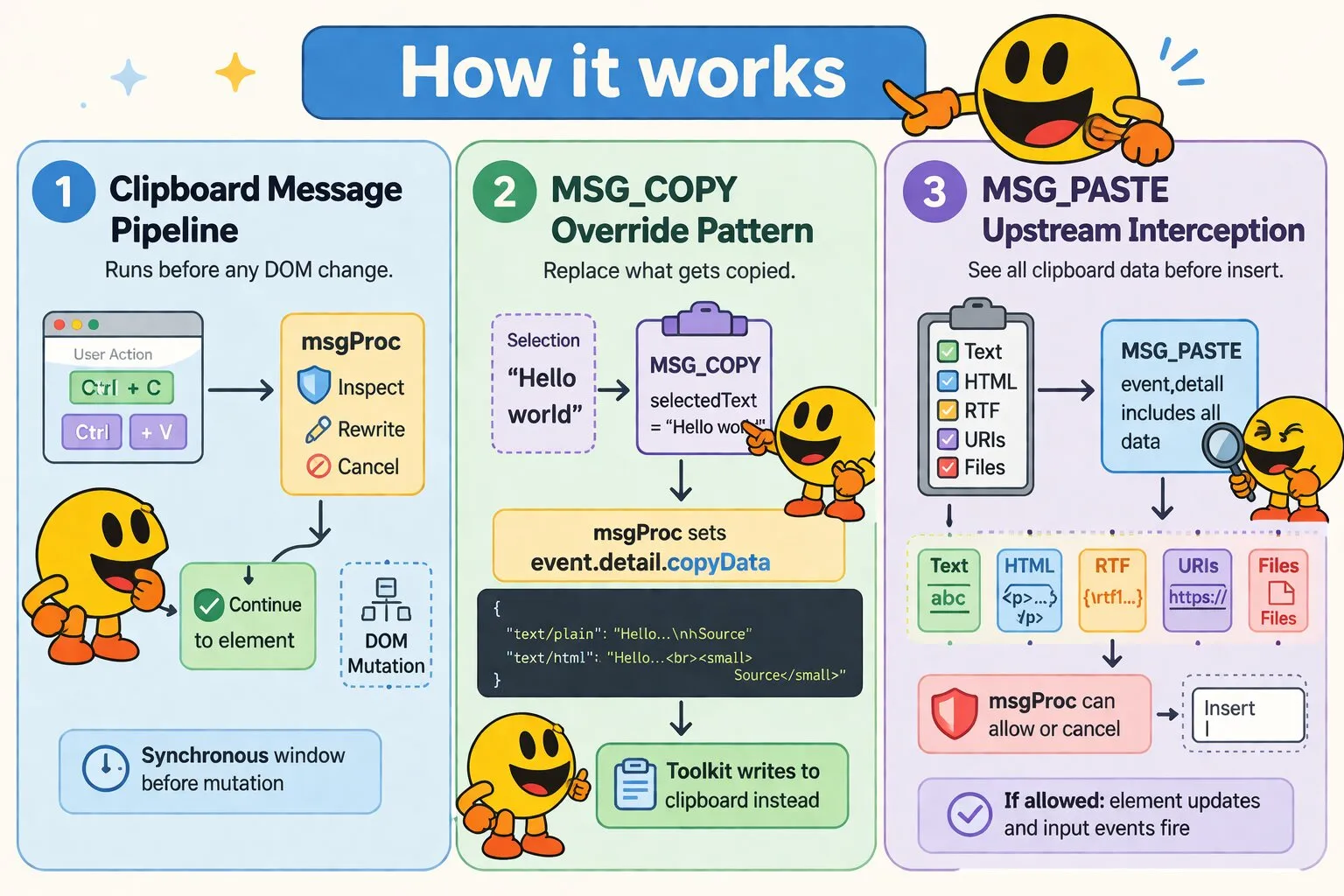
The browser clipboard pipeline fires before any DOM mutation, giving msgProc a synchronous window to inspect, rewrite, or cancel copy and paste operations. MSG_COPY exposes what the user selected and lets you substitute arbitrary MIME data; MSG_PASTE delivers everything on the clipboard — text, HTML, RTF, URIs, and files — before it touches the focused element.
Copy (MSG_COPY)
MSG_COPY fires when the user initiates a copy operation (Ctrl+C, context menu copy, etc.) within the container. Use this to intercept copy operations, modify what gets placed on the clipboard, or block copying entirely.
Message Parameters
| Parameter | Type | Description |
|---|---|---|
wParam |
number | Modifier key state at time of copy. Test with MK_SHIFT, MK_CONTROL, MK_ALT |
lParam |
number | Length of the currently selected text (0 if no text selection) |
Detail Properties
| Property | Type | Description |
|---|---|---|
selectedText |
string | The currently selected text at time of copy. Empty string if no selection |
copyData |
object | null | Mutable struct for overriding clipboard contents. Initially null. Set to an object with MIME type keys to override what gets copied (e.g., { 'text/plain': '...', 'text/html': '...' }). The toolkit reads this back after msgProc returns and writes it to the clipboard |
copyData property in event.detail starts as null. If msgProc populates it with an object, the toolkit prevents the default copy and writes the provided data to the clipboard instead. This works because dispatch is synchronous — msgProc runs and returns before the framework checks copyData.
false calls preventDefault() immediately, before the toolkit checks copyData — so if both are used together, the override is silently skipped. Populating copyData is itself what blocks the native copy and substitutes your data, so leave that handler returning true/undefined. Use plain return false, with no copyData, only when you want to block copying outright instead (see below).
Example: Override Clipboard Content
msgProc(event) {
    if (event.message === wakaPAC.MSG_COPY) {
        // Add attribution to copied text
        const text = event.detail.selectedText;

        event.detail.copyData = {
            'text/plain': text + '\n\nSource: ' + window.location.href,
            'text/html': text + '<br><small>Source: ' + window.location.href + '</small>'
        };

        // Do not return false here — setting copyData is what overrides the
        // clipboard; returning false would prevent the copy before the
        // toolkit gets a chance to write copyData to it.
    }
}
Example: Block Copy Entirely
To stop copying altogether — no clipboard write at all, not even the original selection — just return false and leave copyData untouched:
msgProc(event) {
    if (event.message === wakaPAC.MSG_COPY) {
        // Redacted field — don't let the user copy its contents
        if (this.isRedacted) {
            return false;
        }
    }
}
Paste (MSG_PASTE)
MSG_PASTE fires when the user initiates a paste operation (Ctrl+V, context menu paste, etc.) within the container. Use this to inspect, validate, or block incoming clipboard content before it reaches the target element. If msgProc does not cancel the paste, the content is inserted into the focused element and MSG_INPUT / MSG_INPUT_COMPLETE fire as normal.
Message Parameters
| Parameter | Type | Description |
|---|---|---|
wParam |
number | Modifier key state at time of paste. Test with MK_SHIFT, MK_CONTROL, MK_ALT |
lParam |
number | Length of the pasted plain text (0 for non-text paste such as files) |
Detail Properties
| Property | Type | Description |
|---|---|---|
text/plain |
string | Plain text content from the clipboard. Empty string if no text data is available |
text/html |
string | HTML content from the clipboard. Present when pasting from browsers, rich text editors, or applications like Word. Empty string if unavailable |
text/rtf |
string | Rich Text Format content from the clipboard. Some applications provide RTF alongside or instead of HTML. Empty string if unavailable |
text/uri-list |
string | Raw URI list string from the clipboard. Empty string if unavailable |
uris |
Array | Parsed URIs from text/uri-list. Comments and empty lines are stripped. Present when the user copies a hyperlink or drags a URL. Empty array if unavailable |
files |
object[] | Array of file metadata objects from the clipboard, each containing name (string), size (number, bytes), and type (string, MIME type). Common for screenshot pastes and image data. Empty array if no files. Access the actual File blobs via event.originalEvent.clipboardData.files if needed |
types |
Array | List of all MIME types present on the clipboard, mirroring DataTransfer.types. Useful for detecting application-specific formats (e.g., VS Code, Google Docs) without preemptively reading them |
false from msgProc cancels the paste entirely, and no input messages fire.
Example: Validate Paste Content
msgProc(event) {
    if (event.message === wakaPAC.MSG_PASTE) {
        // Block paste if content is too long
        if (event.detail['text/plain'].length > this.maxLength) {
            this.showError('Pasted content exceeds maximum length');
            return false;
        }
    }
}
Best Practices
- Clipboard event order: MSG_COPY and MSG_PASTE fire before any input mutation. Use them as gatekeepers to block or modify clipboard operations before they affect form elements
- Override copy content via copyData: Set
event.detail.copyDatato a MIME-keyed object to replace what the browser would normally put on the clipboard. Leave itnullto allow the default copy - Access file blobs through originalEvent: MSG_PASTE detail contains file metadata for quick inspection. For actual file processing (upload, preview), access the File objects via
event.originalEvent.clipboardData.files - MIME-keyed detail properties: The
text/plain,text/html,text/rtf, andtext/uri-listproperties mirrorDataTransfer.getData()key names directly.typesmirrorsDataTransfer.types - Return false to cancel: Returning
falsefrom either handler cancels the operation entirely — no clipboard write for MSG_COPY, no input mutation or MSG_INPUT for MSG_PASTE