
WakaStore
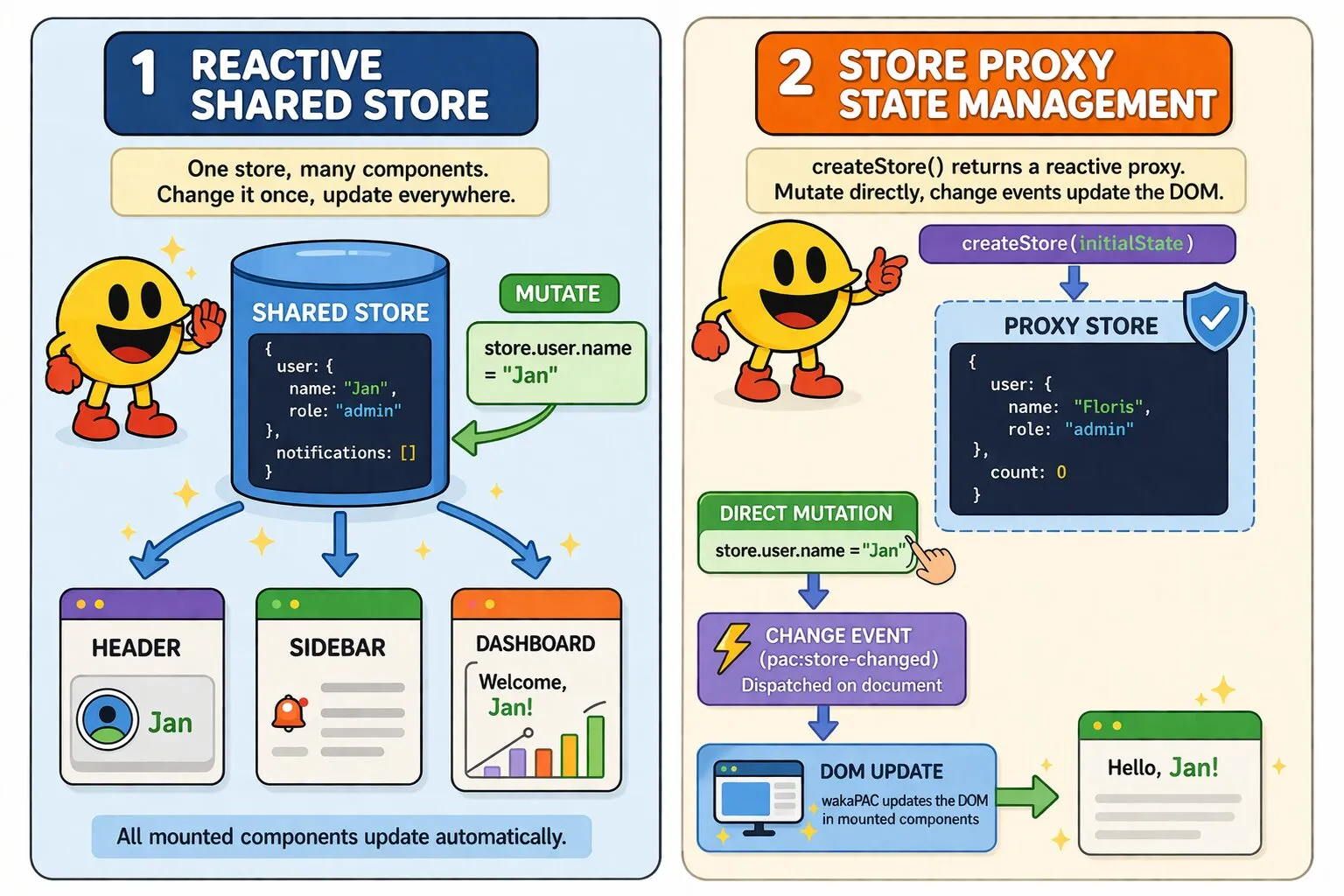
WakaStore is a shared reactive state plugin for wakaPAC. Multiple components read and write the same store object, and any mutation automatically propagates to all of them.
On this page:
Getting Started
Include the script after wakaPAC, register the plugin, then create a store:
<script src="https://cdn.jsdelivr.net/gh/quellabs/wakapac@main/wakapac.min.js"></script>
<script src="https://cdn.jsdelivr.net/gh/quellabs/wakapac@main/plugins/wakastore.min.js"></script>

<script>
    wakaPAC.use(wakaStore); // must be called before any wakaPAC() calls

    const store = wakaStore.createStore({
        user: { name: 'Floris', role: 'admin' },
        notifications: []
    });
</script>
Mount the store on components under any property name. Mutate directly — no special setter syntax required. Changes propagate immediately to all mounted components:
wakaPAC('#header',    { session: store });
wakaPAC('#sidebar',   { session: store });
wakaPAC('#dashboard', { currentUser: store });

store.user.name = 'Jan'; // all three components update
In templates, reference store properties through the mounted key name:
<span>{{session.user.name}}</span>      <!-- in #header -->
<span>{{currentUser.user.name}}</span>  <!-- in #dashboard -->
You can also mutate through this inside a component's methods or event handlers, using the mounted key name directly:
wakaPAC('#header', {
    session: store,

    logout() {
        this.session.user.name = '';
        this.session.user.role = 'guest';
    }
});
Deletions are reactive too:
delete store.user.role; // all components that reference user.role updateArrays
Arrays in the store are fully reactive. The supported mutating methods are push, pop, shift, unshift, splice, sort, and reverse — all trigger DOM updates and foreach re-rendering across every mounted component:
store.notifications.push({ id: 1, text: 'New message' });
store.notifications.splice(0, 1);
Non-Reactive Properties
Properties whose names start with _ or $ are non-reactive. Mutations are applied to the underlying object but do not trigger DOM updates:
store._internalFlag = true;   // silent — no DOM update
store.$debug = { trace: [] }; // silent — no DOM update
store.user.name = 'Jan';      // reactive — all components update
Multiple Stores
A single component can mount multiple stores simultaneously. Each store is tracked independently:
const userStore = wakaStore.createStore({ name: 'Floris', role: 'admin' });
const cartStore = wakaStore.createStore({ items: [], total: 0 });

wakaPAC('#checkout', {
    user: userStore,
    cart: cartStore
});

cartStore.items.push({ sku: 'ABC', qty: 2 }); // only cart bindings update
userStore.name = 'Jan';                        // only user bindings update
Local Persistence
Stores can persist their state to localStorage and rehydrate on page load. Pass a persist key to createStore to opt in — this unlocks save(), load(), and clearPersist() on the store proxy.
const store = wakaStore.createStore({ draft: { title: '', body: '' } }, {
    persist: 'article-draft'
});
Automatic persistence
Pass autoLoad: true to rehydrate on creation and autoSave: true to write to localStorage on every mutation (debounced). The two options are independent — enable either or both. The restored state is available before any component mounts.
const store = wakaStore.createStore({
    theme: 'light',
    sidebarCollapsed: false,
    tablePageSize: 25
}, {
    persist: 'user-prefs',
    autoLoad: true,
    autoSave: true
});
Manual persistence
For full control over when state is loaded and saved, call store.load() and store.save() explicitly. This is useful when you want to save only at specific points — such as on form submit rather than on every keystroke — or when you want to discard unsaved changes on cancel.
// Save when the user pauses typing
store.save();

// On successful submit, clear the saved draft
store.push('/api/articles')
    .then(() => store.clearPersist())
    .catch(error => console.error('submit failed', error));
Merge strategy
On load(), stored values overwrite matching keys in the current state. Keys present in initialState but absent from storage keep their defaults. This means adding new properties to your store in a later version of your app will not leave them undefined for returning users who have older data in storage.
Server Sync — HTTP
Stores can poll a server endpoint and push local state back. All writes go through the store proxy, so DOM updates happen automatically.
Polling
Call poll() to start polling at a fixed interval. The endpoint should return a plain JSON object. The store shallow-merges the response via Object.assign and all mounted components update:
store.poll('/api/user', { interval: 5000 });// Server response — plain JSON object
{ "name": "Floris", "role": "admin" }
// Becomes: store.name = "Floris", store.role = "admin"The poll pauses automatically when the browser tab is hidden and resumes when it becomes visible. Call stopPoll() to stop it permanently.
push() before the next cycle fires if you need to persist local changes.Pushing
Call push() to send the current store state to a server endpoint as a PATCH request. If the server returns a plain JSON object, it is merged back into the store automatically — useful for server-generated fields like timestamps or IDs. Returns a Promise that resolves with the parsed response body:
store.user.name = 'Jan';

store.push('/api/user/1')
    .then(response => console.log('saved'))
    .catch(error => console.error('failed', error));
To send a partial payload, pass a body option:
store.push('/api/user/1', { body: { name: store.user.name } });push() always attempts to parse the response as JSON. Endpoints returning 204 No Content will cause the promise to reject — supply an onError callback or a merge callback that ignores the response to handle this gracefully.Custom merge
Supply a merge callback when the response shape requires custom handling — envelope responses, arrays, or nested structures. It receives the raw parsed response and is called with the store as this. Works for both poll() and push():
store.poll('/api/data', {
    interval: 5000,
    merge: function(response) {
        this.items = response.data.items;
        this.total = response.meta.total;
    }
});
Options
| Option | Method | Default | Description |
|---|---|---|---|
interval |
poll |
5000 |
Milliseconds between poll cycles, measured from when the previous response settles. |
merge |
poll, push |
— | Custom merge callback function(response), called with the store as this. Use for envelope responses, arrays, or any shape that isn't a plain JSON object. |
onError |
poll, push |
— | Error callback (error) => void. For poll, the loop continues after errors unless you call stopPoll() inside. For push, the error is re-thrown after the callback so your .catch() still fires. |
method |
push |
'PATCH' |
HTTP method to use for the push request. |
body |
push |
full store state | Payload to send. Pass a partial object to send only specific fields. |
fetchOptions |
poll, push |
— | Additional options forwarded directly to fetch(), such as custom headers or credentials. |
Server Sync — WebSocket
For real-time updates pushed from the server, use connect(). It opens a WebSocket connection and merges each incoming message into the store automatically. All mounted components update as normal.
store.connect('wss://example.com/updates');
store.disconnect();
Each message must be a JSON string. The default merge is Object.assign(store, data), which expects a plain JSON object. Supply a merge callback for any other shape:
store.connect('wss://example.com/updates', {
    merge: function(data) {
        this.items = data.items;
        this.total = data.meta.total;
    }
});
Reconnection
Reconnect is enabled by default. On close, WakaStore waits reconnectDelay ms before retrying, doubling the delay on each attempt up to reconnectDelayMax. The counter resets when a connection is established successfully.
To suppress reconnect for a specific close event, return false from the onClose callback — useful for codes like 4001 (unauthorised) where retrying is pointless:
store.connect('wss://example.com/updates', {
    reconnectDelay:    1000,   // base delay in ms (default)
    reconnectDelayMax: 30000,  // cap in ms (default)
    onClose: function(event) {
        if (event.code === 4001) return false; // don't reconnect
    },
    onError: function(event) {
        console.error('WebSocket error', event);
    }
});
Calling connect() while a connection is already active replaces it — the existing socket is closed cleanly before the new one opens.
poll() and connect() simultaneously is not recommended — concurrent updates from both sources produce unpredictable merge order. Use one or the other.Options
| Option | Default | Description |
|---|---|---|
protocols |
— | Subprotocol string or array passed to the WebSocket constructor. |
merge |
— | Custom merge callback function(data), called with the store as this. Use for non-plain-object messages. |
onError |
— | Error callback (event) => void. Receives the native ErrorEvent. |
onClose |
— | Close callback (CloseEvent) => void|false. Return false to suppress reconnect for this close event. |
reconnect |
true |
Whether to reconnect automatically on close. |
reconnectDelay |
1000 |
Base reconnect delay in ms. Doubles on each attempt. |
reconnectDelayMax |
30000 |
Maximum reconnect delay in ms. |
Cleanup
Call store.destroy() when discarding a store — on SPA navigation, for example — to stop any running poll, close any active WebSocket connection, and detach the autoSave listener in one call. Without this, listeners and timers accumulate if stores are created and discarded repeatedly.
store.destroy();API
wakaPAC.use(wakaStore)
Register the plugin. Must be called before any components are created.
wakaStore.createStore(initialState, opts?)
Create a new reactive store from a plain object. Throws if initialState is not a plain object (arrays, Date, Map, Set, and other non-plain objects are rejected).
| Parameter | Type | Description |
|---|---|---|
initialState | object | A plain object used as the initial store state. |
opts.persist | string | Optional. A localStorage key. When set, save(), load(), and clearPersist() become available on the store. |
opts.autoLoad | boolean | Optional. When true and persist is set, the store rehydrates from localStorage on creation. The restored state is available before any component mounts. Defaults to false. |
opts.autoSave | boolean | Optional. When true and persist is set, the store writes to localStorage on every mutation (debounced). Defaults to false. |
Returns Proxy | Reactive store proxy for direct mutation. | |
store.poll(url, opts?)
Start polling a JSON endpoint and merging responses into the store. Default merge: Object.assign(store, response). Replaces any currently active poll on this store.
| Parameter | Type | Description |
|---|---|---|
url | string | The endpoint URL to poll. |
opts.interval | number | Optional. Milliseconds between poll cycles, measured from when the previous response settles. Defaults to 5000. |
opts.merge | function | Optional. Custom merge callback function(response), called with the store as this. Use for envelope responses or non-plain-object shapes. |
opts.onError | function | Optional. Error callback (error) => void. The poll loop continues after errors unless you call stopPoll() inside. |
opts.fetchOptions | object | Optional. Additional options forwarded directly to fetch(). |
store.stopPoll()
Stop the active poll permanently. Safe to call when no poll is running.
store.push(url, opts?)
Send store state to a server endpoint as a PATCH request. If the server returns a plain JSON object it is merged back into the store via Object.assign.
| Parameter | Type | Description |
|---|---|---|
url | string | The endpoint URL to send the request to. |
opts.method | string | Optional. HTTP method to use. Defaults to 'PATCH'. |
opts.body | object | Optional. Payload to send. Defaults to the full store state. |
opts.merge | function | Optional. Custom merge callback function(response), called with the store as this. Use for envelope responses or non-plain-object shapes. |
opts.onError | function | Optional. Error callback (error) => void. The error is re-thrown after the callback so your .catch() still fires. |
opts.fetchOptions | object | Optional. Additional options forwarded directly to fetch(). |
Returns Promise<object> | Resolves with the parsed response body. | |
store.connect(url, opts?)
Open a WebSocket connection and merge incoming JSON messages into the store. Default merge: Object.assign(store, data). Auto-reconnects on close with exponential backoff. Replaces any active connection on this store.
| Parameter | Type | Description |
|---|---|---|
url | string | WebSocket endpoint (ws:// or wss://). |
opts.protocols | string|string[] | Optional. Subprotocol(s) passed to the WebSocket constructor. |
opts.merge | function | Optional. Custom merge callback function(data), called with the store as this. |
opts.onError | function | Optional. Error callback (event) => void. Receives the native ErrorEvent. |
opts.onClose | function | Optional. Close callback (CloseEvent) => void|false. Return false to suppress reconnect for this close event. |
opts.reconnect | boolean | Optional. Auto-reconnect on close. Defaults to true. |
opts.reconnectDelay | number | Optional. Base reconnect delay in ms. Doubles on each attempt. Defaults to 1000. |
opts.reconnectDelayMax | number | Optional. Maximum reconnect delay in ms. Defaults to 30000. |
store.disconnect()
Close the active WebSocket connection and cancel any pending reconnect. Safe to call when no connection is active. The store remains fully usable afterwards.
store.save()
Write the current store state to localStorage under the key set in opts.persist. Failures are swallowed silently — private browsing and storage quota errors do not throw.
| Parameter | Type | Description |
|---|---|---|
Returns boolean | true on success, false if the write failed or no persist key was set. | |
store.load()
Rehydrate the store from localStorage. Stored values overwrite matching keys in the current state. Keys present in initialState but absent from storage keep their defaults.
| Parameter | Type | Description |
|---|---|---|
Returns boolean | true if stored data was found and applied, false otherwise. | |
store.clearPersist()
Remove this store's entry from localStorage. Does not affect in-memory state.
| Parameter | Type | Description |
|---|---|---|
Returns boolean | false if no persist key was set, true otherwise. | |
store.stopAutoSave()
Detach the autoSave mutation listener and cancel any pending debounced write. The persist key and save() / load() methods remain available — only the automatic save-on-mutation behaviour stops. Safe to call when autoSave was not enabled.
store.destroy()
Tear down all active background activity in one call: stopPoll() + disconnect() + stopAutoSave(). The store proxy remains usable afterwards — in-memory state and the persistence methods are unaffected. Call this when discarding a store on SPA navigation to prevent listener accumulation.
// On route change or component teardown
store.destroy();
Events
These events are dispatched internally by WakaStore to drive reactivity. You do not need to handle them yourself — wakaPAC subscribes to them automatically. They are documented here in case you need to observe or debug store activity.
pac:store-changed
Fired on document by the store proxy on every mutation. Useful for observing or logging store changes globally across all components.
Event Detail
| Property | Type | Description |
|---|---|---|
storeId |
string | Internal identifier of the store that was mutated. |
path |
string | Dot-separated path of the mutated property (e.g. user.name). |
oldValue |
any | The value before the mutation. |
newValue |
any | The value after the mutation. For array mutations, this is the post-mutation snapshot of the array. |
pac:change
Dispatched on each subscribed container element after a store mutation. The path is translated to the component's mounted key name rather than the raw store path. wakaPAC uses this event to update bindings within that component.
Event Detail
| Property | Type | Description |
|---|---|---|
path |
string | Dot-separated path of the mutated property, prefixed with the component's mounted key name (e.g. session.user.name). |
pac:array-change
Dispatched on each subscribed container element instead of pac:change when the mutation is an array operation (e.g. push, splice). Carrying array-specific detail lets wakaPAC's foreach diffing perform minimal DOM updates rather than re-rendering the entire list.
Event Detail
| Property | Type | Description |
|---|---|---|
path |
string | Dot-separated path to the mutated array, prefixed with the component's mounted key name. |
Notes
Store references must be placed at the top level of the abstraction passed to wakaPAC(). Nested
references are not scanned and will not be subscribed:
// correct — store is a top-level key
wakaPAC('#header', { session: store });

// incorrect — store is nested and will not be found
wakaPAC('#header', { state: { session: store } });
Store references are static after a component is mounted — replacing a store reference on the component after creation is not detected. Destroy and recreate the component instead.
Re-entrant mutations (where a change handler writes back to the same store) are silently dropped to prevent infinite update loops. If you need to respond to a store change by writing a derived value, use a different store or a plain (non-reactive) property:
// Avoid this pattern — the mutation is silently dropped
document.addEventListener('pac:store-changed', function() {
    store.counter++; // re-entrant write to the same store; no-op
});
Best Practices
- Register before creating components — call
wakaPAC.use(wakaStore)before anywakaPAC()calls. - Keep stores focused — one store for session state, one for cart state, etc. Mixing unrelated concerns makes changes harder to reason about.
- Mount under descriptive names —
{ session: store }reads better in templates than{ store: store }. - Push before the next poll — if you mutate locally while polling is active, call
push()before the next cycle or those changes will be overwritten. - Use
onErrorto control poll fate — by default the loop continues after errors. Callstore.stopPoll()insideonErrorif repeated failures should stop polling. - Suppress reconnect on fatal close codes — return
falsefromonClosefor codes like4001(unauthorised) where reconnecting is pointless. - Call
destroy()on navigation — in SPAs, callstore.destroy()when a store is no longer needed to stop background activity and prevent listener accumulation. - Use
autoLoad+autoSavefor preferences, manualload()/save()for drafts — auto-load and auto-save suit persistent UI state that should always reflect the latest value; manual control suits form drafts where the user should decide when to load and commit. - Clear storage on logout — if your store contains user-specific data, call
store.clearPersist()when the user logs out to avoid leaking state to the next session.