
WakaVideo
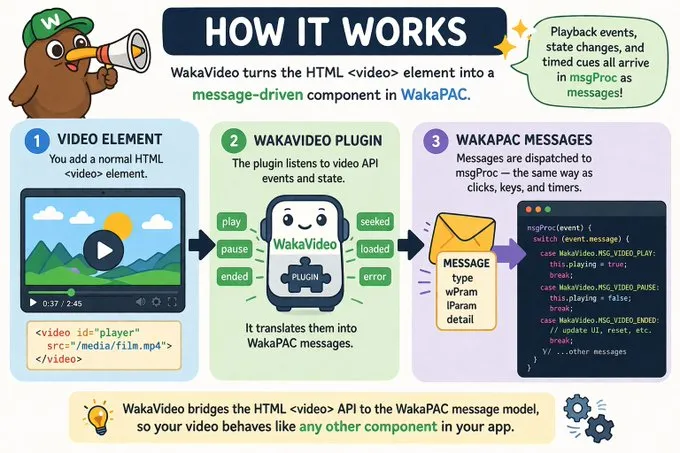
WakaVideo integrates with WakaPAC as a plugin, bridging the HTML <video> element API into the WakaPAC message model. Playback events, state changes, and timed cues all arrive in msgProc as messages — the same dispatch table as clicks, keypresses, and timers.
On this page:
Getting Started
Register WakaVideo with WakaPAC once, before creating any components. The plugin activates automatically for components whose root element is a <video> element.
<script src="https://cdn.jsdelivr.net/gh/quellabs/wakapac@main/wakapac.min.js"></script>
<script src="https://cdn.jsdelivr.net/gh/quellabs/wakapac@main/plugins/wakavideo.min.js"></script>

<script>
    wakaPAC.use(WakaVideo);
</script>
Target your video element as you would any other WakaPAC component — by id, class, or data-pac-id:
<video id="player" src="/media/film.mp4"></video>The Basics
Once registered, video playback events arrive in msgProc. Control playback through the WakaVideo API.
wakaPAC('#player', {
    init() {
        WakaVideo.play(this.pacId);
    },

    msgProc(event) {
        switch (event.message) {
            case WakaVideo.MSG_VIDEO_LOADED:
                console.log('Duration:', event.detail.duration);
                console.log('Size:', event.detail.videoWidth, 'x', event.detail.videoHeight);
                break;

            case WakaVideo.MSG_VIDEO_PLAY:
                this.playing = true;
                break;

            case WakaVideo.MSG_VIDEO_PAUSE:
                this.playing = false;
                break;

            case WakaVideo.MSG_VIDEO_ENDED:
                this.playing = false;
                break;

            case WakaVideo.MSG_VIDEO_ERROR:
                console.error('Playback error, code:', event.wParam);
                break;
        }
    }
});
Messages
The plugin delivers message types to msgProc as playback events occur. All message constants are available on the WakaVideo object after wakaPAC.use(WakaVideo) has been called.
Playback Started (MSG_VIDEO_PLAY)
Fired when playback begins, including after a pause or seek.
| Parameter | Type | Description |
|---|---|---|
wParam |
number | Always 0. |
lParam |
number | Always 0. |
Playback Paused (MSG_VIDEO_PAUSE)
Fired when playback is paused.
| Parameter | Type | Description |
|---|---|---|
wParam |
number | Always 0. |
lParam |
number | Always 0. |
Playback Ended (MSG_VIDEO_ENDED)
Fired when playback reaches the end of the media.
| Parameter | Type | Description |
|---|---|---|
wParam |
number | Always 0. |
lParam |
number | Always 0. |
Seek Completed (MSG_VIDEO_SEEK)
Fired when a seek operation completes and the video is ready to play from the new position.
| Parameter | Type | Description |
|---|---|---|
wParam |
number | The new playback position in whole milliseconds (truncated, not rounded). |
lParam |
number | Always 0. |
detail.currentTime |
number | The new playback position in seconds, with full sub-second precision. |
Metadata Loaded (MSG_VIDEO_LOADED)
Fired when the video's metadata is available — duration and dimensions. For local files or cached resources, this may fire immediately during component initialisation.
| Parameter | Type | Description |
|---|---|---|
wParam |
number | Always 0. |
lParam |
number | Always 0. |
detail.duration |
number | Total duration in seconds. |
detail.videoWidth |
number | Intrinsic video width in pixels. |
detail.videoHeight |
number | Intrinsic video height in pixels. |
Volume Changed (MSG_VIDEO_VOLUME_CHANGE)
Fired when either the volume level or muted state changes. Both properties are included regardless of which changed.
| Parameter | Type | Description |
|---|---|---|
wParam |
number | Current volume level (0–100). |
lParam |
number | Muted state: 1 if muted, 0 if not. |
detail.volume |
number | Current volume level (0–100). |
detail.muted |
boolean | Current muted state. |
Playback Rate Changed (MSG_VIDEO_RATE_CHANGE)
Fired when the playback rate changes. This fires for both programmatic changes via WakaVideo.setPlaybackRate() and changes made directly on the element.
| Parameter | Type | Description |
|---|---|---|
wParam |
number | Always 0. |
lParam |
number | Always 0. |
detail.playbackRate |
number | The new playback rate. 1.0 is normal speed. |
Playback Stalled (MSG_VIDEO_WAITING)
Fired when playback stops because the browser is waiting for more data. Typically indicates a buffering condition on a network stream. Playback resumes automatically once data is available, at which point MSG_VIDEO_CANPLAY fires.
| Parameter | Type | Description |
|---|---|---|
wParam |
number | Always 0. |
lParam |
number | Always 0. |
Playback Ready (MSG_VIDEO_CANPLAY)
Fired when enough data is available to begin or resume playback. Paired with MSG_VIDEO_WAITING — use both to drive a buffering indicator:
case WakaVideo.MSG_VIDEO_WAITING:
    this.buffering = true;
    break;

case WakaVideo.MSG_VIDEO_CANPLAY:
    this.buffering = false;
break;| Parameter | Type | Description |
|---|---|---|
wParam |
number | Always 0. |
lParam |
number | Always 0. |
Time Update (MSG_VIDEO_TIMEUPDATE)
Fired continuously during playback to report the current position. In visible tabs this fires at up to ~60 Hz via requestAnimationFrame. In hidden tabs, where requestAnimationFrame is suspended by the browser, it falls back to the native timeupdate event at ~4 Hz. Use this message to drive a progress bar or time display in a companion controls component.
case WakaVideo.MSG_VIDEO_TIMEUPDATE:
    this.progressMs = event.wParam;          // integer milliseconds, cheap to read
    this.currentTime = event.detail.currentTime; // fractional seconds, full precision
break;| Parameter | Type | Description |
|---|---|---|
wParam |
number | Current playback position in whole milliseconds (truncated, not rounded). Convenient for integer comparisons and progress bar calculations. |
lParam |
number | Always 0. |
detail.currentTime |
number | Current playback position in seconds, with full sub-second precision. |
Cue Entered (MSG_VIDEO_CUE_ENTER)
Fired when playback enters a cue's time range. Add cues programmatically via WakaVideo.addCue(). Each cue fires its own message — if multiple cues start at the same time, each fires separately.
| Parameter | Type | Description |
|---|---|---|
wParam |
number | Always 0. |
lParam |
number | Always 0. |
detail.startTime |
number | Cue start time in seconds. |
detail.endTime |
number | Cue end time in seconds. |
detail.text |
string | The cue payload, as passed to WakaVideo.addCue(). May be plain text or JSON. |
Cue Exited (MSG_VIDEO_CUE_LEAVE)
Fired when playback exits a cue's time range. Carries the same payload as MSG_VIDEO_CUE_ENTER so the cue can be identified without keeping local state.
| Parameter | Type | Description |
|---|---|---|
wParam |
number | Always 0. |
lParam |
number | Always 0. |
detail.startTime |
number | Cue start time in seconds. |
detail.endTime |
number | Cue end time in seconds. |
detail.text |
string | The cue payload. |
Playback Error (MSG_VIDEO_ERROR)
Fired when the browser cannot load or decode the media. event.wParam carries the MediaError code for quick filtering:
case WakaVideo.MSG_VIDEO_ERROR:
    switch (event.wParam) {
        case MediaError.MEDIA_ERR_NETWORK:
            this.error = 'Network error — check your connection';
            break;

        case MediaError.MEDIA_ERR_DECODE:
            this.error = 'Playback error — the media could not be decoded';
            break;

        case MediaError.MEDIA_ERR_SRC_NOT_SUPPORTED:
            this.error = 'Format not supported';
            break;

        default:
            this.error = event.detail.message || 'Unknown error';
            break;
    }
break;| Parameter | Type | Description |
|---|---|---|
wParam |
number | MediaError code: MEDIA_ERR_ABORTED (1), MEDIA_ERR_NETWORK (2), MEDIA_ERR_DECODE (3), MEDIA_ERR_SRC_NOT_SUPPORTED (4), or 0 if unavailable. |
lParam |
number | Always 0. |
detail.message |
string | Human-readable error description, or an empty string if the browser provides none. |
Reactive Properties
WakaVideo injects properties onto the component abstraction that are set when metadata loads and remain stable thereafter. Because the video component has no template of its own, these are most useful when read from a companion controls component in response to MSG_VIDEO_LOADED.
| Property | Type | Description |
|---|---|---|
duration |
number | NaN until metadata loads, then the total duration in seconds. |
videoWidth |
number | null | null until metadata loads, then the intrinsic video width in pixels. |
videoHeight |
number | null | null until metadata loads, then the intrinsic video height in pixels. |
API
All API methods take pacId as their first argument. Methods that target a pacId not registered as a video component are silently ignored.
WakaVideo.play(pacId)
Starts playback. Autoplay policy rejections are caught internally and dispatched as MSG_VIDEO_ERROR, so all error handling stays in msgProc.
| Parameter | Type | Description |
|---|---|---|
pacId | string | The data-pac-id of the target component. |
Returns void | ||
WakaVideo.pause(pacId)
Pauses playback.
| Parameter | Type | Description |
|---|---|---|
pacId | string | The data-pac-id of the target component. |
Returns void | ||
WakaVideo.seek(pacId, time)
Seeks to a position in seconds. MSG_VIDEO_SEEK fires when the seek completes.
| Parameter | Type | Description |
|---|---|---|
pacId | string | The data-pac-id of the target component. |
time | number | Target position in seconds. |
Returns void | ||
WakaVideo.setVolume(pacId, volume)
Sets the volume level. MSG_VIDEO_VOLUME_CHANGE fires after the change.
| Parameter | Type | Description |
|---|---|---|
pacId | string | The data-pac-id of the target component. |
volume | number | Volume level from 0 (silent) to 100 (full). Values outside this range are clamped. |
Returns void | ||
WakaVideo.setMuted(pacId, muted)
Sets the muted state. MSG_VIDEO_VOLUME_CHANGE fires after the change.
| Parameter | Type | Description |
|---|---|---|
pacId | string | The data-pac-id of the target component. |
muted | boolean | true to mute, false to unmute. |
Returns void | ||
WakaVideo.setPlaybackRate(pacId, rate)
Sets the playback rate. MSG_VIDEO_RATE_CHANGE fires after the change. Typical values are 0.5, 1.0, 1.5, and 2.0. Browser support for values outside this range varies.
| Parameter | Type | Description |
|---|---|---|
pacId | string | The data-pac-id of the target component. |
rate | number | Playback rate multiplier. 1.0 is normal speed. |
Returns void | ||
WakaVideo.bitBlt(dc, pacId)
Copies the current video frame into a canvas drawing context, scaled to fill the context's canvas dimensions. Useful for frame capture, thumbnail generation, or compositing. Call from a MSG_VIDEO_PAUSE or MSG_VIDEO_SEEK handler to capture a specific frame.
| Parameter | Type | Description |
|---|---|---|
dc | CanvasRenderingContext2D | The target drawing context. The frame is scaled to fill the context's canvas dimensions. |
pacId | string | The data-pac-id of the target component. |
Returns void | ||
WakaVideo.stretchBlt(dc, pacId, dx, dy, dw, dh)
Copies the current video frame into a specific rectangle on a canvas drawing context.
| Parameter | Type | Description |
|---|---|---|
dc | CanvasRenderingContext2D | The target drawing context. |
pacId | string | The data-pac-id of the target component. |
dx | number | Destination x in canvas pixels. |
dy | number | Destination y in canvas pixels. |
dw | number | Destination width in canvas pixels. |
dh | number | Destination height in canvas pixels. |
Returns void | ||
WakaVideo.addCue(pacId, startTime, endTime, text)
Adds a timed cue. MSG_VIDEO_CUE_ENTER fires when playback enters the cue's time range; MSG_VIDEO_CUE_LEAVE fires when it exits. The cue track is lazy-created on the first call. Cues cannot be removed once added.
WakaVideo.addCue(pacId, 10, 15, 'chapter-2');

case WakaVideo.MSG_VIDEO_CUE_ENTER:
    this.currentChapter = event.detail.text;
    break;

case WakaVideo.MSG_VIDEO_CUE_LEAVE:
    this.currentChapter = null;
break;| Parameter | Type | Description |
|---|---|---|
pacId | string | The data-pac-id of the target component. |
startTime | number | Cue start time in seconds. Must be less than endTime. |
endTime | number | Cue end time in seconds. |
text | string | Cue payload. Use for chapter names, labels, or any identifier that maps to logic in msgProc. |
Returns void | ||
Best Practices
- Register once: Call
wakaPAC.use(WakaVideo)once before creating any components. - Wait for MSG_VIDEO_LOADED: Do not read
duration,videoWidth, orvideoHeightbefore this message fires — they areNaNornulluntil metadata is available. - Drive progress bars with MSG_VIDEO_TIMEUPDATE: Use
event.wParam(milliseconds) for cheap integer comparisons orevent.detail.currentTimefor full precision. The message fires at ~60 Hz in visible tabs and drops to ~4 Hz in hidden tabs. - Autoplay rejections arrive in msgProc: Browsers block autoplay without user interaction. If
WakaVideo.play()is rejected by autoplay policy,MSG_VIDEO_ERRORfires withwParam = 0. Set the video asmutedto satisfy autoplay policy when silent autoplay is needed. - Use MSG_VIDEO_WAITING / MSG_VIDEO_CANPLAY for buffering indicators: These fire reliably on network streams. Do not rely on the absence of
MSG_VIDEO_TIMEUPDATEas a buffering signal. - Use wParam for error codes: Quick filtering on
event.wParamagainstMediaErrorconstants is cleaner than inspectingevent.detail.messagefor common error cases. - Use plain strings for cue payloads: The
detail.textfield mirrors the browser'sVTTCue.textproperty and is a plain string. Use it for chapter names, labels, or any identifier that maps to logic in yourmsgProc. - No manual cleanup needed: The plugin cancels the
requestAnimationFrameloop and removes all event listeners automatically when the component is destroyed.