
Browser Properties
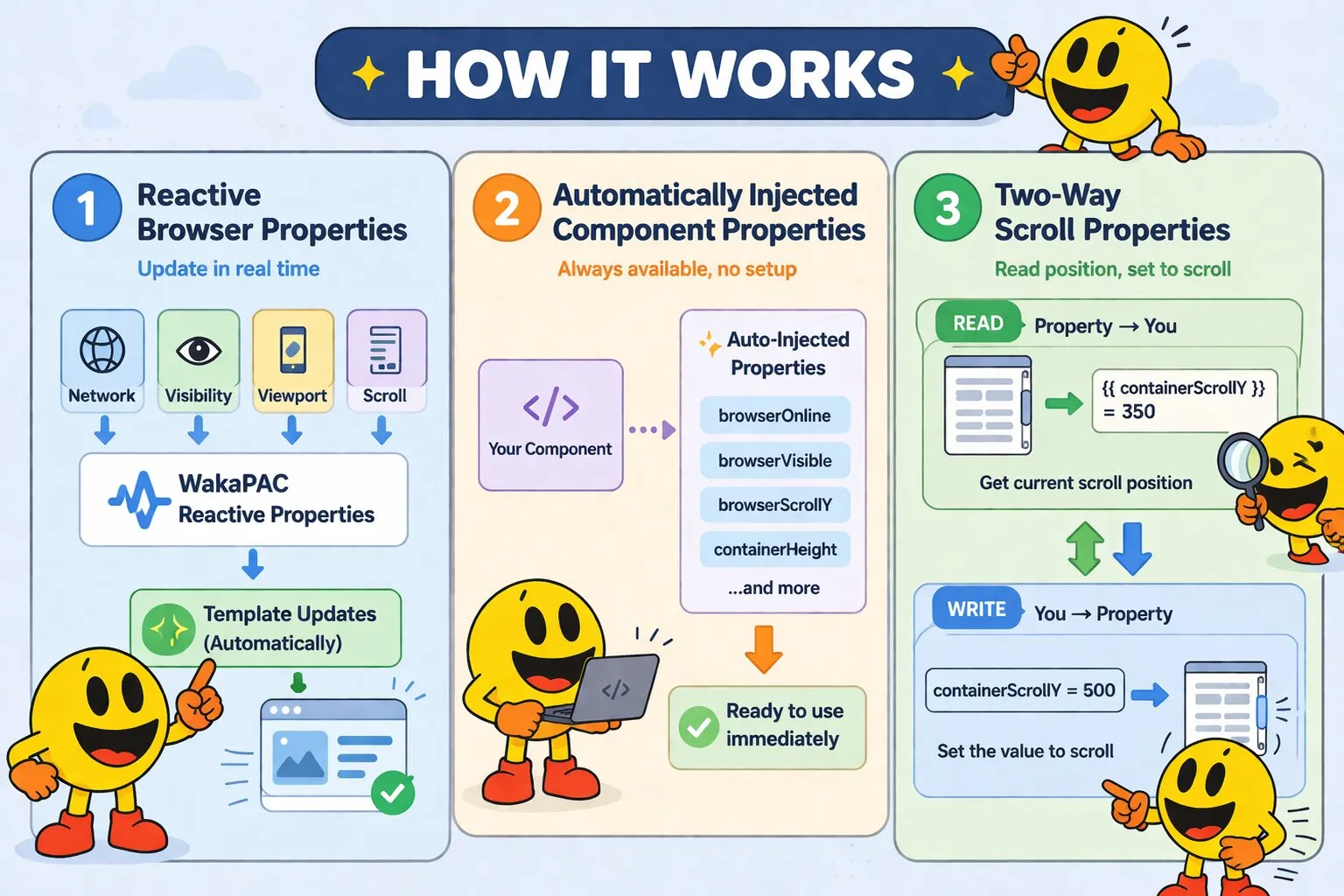
WakaPAC automatically provides reactive properties that track browser and viewport state. These properties update in real-time as the browser state changes - no manual event listeners needed.
On this page:
- How Browser Properties Work
- Understanding Browser vs Container Properties
- Component Identity
- Network & Connectivity
- Browser Environment
- Viewport Dimensions
- Window Scroll Position
- Document Dimensions
- Container Viewport Visibility
- Container Scroll Properties
- Container Focus State
- Quick Reference Tables
How Browser Properties Work
Every WakaPAC component automatically has access to browser and container properties:
- Automatically injected: Available immediately in every component without configuration
- Reactive: Changes trigger template updates just like your own data properties
- Read-only or two-way: Some properties can be set to control browser behavior (like scroll position)
- Optimized: Updates are debounced and batched for performance
Understanding Browser vs Container Properties
Browser properties (prefix: browser*) track the entire browser window and document:
- Network connectivity and quality
- Tab visibility state and screen orientation
- Window scroll position and document dimensions
- Viewport size
Container properties (prefix: container*) track the specific element that WakaPAC is bound to:
- Container scroll position and content size
- Container dimensions and visibility in viewport
- Focus state within the container
Example comparison:
browserScrollY- how far the entire page is scrolledcontainerScrollY- scroll position within a specific scrollable elementbrowserViewportHeight- height of the browser windowcontainerHeight- height of the component's container element
Component Identity
pacId
Type: string | Updates: Never | Writable: No
Unique identifier for this component. Uses data-pac-id attribute, element id, or auto-generates one.
wakaPAC('#app', {
    init() {
        console.log(this.pacId); // "app"
    }
});
container
Type: HTMLElement | Updates: Never | Writable: No
Reference to the DOM element this component is bound to. Use for imperative DOM operations when reactive bindings aren't sufficient.
wakaPAC('#app', {
    init() {
        // Third-party library integration
        this.chart = new Chart(this.container.querySelector('canvas'), {...});

        // Focus management
        this.container.querySelector('.email-input').focus();

        // Measuring DOM
        const height = this.container.querySelector('.content').offsetHeight;
    }
});querySelector() will find elements inside child components. For most cases, use reactive bindings instead of direct DOM manipulation.
Network & Connectivity
browserOnline
Type: boolean | Updates: online/offline events | Writable: No
Indicates whether the browser has network connectivity.
<div data-pac-bind="visible: browserOnline">
    <span class="status-online">● Connected</span>
</div>

<div data-pac-bind="visible: !browserOnline">
    <span class="status-offline">● Offline - Changes will sync when reconnected</span>
</div>
browserNetworkEffectiveType
Type: string | Updates: connection changes | Writable: No
Reports effective network connection type using the Network Information API when available. Possible values:
'slow-2g'- Very slow connection (~50 kbps)'2g'- Slow connection (~250 kbps)'3g'- Moderate connection (~700 kbps)'4g'- Fast connection (≥10 Mbps) - this is the default if the API isn't available
<div class="network-indicator">
    Connection: {{ browserNetworkEffectiveType }}
</div>

<!-- Load appropriate image quality based on connection -->
<img data-pac-bind="src: browserNetworkEffectiveType === '4g' ? highResUrl : lowResUrl"
     alt="Product image">
browserNetworkQuality
Type: string | Updates: connection changes | Writable: No
Simplified network quality assessment for easier decision-making. Possible values:
'offline'- No connection'slow'- 2g or 3g connections'fast'- 4g or better
wakaPAC('#app', {
    init() {
        // Configure app based on network quality
        if (this.browserNetworkQuality === 'slow') {
            this.enableLowDataMode();
        }
    },

    enableLowDataMode() {
        this.imagesEnabled = false;
        this.autoplayVideo = false;
        this.prefetchLinks = false;
    }
});
Browser Environment
browserVisible
Type: boolean | Updates: visibility changes | Writable: No
Tracks whether the browser tab is currently visible to the user. Becomes false when users switch tabs, minimize the browser, or switch applications.
wakaPAC('#video-player', {
    isPlaying: false,

    watch: {
        browserVisible(isVisible) {
            // Automatically pause when tab becomes hidden
            if (!isVisible && this.isPlaying) {
                this.pauseVideo();
            }
        }
    },

    pauseVideo() {
        this.isPlaying = false;
        document.querySelector('video').pause();
    }
});
browserOrientationAngle
Type: number | Updates: orientation changes | Writable: No
Current screen orientation in degrees relative to the device's natural orientation. Possible values: 0, 90, 180, 270. On a device whose natural orientation is portrait, holding it landscape gives 90 or 270.
browserOrientationType
Type: string | Updates: orientation changes | Writable: No
Descriptive orientation type string. Possible values:
'portrait-primary'— upright portrait (natural position for most phones/tablets)'portrait-secondary'— portrait, upside down'landscape-primary'— landscape, rotated 90° clockwise'landscape-secondary'— landscape, rotated 90° counter-clockwise'unknown'— browser does not support the Screen Orientation API
<!-- Show a rotation hint when not in portrait -->
<div data-pac-bind="visible: browserOrientationType !== 'portrait-primary'">
    Please rotate your device to portrait mode.
</div>
wakaPAC('#app', {
watch: {
browserOrientationAngle(angle) {
// Re-layout canvas or chart when device rotates
this.redrawChart();
}
}
});browserDevicePixelRatio
Type: number | Updates: display DPR changes | Writable: No
The ratio of physical pixels to CSS pixels for the current display. A value of 1 means one physical
pixel per CSS pixel (standard displays). A value of 2 means four physical pixels per CSS pixel
(HiDPI/Retina displays). Common values are 1, 1.5, 2, and 3.
Changes when the user moves the browser window to a monitor with a different pixel density, or adjusts OS display
scaling.
Viewport Dimensions
browserViewportWidth / browserViewportHeight
Type: number | Updates: resize/orientation changes | Writable: No
Width and height of the visible browser viewport in pixels. This is the area the user can actually see - equivalent to window.innerWidth and window.innerHeight.
<!-- Responsive layout switching based on viewport width -->
<div data-pac-bind="visible: browserViewportWidth >= 768">
    <nav class="desktop-navigation">
        <!-- Full navigation menu -->
    </nav>
</div>

<div data-pac-bind="visible: browserViewportWidth < 768">
    <button data-pac-bind="click: toggleMobileMenu">☰ Menu</button>
</div>

<!-- Debug viewport size -->
<div class="debug-info">
    Viewport: {{ browserViewportWidth }} × {{ browserViewportHeight }}px
</div>
wakaPAC('#app', {
computed: {
isMobile() {
return this.browserViewportWidth < 768;
},
isTablet() {
return this.browserViewportWidth >= 768 && this.browserViewportWidth < 1024;
},
isDesktop() {
return this.browserViewportWidth >= 1024;
}
}
});Window Scroll Position
browserScrollX / browserScrollY
Type: number | Updates: scroll events | Writable: Yes
Current scroll position of the browser window in pixels. browserScrollX is horizontal (from left), browserScrollY is vertical (from top).
Two-way binding: Setting these properties programmatically scrolls the window.
<!-- Show "back to top" button when scrolled down -->
<button data-pac-bind="visible: browserScrollY > 300, click: scrollToTop">
    ↑ Back to Top
</button>

<!-- Reading progress bar -->
<div class="reading-progress"
     data-pac-bind="style: { width: scrollProgress + '%' }">
</div>
wakaPAC('#app', {
computed: {
scrollProgress() {
const maxScroll = this.browserContentHeight - this.browserViewportHeight;
return maxScroll > 0 ? (this.browserScrollY / maxScroll * 100) : 0;
}
},
scrollToTop() {
// Programmatically scroll to top
this.browserScrollY = 0;
},
scrollToSection(sectionTop) {
// Scroll to specific position
this.browserScrollY = sectionTop;
}
});Document Dimensions
browserContentWidth / browserContentHeight
Type: number | Updates: content/resize changes | Writable: No
Total width and height of the entire document in pixels, including content outside the viewport. This is always greater than or equal to viewport dimensions.
Example: If your page is 3000px tall but the viewport is only 800px tall, browserContentHeight is 3000 and browserViewportHeight is 800.
wakaPAC('#infinite-scroll', {
    items: [],
    loading: false,

    computed: {
        // Distance from bottom of page
        distanceFromBottom() {
            return this.browserContentHeight - this.browserScrollY - this.browserViewportHeight;
        },

        // Trigger loading when within 200px of bottom
        shouldLoadMore() {
            return this.distanceFromBottom < 200 && !this.loading;
        }
    },

    watch: {
        shouldLoadMore(should) {
            if (should) {
                this.loadMoreContent();
            }
        }
    },

    async loadMoreContent() {
        this.loading = true;
        const newItems = await fetch('/api/items').then(r => r.json());
        this.items.push(...newItems);
        this.loading = false;
    }
});
Container Viewport Visibility
containerVisible
Type: boolean | Updates: scroll/resize | Writable: No
Whether any part of the container element is currently visible in the viewport. Useful for lazy loading or triggering animations when elements scroll into view.
<div id="feature-section" data-pac-bind="class: { 'fade-in': containerVisible }">
    <h2>Features</h2>
    <p>This content animates when scrolled into view</p>
</div>
containerFullyVisible
Type: boolean | Updates: scroll/resize | Writable: No
Whether the entire container element is completely visible within the viewport (all edges are within bounds). More strict than containerVisible.
wakaPAC('#ad-card', {
    impressionTracked: false,

    watch: {
        containerFullyVisible(fullyVisible) {
            // Track impression only when ad is fully visible
            if (fullyVisible && !this.impressionTracked) {
                this.trackImpression();
                this.impressionTracked = true;
            }
        }
    },

    trackImpression() {
        console.log('Ad fully visible - tracking impression');
        // Send analytics event
    }
});
containerClientRect
Type: object | Updates: scroll/resize | Writable: No
Position and dimensions of the container relative to the viewport. Contains the following properties:
top- Distance from top of viewport (px)left- Distance from left of viewport (px)right- Distance from right of viewport (px)bottom- Distance from bottom of viewport (px)width- Width of container (px)height- Height of container (px)x- Same aslefty- Same astop
wakaPAC('#tooltip-trigger', {
    tooltipX: 0,
    tooltipY: 0,

    showTooltip() {
        const rect = this.containerClientRect;
        // Position tooltip above and centered on trigger
        this.tooltipX = rect.left + (rect.width / 2);
        this.tooltipY = rect.top - 10;
    }
});
containerWidth / containerHeight
Type: number | Updates: resize | Writable: No
Width and height of the container element in pixels (equivalent to clientWidth and clientHeight). This is the visible content area, excluding scrollbars and borders.
<div id="responsive-component">
    <div data-pac-bind="visible: containerWidth >= 600">
        Wide layout (600px+)
    </div>

    <div data-pac-bind="visible: containerWidth < 600">
        Compact layout (<600px)
    </div>
</div>
Container Scroll Properties
containerIsScrollable
Type: boolean | Updates: content/resize changes | Writable: No
Whether the container has scrollable content in any direction (content is larger than the visible area).
<div data-pac-bind="visible: containerIsScrollable" class="scroll-hint">
    ↓ Scroll to see more
</div>
containerScrollX / containerScrollY
Type: number | Updates: container scroll | Writable: Yes
Current scroll position within the container element in pixels (equivalent to scrollLeft and scrollTop).
Two-way binding: Setting these properties programmatically scrolls the container.
<div id="scrollable-panel" style="height: 400px; overflow-y: auto;">
    <button data-pac-bind="click: scrollToTop, visible: containerScrollY > 100">
        ↑ Top
    </button>

    <!-- Long content here -->
</div>
wakaPAC('#scrollable-panel', {
scrollToTop() {
this.containerScrollY = 0;
},
scrollToBottom() {
this.containerScrollY = this.containerContentHeight - this.containerHeight;
}
});containerContentWidth / containerContentHeight
Type: number | Updates: content changes | Writable: No
Total width and height of scrollable content inside the container in pixels (equivalent to scrollWidth and scrollHeight). This is the full content size including parts outside the visible area.
Example: If a container is 300px tall but contains 1000px of content, containerHeight is 300 and containerContentHeight is 1000.
wakaPAC('#chat-window', {
    computed: {
        // Maximum scroll position
        maxScrollY() {
            return this.containerContentHeight - this.containerHeight;
        },

        // Is scrolled to bottom?
        isAtBottom() {
            return this.containerScrollY >= this.maxScrollY - 10;
        }
    },

    scrollToNewestMessage() {
        this.containerScrollY = this.maxScrollY;
    }
});
containerScrollWindow
Type: object | Updates: scroll/content changes | Writable: No
Object containing scroll measurements for the container. Contains:
top- Same ascontainerScrollYleft- Same ascontainerScrollXright-scrollX + containerWidthbottom-scrollY + containerHeightx- Same aslefty- Same astop
Container Focus State
containerFocus
Type: boolean | Updates: focus/blur events | Writable: No
Whether the container element itself has direct keyboard focus (matches :focus CSS pseudo-class). The container needs tabindex to be focusable.
containerFocusWithin
Type: boolean | Updates: focus/blur events | Writable: No
Whether the container or any of its descendants has focus (matches :focus-within CSS pseudo-class). More useful than containerFocus for styling parent containers when child inputs are focused.
<div id="form-section" data-pac-bind="class: { 'highlight-border': containerFocusWithin }">
    <label>Name: <input type="text"></label>
    <label>Email: <input type="email"></label>
</div>
wakaPAC('#search-box', {
searchQuery: '',
showSuggestions: false,
watch: {
containerFocusWithin(hasFocus) {
// Show/hide suggestions based on focus
this.showSuggestions = hasFocus && this.searchQuery.length > 0;
// Auto-submit when focus leaves
if (!hasFocus && this.searchQuery) {
this.performSearch();
}
}
},
performSearch() {
console.log('Searching for:', this.searchQuery);
}
});Quick Reference Tables
Browser-Level Properties
| Property | Type | Writable | Description |
|---|---|---|---|
pacId |
string | No | Unique component identifier |
browserOnline |
boolean | No | Network connectivity status |
browserNetworkEffectiveType |
string | No | Connection type (slow-2g, 2g, 3g, 4g) |
browserNetworkQuality |
string | No | Simplified quality (offline, slow, fast) |
browserVisible |
boolean | No | Tab/window is currently visible |
browserScrollX |
number | Yes | Window horizontal scroll (px) |
browserScrollY |
number | Yes | Window vertical scroll (px) |
browserViewportWidth |
number | No | Visible viewport width (px) |
browserViewportHeight |
number | No | Visible viewport height (px) |
browserContentWidth |
number | No | Total document width (px) |
browserContentHeight |
number | No | Total document height (px) |
browserOrientationAngle |
number | No | Screen orientation in degrees (0, 90, 180, 270) |
browserOrientationType |
string | No | Orientation type string (e.g. portrait-primary) |
browserDevicePixelRatio |
number | No | Physical to CSS pixel ratio (1 = standard, 2 = HiDPI/Retina) |
Container-Level Properties
| Property | Type | Writable | Description |
|---|---|---|---|
containerVisible |
boolean | No | Any part visible in viewport |
containerFullyVisible |
boolean | No | Completely visible in viewport |
containerClientRect |
object | No | Position/dimensions relative to viewport |
containerWidth |
number | No | Container visible width (px) |
containerHeight |
number | No | Container visible height (px) |
containerIsScrollable |
boolean | No | Has scrollable content |
containerScrollX |
number | Yes | Container horizontal scroll (px) |
containerScrollY |
number | Yes | Container vertical scroll (px) |
containerContentWidth |
number | No | Total scrollable width (px) |
containerContentHeight |
number | No | Total scrollable height (px) |
containerScrollWindow |
object | No | Scroll measurements (top, left, right, bottom, x, y) |
containerFocus |
boolean | No | Container has direct focus |
containerFocusWithin |
boolean | No | Container or child has focus |