
WakaDDraw
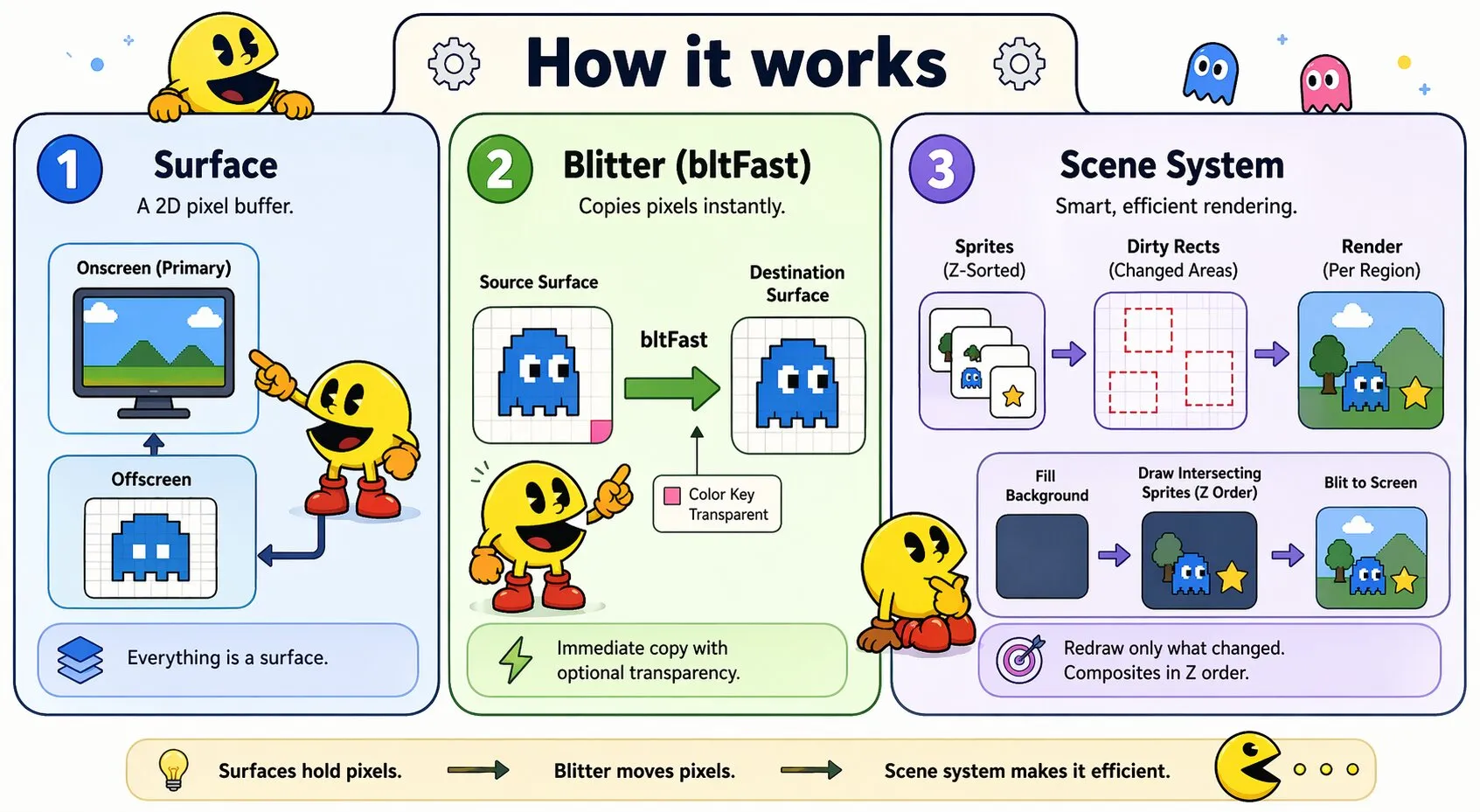
WakaDDraw is a DirectDraw-inspired blitter plugin for wakaPAC. It provides a two-tier graphics API: a low-level blitter for direct surface-to-surface pixel transfer, and a higher-level scene system that manages sprites and dirty rectangle compositing automatically. Surfaces are the only concept — everything is represented as a surface, either onscreen or offscreen.
On this page:
Getting Started
Include the script after wakaPAC and register the plugin:
<script src="https://cdn.jsdelivr.net/gh/quellabs/wakapac@main/wakapac.min.js"></script>
<script src="https://cdn.jsdelivr.net/gh/quellabs/wakapac@main/plugins/wakaddraw.min.js"></script>

<script>
    wakaPAC.use(wakaDDraw); // must be called before any wakaPAC() calls
</script>
Once registered, wakaDDraw is available globally.
Concepts
A Surface is a 2D pixel buffer. The onscreen surface represents the visible render target of a wakaPAC component and is the render destination. Offscreen surfaces are pixel buffers drawn into and blitted from.
The blitter (bltFast) copies pixels from one surface to another immediately, with optional color key transparency. It has no state.
The scene system builds on the blitter. A scene manages a z-sorted list of sprites and a non-overlapping dirty rect list. On each sceneRender() call, only damaged regions are redrawn. Each dirty region is reconstructed from scratch: the background is filled, then all sprites intersecting that region are composited in z-order (bottom to top). The user drives the timing from their own timer.
The tilemap renders a tile-indexed map into an offscreen surface, which is then used as a sprite source in the scene. Scrolling is handled by the drawTo() call.
Basic Render Loop (Blitter)
wakaPAC('[data-pac-id="game"]', {
    init() {
        this.primary = wakaDDraw.getSurface(this.pacId);
        this.hero    = wakaDDraw.createSurface(32, 32);

        // Draw hero pixels into surface context
        const ctx = wakaDDraw.getContext(this.hero);
        ctx.fillStyle = '#4a9eff';
        ctx.fillRect(8, 8, 16, 16);
        wakaDDraw.applyColorKey(this.hero);

        this.x = 100;
        this._timer = wakaPAC.setTimer(this.pacId, 16);
    },

    msgProc(event) {
        switch (event.message) {
            case wakaPAC.MSG_TIMER: {
                // Clear to background color, then blt hero at current position
                wakaDDraw.clearSurface(this.primary, '#1a2a3a');
                wakaDDraw.bltFast(this.primary, this.x, 80, this.hero);
                this.x += 1;
                break;
            }
        }
    }
});
Scene System Render Loop
wakaPAC('[data-pac-id="game"]', {
    init() {
        this.primary     = wakaDDraw.getSurface(this.pacId);
        this.heroSurface = wakaDDraw.createSurface(32, 32);

        // Draw hero pixels...
        wakaDDraw.applyColorKey(this.heroSurface);

        this.scene = wakaDDraw.sceneCreate({ background: '#1a2a3a' });
        this.hero  = wakaDDraw.createSprite(this.heroSurface, null, 1);
        this.hero.moveTo(100, 80);

        wakaDDraw.sceneAddSprite(this.scene, this.hero);
        wakaDDraw.sceneInvalidate(this.scene, this.primary);

        this._timer = wakaPAC.setTimer(this.pacId, 16);
    },

    msgProc(event) {
        switch (event.message) {
            case wakaPAC.MSG_TIMER: {
                // Move sprite — dirty rects are marked automatically
                this.hero.moveTo(this.hero.x + 1, this.hero.y);
                wakaDDraw.sceneRender(this.scene, this.primary);
                break;
            }
        }
    }
});
Surfaces
All surfaces expose the following properties:
| Property | Type | Description |
|---|---|---|
width | number | Surface width in pixels |
height | number | Surface height in pixels |
offscreen | boolean | true for offscreen surfaces, false for the onscreen primary |
colorKey | string | null | CSS color applied as transparency at load time. null means native color key. |
Color Keys
A color key designates a specific color as transparent. Pixels matching the key color (by RGB, ignoring alpha) are set to alpha=0 when applyColorKey() is called. By default, no color key is set (null) — surfaces use native alpha transparency from the source image. Color keying happens once at load or draw time — the key color is baked into the surface's alpha channel. At blit time, bltFast uses standard alpha compositing (source-over) with no per-pixel CPU work.
Pass { colorKey: '#ff00ff' } to opt into magenta-based color keying for legacy assets that use a solid color as fake transparency instead of a proper alpha channel.
Error Handling
WakaDDraw uses a two-tier error strategy:
- Low-level API (
getSurface,createSurface,bltFast,bltBitmap,lock,unlock) — throws on misuse. These are programming errors that must be caught at development time. - High-level API (
scene*,createSprite) — returns or no-ops on bad input with aconsole.warn. Scene state can be complex and partial failures should not crash the render loop.
Flags
| Constant | Value | Description |
|---|---|---|
wakaDDraw.DDBLTFAST_NOCOLORKEY | 0x00 | Ignore source color key. All pixels are copied, including those matching the key color. |
wakaDDraw.DDBLTFAST_SRCCOLORKEY | 0x01 | Respect source color key. Transparent pixels (alpha=0) are composited using source-over. This is the default when the source surface has a color key. |
API
wakaDDraw.getSurface(pacId)
Returns an onscreen surface representing the render target of a wakaPAC component. This is the render destination for bltFast() and sceneRender(). Throws if the component's container is not a <canvas> element.
| Parameter | Type | Description |
|---|---|---|
pacId | string | The data-pac-id of the target component. Use this.pacId from within a component abstraction. |
Returns Surface | Onscreen surface. offscreen is false. | |
wakaDDraw.createSurface(width, height, opts?)
Creates a blank offscreen surface. Draw into it using wakaDDraw.getContext(surface), then call applyColorKey() to make the key color transparent. By default no color key is set — pass { colorKey: '#ff00ff' } to enable magenta keying for legacy assets.
| Parameter | Type | Description |
|---|---|---|
width | number | Surface width in pixels |
height | number | Surface height in pixels |
opts.colorKey | string | null | Color key CSS color. Default: null (native color key). Pass a CSS color string to enable keying for legacy assets. |
Returns Surface | Offscreen surface. offscreen is true. | |
wakaDDraw.getContext(surface)
Returns the 2D rendering context of an offscreen surface for direct drawing. Use this to draw programmatically into a surface before calling applyColorKey(). Throws if called on an onscreen surface — drawing directly into the primary bypasses the compositor.
| Parameter | Type | Description |
|---|---|---|
surface | Surface | Offscreen surface to draw into |
Returns CanvasRenderingContext2D | ||
wakaDDraw.bltBitmap(surface, bitmap)
Blits a wakaPAC bitmap onto a surface's pixel data. Applies the surface's color key after blitting if one is set. The caller is responsible for calling wakaPAC.deleteBitmap() when done with the bitmap.
const bitmap = await wakaPAC.loadBitmap('/img/hero.png');
wakaDDraw.bltBitmap(heroSurface, bitmap);
wakaPAC.deleteBitmap(bitmap);| Parameter | Type | Description |
|---|---|---|
surface | Surface | Destination surface |
bitmap | Bitmap | Bitmap handle from wakaPAC.loadBitmap() |
Returns void | ||
wakaDDraw.loadSurface(url, opts?)
Loads a bitmap from a URL and returns a ready-to-use offscreen surface. Combines wakaPAC.loadBitmap(), createSurface(), bltBitmap(), and wakaPAC.deleteBitmap() into a single call. The surface dimensions match the loaded image exactly. Native alpha transparency is preserved by default. Pass { colorKey: '#ff00ff' } only for legacy assets that use a solid color as fake transparency instead of a proper alpha channel.
// PNG with native alpha — default, no opts needed
this.hero = await wakaDDraw.loadSurface('/images/hero.png');

// Legacy sprite using magenta as transparency — opt in explicitly
this.enemy = await wakaDDraw.loadSurface('/images/enemy.png', { colorKey: '#ff00ff' });| Parameter | Type | Description |
|---|---|---|
url | string | URL of the image to load |
opts.colorKey | string | null | Color key CSS color. Default: null (native color key). Pass a CSS color string to enable keying for legacy assets. |
Returns Promise<Surface> | Offscreen surface sized to the image. offscreen is true. | |
wakaDDraw.bltFast(dst, dx, dy, src, rect?, flags?)
Blits a source surface into a destination surface immediately. If rect is omitted, the entire source surface is blitted. rect follows DOMRect conventions — both x/y and left/top are accepted.
By default, if the source surface has a color key, DDBLTFAST_SRCCOLORKEY is used — transparent pixels are composited correctly. Pass DDBLTFAST_NOCOLORKEY to copy all pixels regardless of the color key.
| Parameter | Type | Description |
|---|---|---|
dst | Surface | Destination surface |
dx, dy | number | Destination position in pixels |
src | Surface | Source surface |
rect | DOMRect | {x?, left?, y?, top?, width, height} | undefined | Source region. Omit to blt the entire source surface. |
flags | number | undefined | DDBLTFAST_SRCCOLORKEY or DDBLTFAST_NOCOLORKEY. Defaults to SRCCOLORKEY if the source has a color key. |
Returns void | ||
wakaDDraw.lock(surface)
Locks a surface for direct pixel access. Returns an ImageData snapshot of the surface canvas. Mutate imageData.data directly, then call unlock() to write it back.
| Parameter | Type | Description |
|---|---|---|
surface | Surface | Surface to lock |
Returns ImageData | Pixel data snapshot | |
wakaDDraw.unlock(surface, imageData)
Writes ImageData back to the surface canvas. Call applyColorKey() afterward if the key color was drawn into the pixels.
| Parameter | Type | Description |
|---|---|---|
surface | Surface | Surface to unlock |
imageData | ImageData | Pixel data from lock() |
Returns void | ||
wakaDDraw.applyColorKey(surface)
Applies the surface's color key to its pixel data in-place. Pixels matching the key color (by RGB) are set to alpha=0. No-op if colorKey is null.
This operation is O(pixels) — call it once after loading or bulk pixel operations, never per frame.
| Parameter | Type | Description |
|---|---|---|
surface | Surface | Surface to process |
Returns void | ||
wakaDDraw.clearSurface(surface, color?)
Clears a surface to a solid color. Use this at the start of each frame when driving the render loop manually with bltFast. The scene system does not need this — it clears only dirty regions itself via its background color.
| Parameter | Type | Description |
|---|---|---|
surface | Surface | Surface to clear. Works on both onscreen and offscreen surfaces. |
color | string | CSS fill color. Pass 'transparent' to clear to transparent black. Default: '#000000'. |
Returns void | ||
wakaDDraw.requestFullscreen(pacId)
Requests fullscreen for the primary surface of a wakaPAC component. Must be called from a user gesture (a click, keydown, or similar) — the browser will silently deny the request otherwise. Errors are reported via console.warn and not propagated to the caller. Handles the webkitRequestFullscreen prefix for Safari automatically.
wakaPAC dispatches MSG_SIZE with wParam === SIZE_FULLSCREEN once the transition completes. lParam carries the screen dimensions: wakaPAC.LOWORD(lParam) = width, wakaPAC.HIWORD(lParam) = height. On exit, MSG_SIZE fires again with wParam === SIZE_RESTORED and the original surface dimensions.
wakaPAC('[data-pac-id="game"]', {
    init() {
        this.primary = wakaDDraw.getSurface(this.pacId);
        this.scene   = wakaDDraw.sceneCreate({ background: '#000' });
        // ... add sprites, start timer ...
    },

    msgProc(event) {
        switch (event.message) {

            case wakaPAC.MSG_LCLICK:
                // Must be called from a user gesture
                wakaDDraw.requestFullscreen(this.pacId);
                break;

            case wakaPAC.MSG_SIZE: {
                const w = wakaPAC.LOWORD(event.lParam);
                const h = wakaPAC.HIWORD(event.lParam);

                if (event.wParam === wakaPAC.SIZE_FULLSCREEN) {
                    // Surface is now displayed at screen resolution (w x h)
                    // Pixel dimensions are unchanged - browser upscales via CSS
                } else if (event.wParam === wakaPAC.SIZE_RESTORED) {
                    // Returned to windowed mode, w x h are the original surface dimensions
                }
                break;
            }

            case wakaPAC.MSG_KEYDOWN:
                if (event.wParam === wakaPAC.VK_ESCAPE && wakaDDraw.isFullscreen) {
                    wakaDDraw.exitFullscreen();
                }
                break;
        }
    }
});| Parameter | Type | Description |
|---|---|---|
pacId | string | The data-pac-id of the component whose primary surface to fullscreen. Use this.pacId from within a component abstraction. |
Returns void | ||
wakaDDraw.exitFullscreen()
Exits fullscreen mode. No-op if no element is currently fullscreen. Errors are reported via console.warn and not propagated to the caller. Handles the webkitExitFullscreen prefix for Safari automatically.
| Parameter | Type | Description |
|---|---|---|
Returns void | ||
wakaDDraw.isFullscreen
Returns true if any element is currently fullscreen, false otherwise. Checks both the standard document.fullscreenElement and the Safari document.webkitFullscreenElement.
| Type | Description |
|---|---|
boolean | Read-only getter. true while in fullscreen. |
Scene System
The scene system is a higher-level compositor built on bltFast. It maintains a z-sorted sprite list and a non-overlapping dirty rect list. On each sceneRender() call, only the regions that changed are redrawn. For each dirty rect, the region is first cleared to the background color, then all sprites intersecting that region are blitted in z-order (painter's algorithm, bottom to top), reconstructing the final image for that region. Sprites that did not move cost nothing.
The dirty rect list is guaranteed non-overlapping through a rectangle subtraction algorithm. If the number of dirty rects reaches 64, the system collapses to a full redraw for that frame, preventing O(n²) fragmentation.
Rendering is immediate-mode. Dirty regions are rebuilt each frame; previous framebuffer contents are not reused. The system does not perform occlusion culling — all sprites intersecting a dirty region are drawn regardless of coverage.
wakaDDraw.sceneCreate(opts?)
Creates a scene. The scene owns a sprite list and a dirty rect list. It does not own a surface — the primary surface is passed to sceneRender() each frame.
| Parameter | Type | Description |
|---|---|---|
opts.background | string | Fallback fill color painted into dirty regions before sprites are blitted. Default: '#000'. |
Returns Scene | ||
wakaDDraw.sceneDestroy(scene)
Destroys a scene. Detaches all sprites and clears state. Call from destroy().
| Parameter | Type | Description |
|---|---|---|
scene | Scene | Scene to destroy |
Returns void | ||
wakaDDraw.sceneInvalidate(scene, primary)
Marks the entire scene dirty, forcing a full redraw on the next sceneRender() call. Call this after creating the scene and adding all initial sprites to ensure the first frame renders correctly. Also call after changing the background color.
| Parameter | Type | Description |
|---|---|---|
scene | Scene | Target scene |
primary | Surface | Onscreen surface — used to determine the full-redraw bounds |
Returns void | ||
wakaDDraw.sceneAddSprite(scene, sprite)
Adds a sprite to a scene. The sprite list is kept z-sorted on insertion. Marks the sprite's initial position dirty so it appears on the next sceneRender(). No-op if the sprite is already in this scene.
| Parameter | Type | Description |
|---|---|---|
scene | Scene | Target scene |
sprite | Sprite | Sprite to add. Must not already belong to another scene. |
Returns void | ||
wakaDDraw.sceneRemoveSprite(scene, sprite)
Removes a sprite from its scene. Marks the vacated region dirty so the background is restored on the next sceneRender().
| Parameter | Type | Description |
|---|---|---|
scene | Scene | Target scene |
sprite | Sprite | Sprite to remove |
Returns void | ||
wakaDDraw.sceneRender(scene, primary)
Composites the scene into the primary surface. For each dirty rect: fills the background color into that region, then blits all visible sprites intersecting it in z-order. Clears the dirty list when done. No-op if there are no dirty rects.
Call once per frame from the user's timer or requestAnimationFrame.
| Parameter | Type | Description |
|---|---|---|
scene | Scene | Scene to composite |
primary | Surface | Onscreen destination surface |
Returns void | ||
wakaDDraw.createSprite(surface, rect?, z?)
Creates a sprite backed by an offscreen surface. The sprite is not in any scene until sceneAddSprite() is called. Mutations to the sprite's position, rect, z-order, or visibility automatically mark the affected region dirty on its parent scene.
| Parameter | Type | Description |
|---|---|---|
surface | Surface | Source surface for pixel data |
rect | {x?, left?, y?, top?, width, height} | null | Source region on the surface (DOMRect conventions). Pass null to use the full surface. |
z | number | Z-order. Higher values are drawn on top. Sprites with equal z are drawn in insertion order. Default: 0. |
Returns Sprite | ||
Sprite Methods
All sprite mutations take effect immediately and mark the affected region dirty on the parent scene automatically. Mutations before sceneAddSprite() update internal state but produce no dirty rects.
| Method | Description |
|---|---|
sprite.moveTo(x, y) | Moves the sprite to the given position. Marks both old and new positions dirty. Coordinates are rounded to integers. |
sprite.setRect(rect) | Changes the source rect. Pass null to use the full surface. Marks the sprite's current bounds dirty. |
sprite.setZ(z) | Changes z-order and re-sorts the scene's sprite list. Marks the sprite's bounds dirty. |
sprite.show() | Makes the sprite visible. Marks dirty if it was hidden. No-op if already visible. |
sprite.hide() | Hides the sprite. Marks dirty before hiding so the region is repainted cleanly. No-op if already hidden. |
Sprites also expose sprite.x, sprite.y, and sprite.visible as readable properties.
Tilemap
A tilemap is a pure renderer with no position or scroll state of its own. It renders a window of a tile-indexed world map into an offscreen surface on demand. Use that surface as a sprite source in the scene system to composite the tilemap with other sprites.
A tile sheet is an offscreen surface containing tile images arranged in a uniform grid. A tile map is a Uint16Array of tile indices (row-major) referencing positions on the sheet. The same tile index can appear many times in the map — this is how large worlds are built from a small set of tile images.
// Build a 64x64 tile world map
const mapData = new Uint16Array(64 * 64);
mapData.fill(0); // tile 0 = grass everywhere
mapData[14 * 64 + 20] = 2; // place stone tile at column 20, row 14

const tileSheet = wakaDDraw.createSurface(64, 16);
// Draw tiles into tileSheet._ctx at 16x16 per cell...

const map = wakaDDraw.createTilemap(tileSheet, 16, 16, mapData, 64, 64);

// Render visible window into an offscreen surface at scroll offset (scrollX, scrollY)
const tileSurface = wakaDDraw.createSurface(320, 240);
map.drawTo(tileSurface, scrollX, scrollY);

// Use tileSurface as a sprite in the scene
const tileSprite = wakaDDraw.createSprite(tileSurface, null, 0);
wakaDDraw.sceneAddSprite(scene, tileSprite);
Call drawTo() again whenever the scroll position changes — only changed frames need to be redrawn. Invalidate the scene after redrawing the tile surface so the compositor picks up the change.
wakaDDraw.createTilemap(tileSheet, tileW, tileH, mapData, mapWidth, mapHeight)
| Parameter | Type | Description |
|---|---|---|
tileSheet | Surface | Offscreen surface containing tile images |
tileW | number | Tile width in pixels |
tileH | number | Tile height in pixels |
mapData | Uint16Array | Tile index array, row-major. Length must equal mapWidth × mapHeight. Index 0 is the first tile on the sheet — no reserved empty tile. |
mapWidth | number | Map width in tiles |
mapHeight | number | Map height in tiles |
Returns { drawTo } | Tilemap renderer object | |
tilemap.drawTo(dst, scrollX, scrollY)
Renders the visible portion of the map into dst. Only tiles that fall within the destination surface bounds are drawn. Tiles beyond the map edges are not drawn (clamp). Partial tiles at scroll edges are handled correctly.
| Parameter | Type | Description |
|---|---|---|
dst | Surface | Destination offscreen surface. Its dimensions define the visible window. |
scrollX | number | Horizontal pixel offset into the map |
scrollY | number | Vertical pixel offset into the map |
Returns void | ||
Notes
- Implementation note: A surface is backed by an HTML canvas element and its 2D context. Use
wakaDDraw.getContext(surface)to access the context for direct drawing into offscreen surfaces. - The scene system writes directly to the primary surface each frame. Do not use
wakaPAC.invalidateRect()in conjunction with the scene system —sceneRender()is the sole rendering entry point. - The blitter (
bltFast) has no restrictions on source and destination — you can blt from the primary to an offscreen surface or between two offscreen surfaces. The scene system assumes sprites blt from offscreen surfaces into the primary. - Color key transparency is baked into the surface's alpha channel once, via
applyColorKey()orbltBitmap(). At blit time,bltFastuses standard alpha compositing with no per-pixel CPU loop. Do not callapplyColorKey()per frame — it is O(pixels) and intended for one-time surface preparation. This is the inverse of how real DirectDraw worked: DirectDraw stored the key color on the surface and the hardware blitter compared each pixel against it live on every blt. That was free in dedicated blitter hardware; on Canvas 2D it would be an expensive CPU loop every frame. WakaDDraw instead pays the CPU cost once at load time and relies on GPU-accelerated alpha compositing for every blt thereafter. - Sprite positions are always integers.
moveTo()rounds its arguments. This prevents sub-pixel rendering artifacts on pixel-art content — ensure the underlying rendering surface usesimage-rendering: pixelatedin CSS. - Fullscreen does not resize the primary surface — the browser scales it via CSS. The pixel dimensions reported in
MSG_SIZEreflect the screen resolution of the fullscreen display, not the surface's backing buffer. If high-DPI rendering is required at native resolution, resize the canvas explicitly after receivingSIZE_FULLSCREENusingwakaPAC.resizeCanvas()and recreate any surfaces that cache the old dimensions.
Best Practices
- Register before creating components — call
wakaPAC.use(wakaDDraw)before anywakaPAC()calls. - Call sceneInvalidate() after setup — the scene starts with an empty dirty list. Without an initial invalidate, the first render produces a blank frame.
- Apply color keys once — call
applyColorKey()orbltBitmap()once per surface after drawing, never per frame. - Redraw tilemaps only on scroll change —
drawTo()redraws the entire destination surface. Call it only whenscrollXorscrollYchanges, then invalidate the scene to pick up the updated pixels. - Destroy scenes in destroy() — call
wakaDDraw.sceneDestroy()to detach sprites and release state when the component is removed. - Use
{ colorKey: '#ff00ff' }only for legacy assets — color keying is disabled by default. Only opt in for assets that use a solid color as fake transparency. Background surfaces and any PNG with native alpha need no opts at all. - Call requestFullscreen() from a user gesture — the browser enforces this without exception. Wire it to
MSG_LCLICK,MSG_KEYDOWN, or a similar user-initiated message. Calling it frominit(), a timer, or any async path that has lost the gesture context will be rejected by the browser — WakaDDraw logs the failure viaconsole.warnrather than throwing. - Handle MSG_SIZE for both SIZE_FULLSCREEN and SIZE_RESTORED — wakaPAC fires
MSG_SIZEon both transitions. If the component caches surface dimensions (e.g. for clipping, HUD layout, or coordinate mapping), update those caches in theMSG_SIZEhandler rather than storing them only at init time.