
Text Interpolation & Expressions
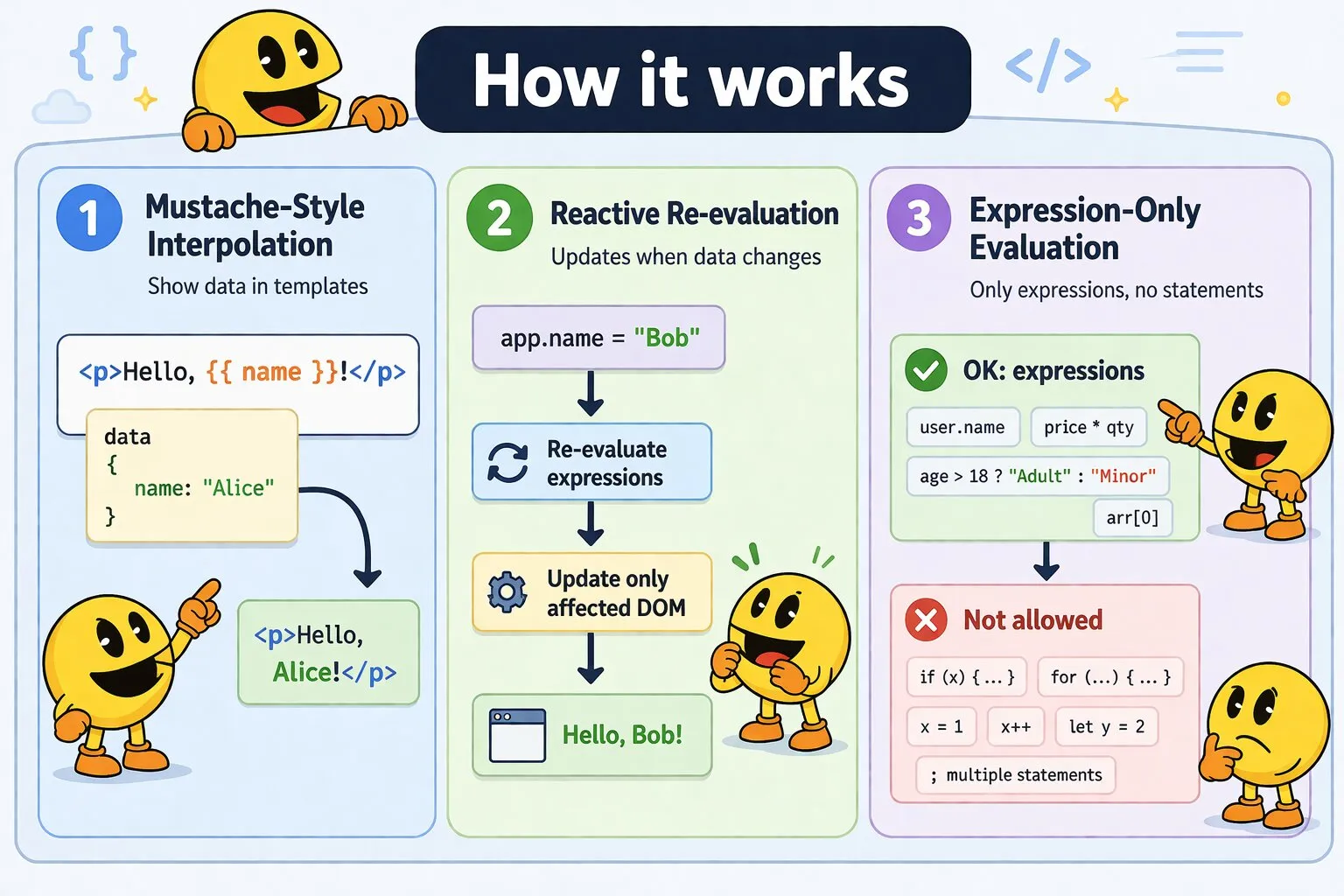
WakaPAC uses mustache syntax (double curly braces) to display dynamic data in your HTML templates. These expressions are evaluated whenever the underlying data changes, automatically updating the DOM.
On this page:
How Interpolation Works
When you initialize WakaPAC with data, it scans your template for {{ }} expressions and replaces them with the evaluated results. When the data changes, WakaPAC re-evaluates only the affected expressions and updates the DOM.
<div id="app">
    <p>Hello, {{ name }}!</p>
</div>

<script>
    const app = wakaPAC('#app', {
        name: 'Alice'
    });

    // Later: update triggers re-evaluation
    app.name = 'Bob';  // DOM updates to "Hello, Bob!"
</script>
Expression Limitations
Before diving into examples, understand what you cannot do in expressions. {{ }} interpolations use the exact same expression language as data-pac-bind attributes — a small hand-written parser, not JavaScript's eval. See Expression Language in the Data Binding docs for the full list of what's supported and what isn't. In short: no statements (if, for, while), no assignments (=, +=, ++), no semicolons or multiple statements, no new variable declarations (let, const, var), and scope is limited to the data properties and methods passed to wakaPAC().
Basic Interpolation
Simple Properties
Display values directly from your data object:
<div id="app">
    <p>Hello, {{ name }}!</p>
    <p>Age: {{ age }}</p>
</div>

<script>
    wakaPAC('#app', {
        name: 'Alice',
        age: 25
    });
</script>
Nested Properties
Access properties within objects using dot notation:
<div id="app">
    <p>User: {{ user.name }}</p>
    <p>Email: {{ user.contact.email }}</p>
    <p>City: {{ user.address.city }}</p>
</div>

<script>
    wakaPAC('#app', {
        user: {
            name: 'Bob',
            contact: {
                email: 'bob@example.com'
            },
            address: {
                city: 'Amsterdam'
            }
        }
    });
</script>
Arithmetic Operations
Perform calculations directly in your templates:
<div id="app">
    <p>Subtotal: ${{ price * quantity }}</p>
    <p>Tax (10%): ${{ price * quantity * 0.1 }}</p>
    <p>Total: ${{ price * quantity * 1.1 }}</p>
    <p>Per item after discount: ${{ (price - discount) }}</p>
</div>

<script>
    wakaPAC('#app', {
        price: 29.99,
        quantity: 3,
        discount: 5.00
    });
</script>
String Operations
Concatenate and manipulate text:
<div id="app">
    <p>Full Name: {{ firstName + ' ' + lastName }}</p>
    <p>Email: {{ username + '@' + domain }}</p>
    <p>Greeting: {{ 'Welcome, ' + title + ' ' + lastName }}</p>
</div>

<script>
    wakaPAC('#app', {
        firstName: 'John',
        lastName: 'Doe',
        username: 'johndoe',
        domain: 'example.com',
        title: 'Dr.'
    });
</script>
Conditional (Ternary) Expressions
Use ternary operators to display different content based on conditions. Syntax: condition ? valueIfTrue : valueIfFalse
Simple Conditionals
<div id="app">
    <p>Status: {{ age >= 18 ? 'Adult' : 'Minor' }}</p>
    <p>Membership: {{ isPremium ? 'Premium Member' : 'Free Member' }}</p>
    <p>Stock: {{ inventory > 0 ? 'Available' : 'Out of Stock' }}</p>
</div>

<script>
    wakaPAC('#app', {
        age: 25,
        isPremium: true,
        inventory: 5
    });
</script>
Logical Operators
Combine multiple conditions using && (AND) and || (OR):
<div id="app">
    <p>Can Vote: {{ age >= 18 && isRegistered ? 'Yes' : 'No' }}</p>
    <p>Alert: {{ errorCount > 0 || warningCount > 0 ? 'Check logs' : 'All clear' }}</p>
    <p>Access: {{ user.role === 'admin' && user.active ? 'Granted' : 'Denied' }}</p>
</div>

<script>
    wakaPAC('#app', {
        age: 21,
        isRegistered: true,
        errorCount: 0,
        warningCount: 2,
        user: { role: 'admin', active: true }
    });
</script>
Working with Arrays
Array Indexing
Access array elements by their numeric index (zero-based):
<div id="app">
    <p>First item: {{ items[0] }}</p>
    <p>Second item: {{ items[1] }}</p>
    <p>Current item: {{ items[currentIndex] }}</p>
    <p>Last item: {{ items[items.length - 1] }}</p>
</div>

<script>
    wakaPAC('#app', {
        currentIndex: 0,
        items: ['Apple', 'Banana', 'Cherry']
    });
</script>
Array Properties and Methods
Use built-in array properties and methods in expressions:
<div id="app">
    <p>Total items: {{ items.length }}</p>
    <p>Has items: {{ items.length > 0 ? 'Yes' : 'No' }}</p>
    <p>Has apples: {{ items.includes('Apple') ? 'Yes' : 'No' }}</p>
    <p>Role authorized: {{ allowedRoles.includes(user.role) ? 'Yes' : 'No' }}</p>
</div>

<script>
    wakaPAC('#app', {
        items: ['Apple', 'Banana', 'Cherry'],
        allowedRoles: ['admin', 'editor'],
        user: { role: 'admin' }
    });
</script>
Arrays of Objects
Access properties within array elements:
<div id="app">
    <p>Current product: {{ products[currentIndex].name }}</p>
    <p>Price: ${{ products[currentIndex].price }}</p>
    <p>First product: {{ products[0].name }}</p>
</div>

<script>
    wakaPAC('#app', {
        currentIndex: 0,
        products: [
            { name: 'Laptop', price: 999 },
            { name: 'Mouse', price: 29 },
            { name: 'Keyboard', price: 79 }
        ]
    });
</script>
Object Literals in Bindings
Create objects inline for use with data-pac-bind attributes (covered in detail in the Data Binding section):
<div id="app">
    <!-- Inline styles using object literal -->
    <div data-pac-bind="style: {color: textColor, fontSize: fontSize + 'px'}">
        Styled text
    </div>

    <!-- Conditional CSS classes using object literal -->
    <div data-pac-bind="class: {active: isActive, disabled: !isEnabled, highlight: score > 50}">
        Element with conditional classes
    </div>
</div>

<script>
    wakaPAC('#app', {
        textColor: 'blue',
        fontSize: 16,
        isActive: true,
        isEnabled: false,
        score: 75
    });
</script>
Handling Undefined and Null Values
WakaPAC handles missing data gracefully:
- Undefined properties: Display as empty string (not the text "undefined")
- Null values: Display as empty string
- Nested undefined: Attempting to access
user.namewhenuseris undefined will show empty string, not throw an error
<div id="app">
    <p>Name: {{ name }}</p>                    <!-- Shows: "Name: " -->
    <p>Age: {{ age }}</p>                      <!-- Shows: "Age: " -->
    <p>User: {{ user.name }}</p>              <!-- Shows: "User: " -->
    <p>Safe: {{ user ? user.name : 'Guest' }}</p>  <!-- Shows: "Safe: Guest" -->
</div>

<script>
    wakaPAC('#app', {
        // name and age are undefined
        // user is undefined
    });
</script>