
Data Binding
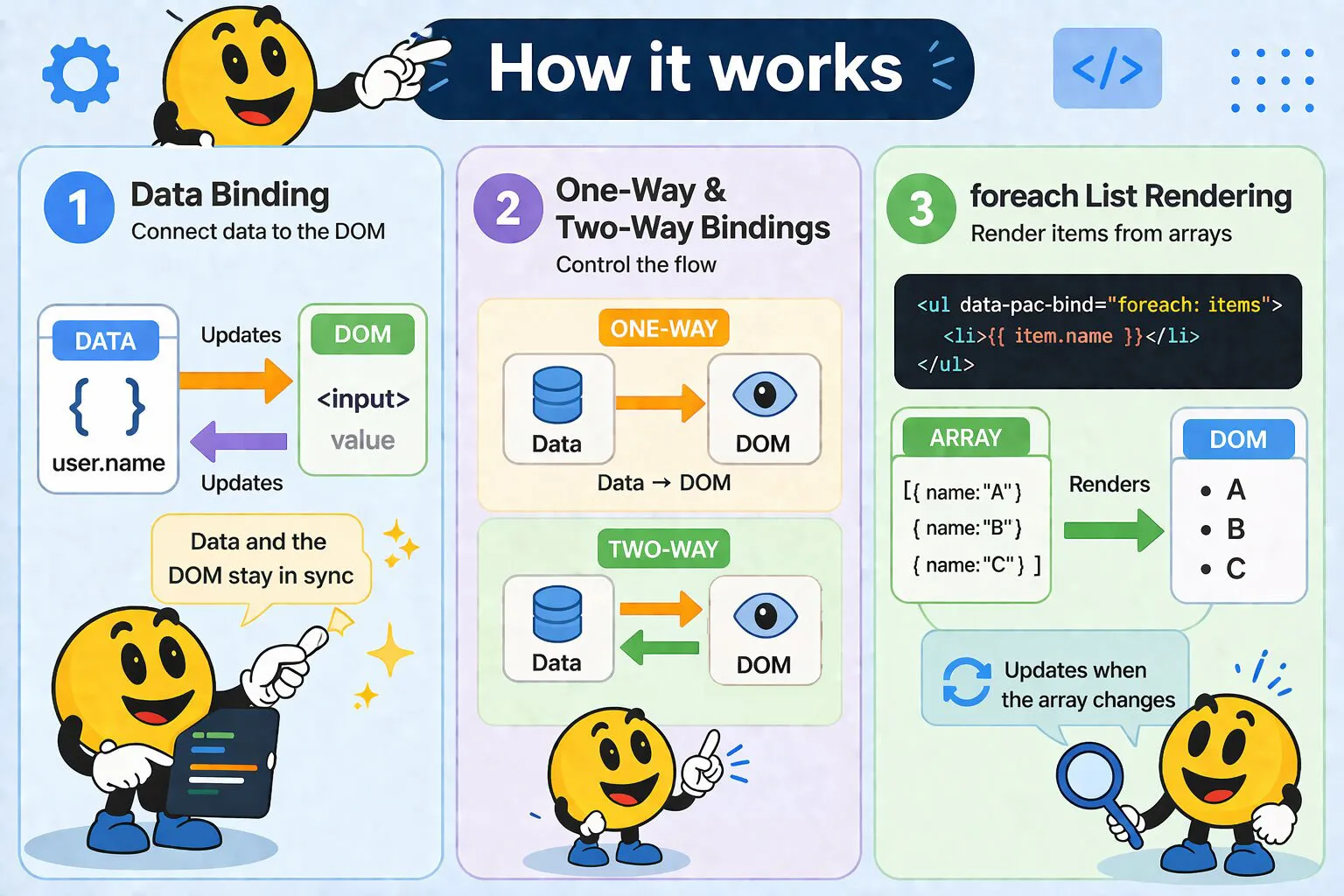
WakaPAC uses the data-pac-bind attribute to connect your data to DOM elements. Bindings automatically synchronize between your data and the page - when data changes, the DOM updates, and when users interact with form elements, your data updates.
On this page:
Understanding Data Binding
Binding Syntax
The data-pac-bind attribute contains comma-separated binding declarations:
<element data-pac-bind="bindingType: expression, anotherType: expression">Each binding has two parts:
- Binding type: What aspect of the element to control (value, visible, click, etc.)
- Expression: An expression evaluated against your data using WakaPAC's expression language
Expression Language
Expressions inside data-pac-bind and {{ }} interpolations aren't run through JavaScript's eval or Function. WakaPAC ships its own small hand-written parser and tokenizer that reads the expression string, builds a syntax tree from it, and evaluates that tree directly against your abstraction. This keeps expressions safe to embed in HTML attributes, but it also means the language is a deliberately limited subset of JavaScript rather than all of it.
Supported:
- Property access via dot and bracket notation, including computed keys:
user.name,items[0],regions[country] - Literals: strings, numbers,
true,false,null,undefined, array literals ([1, 2, 3]) and object literals ({color: 'red'}) - Arithmetic (
+ - * / %), comparison (=== !== == != >= <= > <), and logical (&& ||) operators - Unary operators:
!,-,+ - Ternary expressions:
isActive ? 'on' : 'off' - Method calls on your abstraction:
{{ formatDate(createdAt) }} - One level of method call on a data property that's itself a plain object:
user.getFullName() - A whitelisted set of array methods —
includes(),indexOf(),join()— usable on an array at any nesting depth, e.g.user.tags.includes('admin')
Not supported:
- Array methods that take a callback, such as
filterandmap— that logic belongs in a computed property, where it's cached and only recalculates when dependencies change - Method calls chained two or more levels deep on a non-array object, e.g.
user.address.getCity()— only a bare top-level method or one property hop can carry a call; move deeper logic into a computed property or a top-level method instead - Assignment (
=,+=, etc.),new, arrow functions, and template literals - Optional chaining (
?.) and nullish coalescing (??) - Multiple statements or semicolons — an expression always evaluates to a single value
One-Way vs Two-Way Binding
One-way bindings flow data from your abstraction to the DOM. When your data changes, the DOM updates automatically:
visible,if,enable- Control element stateclick,dblclick,contextmenu,mouseenter,mouseleave,submit,change,copy,paste- Attach event handlers (see Event Handler Bindings)class,style- Control appearance- Standard attributes (
src,href,title, etc.)
Two-way bindings flow data in both directions. DOM changes update your data, and data changes update the DOM:
value- For text inputs, textareas, select dropdowns, and multi-select (bound to an array)checked- For checkboxes
When Bindings Update
Bindings re-evaluate automatically whenever the data they reference changes. For example, if a binding uses {{ user.name }}, it updates when user.name is assigned a new value. WakaPAC tracks dependencies and only updates affected bindings.
Form Input Bindings
value - Text Inputs and Textareas
Two-way binding for text fields. Changes in the input update the data property, and changing the data property updates the input:
<div id="app">
    <input data-pac-bind="value: username" type="text">
    <textarea data-pac-bind="value: description"></textarea>

    <p>Username: {{username}}</p>
    <p>Description: {{description}}</p>
</div>

<script>
    wakaPAC('#app', {
        username: 'alice',
        description: 'Software developer'
    });
</script>
value - Select Dropdowns
Track the selected option's value:
<div id="app">
    <select data-pac-bind="value: selectedOption">
        <option value="A">Option A</option>
        <option value="B">Option B</option>
        <option value="C">Option C</option>
    </select>

    <p>You selected: {{selectedOption}}</p>
</div>

<script>
    wakaPAC('#app', {
        selectedOption: 'B'  // Pre-selects "Option B"
    });
</script>
value - Select Dropdowns (Multiple)
For <select multiple>, bind to an array. The array contains the values of all currently selected options, and setting it pre-selects the matching options:
<div id="app">
    <select multiple data-pac-bind="value: selectedColors">
        <option value="red">Red</option>
        <option value="green">Green</option>
        <option value="blue">Blue</option>
        <option value="yellow">Yellow</option>
    </select>

    <p>Selected: {{selectedColors.join(', ')}}</p>
</div>

<script>
    wakaPAC('#app', {
        selectedColors: ['red', 'blue']  // Pre-selects Red and Blue
    });
</script>
value - Radio Buttons
Radio buttons use value binding (not checked) because all radio buttons in a group bind to the same property. The bound property stores which radio button's value is currently selected:
<div id="app">
    <label>
        <input type="radio" name="theme" value="light" data-pac-bind="value: selectedTheme">
        Light
    </label>
    <label>
        <input type="radio" name="theme" value="dark" data-pac-bind="value: selectedTheme">
        Dark
    </label>
    <label>
        <input type="radio" name="theme" value="auto" data-pac-bind="value: selectedTheme">
        Auto
    </label>

    <p>Selected theme: {{selectedTheme}}</p>
</div>

<script>
    wakaPAC('#app', {
        selectedTheme: 'light'
    });
</script>
checked - Checkboxes
Two-way binding for checkbox state (true when checked, false when unchecked):
<div id="app">
    <label>
        <input type="checkbox" data-pac-bind="checked: isActive">
        Active
    </label>

    <label>
        <input type="checkbox" data-pac-bind="checked: newsletter">
        Subscribe to newsletter
    </label>

    <p>Active: {{isActive}}, Newsletter: {{newsletter}}</p>
</div>

<script>
    wakaPAC('#app', {
        isActive: true,
        newsletter: false
    });
</script>
Display Control Bindings
visible - Toggle Visibility
Controls element visibility using the CSS display property. The element remains in the DOM but is hidden when the expression evaluates to false:
<div id="app">
    <button data-pac-bind="click: toggle">Toggle</button>

    <div data-pac-bind="visible: isVisible">
        <p>This content is only visible when isVisible is true</p>
    </div>
</div>

<script>
    wakaPAC('#app', {
        isVisible: true,
        toggle() {
            this.isVisible = !this.isVisible;
        }
    });
</script>
Use visible when the element is toggled frequently, or when you want to preserve its state (scroll position, input values) while hidden. Use if or wp-if when the content is conditionally relevant — it won't be rendered at all when the condition is false.
if - Conditional Rendering
Clears and restores the element's innerHTML based on the condition. The outer element remains in the DOM but becomes empty when the condition is false:
<div id="app">
    <div data-pac-bind="if: !isLoading">
        <p>Content loaded successfully</p>
    </div>
</div>

<script>
    wakaPAC('#app', {
        isLoading: false,
    });
</script>
wp-if - Comment-Based Conditionals
Use HTML comments to conditionally render content without wrapper elements. This is ideal for tables, grids, or when you need to control multiple sibling elements together. A block opens with <!-- wp-if: expression -->, optionally continues with one or more <!-- wp-else-if: expression --> branches, optionally ends with a <!-- wp-else --> fallback, and always closes with <!-- /wp-if -->. Branches are evaluated in order and only the first truthy one is rendered:
<div id="app">
    <!-- wp-if: status === 'loading' -->
    <p>Loading...</p>
    <!-- wp-else-if: status === 'error' -->
    <p>Something went wrong.</p>
    <!-- wp-else-if: status === 'empty' -->
    <p>No results found.</p>
    <!-- wp-else -->
    <p>Ready.</p>
    <!-- /wp-if -->
</div>

<script>
    wakaPAC('#app', {
        status: 'ready'
    });
</script>
enable - Enable/Disable Controls
Controls the disabled attribute on form elements. When the expression is true, the element is enabled; when false, it's disabled:
<div id="app">
    <input data-pac-bind="value: email" placeholder="Enter email">
    <button data-pac-bind="enable: isFormValid, click: submit">Submit</button>

    <p data-pac-bind="visible: !isFormValid">Please enter a valid email address</p>
</div>

<script>
    wakaPAC('#app', {
        email: '',

        computed: {
            isFormValid() {
                return this.email.includes('@') && this.email.length > 5;
            }
        },

        submit() {
            console.log('Form submitted:', this.email);
        }
    });
</script>
List Rendering
foreach - Repeat Elements
The foreach binding repeats an element for each item in an array, automatically updating when the array changes. By default the current item is available as item and its position as $index (0-based):
<div id="app">
    <ul data-pac-bind="foreach: items">
        <li>{{$index + 1}}. {{item}}</li>
    </ul>
</div>

<script>
    wakaPAC('#app', {
        items: ['Apple', 'Banana', 'Cherry']
    });
</script>
Use data-pac-item to give the iteration variable a meaningful name, and data-pac-index to rename the index variable. Both are optional:
<div data-pac-bind="foreach: users" data-pac-item="user" data-pac-index="i">
    <p>{{i + 1}}. {{user.name}} — {{user.email}}</p>
</div>
The $ prefix on the default $index name prevents conflicts with your own data properties. Renamed index variables carry no prefix.
Nested foreach Loops
You can nest foreach loops for multi-dimensional data. Each loop has its own item and index context:
<div id="app">
    <div data-pac-bind="foreach: categories" data-pac-item="category">
        <h3>{{category.name}}</h3>
        <ul data-pac-bind="foreach: category.products" data-pac-item="product">
            <li>{{product.name}} - ${{product.price}}</li>
        </ul>
    </div>
</div>

<script>
    wakaPAC('#app', {
        categories: [
            {
                name: 'Electronics',
                products: [
                    { name: 'Laptop', price: 999 },
                    { name: 'Mouse', price: 25 }
                ]
            },
            {
                name: 'Books',
                products: [
                    { name: 'JavaScript Guide', price: 39 },
                    { name: 'Design Patterns', price: 45 }
                ]
            }
        ]
    });
</script>
$parent - Reaching an Outer foreach Scope
Inside a nested foreach, bare identifiers resolve against the innermost loop's item and index. $parent climbs out one foreach level, so the identifier that follows it resolves against the enclosing loop's scope instead:
<ul data-pac-bind="foreach: categories" data-pac-item="category">
    <li>
        <ul data-pac-bind="foreach: category.products">
            <li>{{item.name}} belongs to {{$parent.category.name}} (category #{{$parent.$index}})</li>
        </ul>
    </li>
</ul>
Note: $parent only drops the innermost foreach frame — it doesn't evaluate to the outer item by itself. You still have to name the outer frame's item or index variable after it ($parent.category.name, not $parent.name), using whatever name that outer loop actually uses (the default item/$index, or a name set via data-pac-item/data-pac-index).
Chain multiple $parent tokens to climb more than one level ($parent.$parent.item reaches two loops up). $parent.item resolves to the live outer object itself, not a path string, so it stays reactive when that object changes.
placeholder - Default Option for a foreach select
A <select> with foreach can declare a placeholder binding to add a real, empty first option ("Choose one", "None", etc.) alongside the array-driven options — no extra wrapper element needed:
<select data-pac-bind="value: selectedId, foreach: users, placeholder: 'Choose a user'" data-pac-item="user">
    <option value="{{user.id}}">{{user.name}}</option>
</select>
The placeholder is a normal expression, evaluated the same way any other binding expression is, so it can depend on other data and stays correct as that data changes — not just when the array itself changes:
<div id="app">
    <select data-pac-bind="value: selectedId, foreach: users, placeholder: loading ? 'Loading…' : 'Choose a user'" data-pac-item="user">
        <option value="{{user.id}}">{{user.name}}</option>
    </select>
    <button data-pac-bind="click: finishLoading">Simulate load finishing</button>
</div>

<script>
    wakaPAC('#app', {
        loading: true,
        selectedId: '',
        users: [
            { id: 1, name: 'Alice' },
            { id: 2, name: 'Bob' }
        ],
        finishLoading() {
            this.loading = false;
        }
    });
</script>
The placeholder option always renders with an empty value="", so selectedId === '' is how you check whether a real option has been picked yet.
Event Handler Bindings
The event object passed to every binding below isn't the raw browser event — WakaPAC wraps it in its own message object, forwarding target, preventDefault(), stopPropagation(), and stopImmediatePropagation() through to the original so it behaves like a normal event for everyday use. The unwrapped browser event is always available as event.originalEvent for anything not forwarded directly — e.g. event.originalEvent.ctrlKey — and a few bindings additionally expose convenience data on event.detail, noted where relevant below.
click - Event Handlers
Binds a method on your abstraction to the element's click event. Use a bare method reference (no parentheses) to let WakaPAC pass the event object automatically:
<div id="app">
    <button data-pac-bind="click: handleClick">Click me</button>
    <p>Clicked {{count}} times</p>
</div>

<script>
    wakaPAC('#app', {
        count: 0,
        handleClick(event) {
            this.count++;
        }
    });
</script>
Use parentheses when you want to pass specific arguments instead. WakaPAC then evaluates the call as an expression and no event object is injected automatically — though it's still available as $event; see Special Scope Variables:
<button data-pac-bind="click: remove('item-1')">Remove</button>Inside a foreach, bare method references receive (event, item, index) instead of just (event). See Event Handlers in foreach for details.
dblclick - Double-Click
Binds a method to the element's double-click event. Fires only for the left mouse button — a middle- or right-button double-click doesn't trigger it. Same bare-reference vs. parentheses rule as click (see above):
<div id="app">
    <p data-pac-bind="dblclick: handleDoubleClick">Double-click me</p>
</div>

<script>
    wakaPAC('#app', {
        handleDoubleClick(event) {
            console.log('Double-clicked!');
        }
    });
</script>
contextmenu - Right-Click Menu
Binds a method to the element's context-menu request — triggered by a right-click or the keyboard context-menu key. Unlike submit, WakaPAC does not call preventDefault() for you here; call event.preventDefault() yourself inside the handler to suppress the browser's native context menu, e.g. when showing your own:
<div id="app">
    <div data-pac-bind="contextmenu: showMenu">
        Right-click me
    </div>
</div>

<script>
    wakaPAC('#app', {
        showMenu(event) {
            event.preventDefault();
            console.log('Custom menu here');
        }
    });
</script>
mouseenter / mouseleave - Hover Events
Binds a method to run when the pointer enters or leaves the bound element. WakaPAC synthesizes these events from its
mouse-message pipeline rather than using native mouseenter/mouseleave. Each bound element
has its own independent pair, so unbound children don't re-trigger an ancestor's hover state. See
msgProc: Mouse Messages for details, including how to mark
non-interactive elements as hover boundaries.
<div id="app">
    <div data-pac-bind="mouseenter: onEnter, mouseleave: onLeave, class: {highlighted: isHighlighted}">
        Hover over me
    </div>

    <p>Highlighted: {{isHighlighted}}</p>
</div>

<script>
    wakaPAC('#app', {
        isHighlighted: false,
        onEnter(event) {
            this.isHighlighted = true;
        },
        onLeave(event) {
            this.isHighlighted = false;
        }
    });
</script>
submit - Form Submission
Binds a method on your abstraction to a <form>'s submit event. WakaPAC always calls event.preventDefault() for you, so the browser never performs its default navigation/submission — your method decides what happens next:
<div id="app">
    <form data-pac-bind="submit: handleSubmit">
        <input data-pac-bind="value: email" type="email" required>
        <button type="submit">Sign up</button>
    </form>
</div>

<script>
    wakaPAC('#app', {
        email: '',
        handleSubmit(event) {
            console.log('Submitting:', this.email);
        }
    });
</script>
Same bare-reference vs. parentheses rule as click (see above) — parentheses let you pass explicit arguments instead of the auto-injected event:
<form data-pac-bind="submit: handleSubmit($event)">...</form>change - Change Events
Binds a method on your abstraction to the element's change event — fired when a checkbox, radio button, or <select> is toggled/selected, or when a text input commits its value (typically on blur). It's commonly combined with value or checked on the same element to run extra logic whenever the bound value settles:
<div id="app">
    <select data-pac-bind="value: country, change: onCountryChange">
        <option value="us">United States</option>
        <option value="nl">Netherlands</option>
    </select>
</div>

<script>
    wakaPAC('#app', {
        country: 'us',
        onCountryChange(event) {
            console.log('Country changed to:', this.country);
        }
    });
</script>
Same bare-reference vs. parentheses rule as click (see above):
<input data-pac-bind="value: email, change: validateField('email', $event)">copy / paste - Clipboard Events
Bind methods to clipboard copy and paste operations on the element. For copy, the current text selection is available as event.detail.selectedText. For paste, the clipboard contents are available by MIME type — event.detail['text/plain'], event.detail['text/html'] — along with event.detail.uris (any pasted links) and event.detail.files (metadata for pasted images/files):
<div id="app">
    <textarea data-pac-bind="value: notes, copy: onCopy, paste: onPaste"></textarea>
</div>

<script>
    wakaPAC('#app', {
        notes: '',
        onCopy(event) {
            console.log('Copied:', event.detail.selectedText);
        },
        onPaste(event) {
            console.log('Pasted plain text:', event.detail['text/plain']);
        }
    });
</script>
Special Scope Variables
Every event-handler binding — click, dblclick, contextmenu, mouseenter, mouseleave, submit, change, copy, paste — exposes a few extra variables that aren't part of your data model. Reference them like any other identifier once you use parentheses to pass explicit arguments:
$event- The event object described at the top of this section (wrapped, withevent.originalEventfor the raw browser event). Available on every event-handler binding.$item- The current array element. Available on any event-handler binding whose element sits inside aforeachloop.$index- The current array position (0-based). Available on any event-handler binding whose element sits inside aforeachloop.
<li data-pac-bind="click: removeTask($item.id, $index, $event)">{{item.name}}</li>Without parentheses, a bare method reference receives these as plain function parameters automatically instead — see Event Handlers in foreach for that behavior.
Event Handlers in foreach
Bare method references inside a foreach loop automatically receive the event, plus the current item and index, as parameters:
removeTask(event, item, index) {
    // event: the original DOM event
    // item: the current array element
    // index: the array position (0-based)
    this.tasks.splice(index, 1);
}
This automatic injection only applies to bare references (click: removeTask). Calls with parentheses (click: removeTask()) are evaluated as expressions instead and receive no parameters automatically — but the same values are available as $item, $index, and $event; see Special Scope Variables.
See foreach - Repeat Elements above for the full foreach binding syntax.
Style and Appearance Bindings
class - CSS Classes (String)
Apply CSS classes dynamically based on data. When using a string expression, the result becomes the element's class:
<div id="app">
    <div data-pac-bind="class: currentTheme">
        <p>This div has dynamic classes</p>
    </div>

    <button data-pac-bind="click: changeTheme">Change Theme</button>
</div>

<script>
    wakaPAC('#app', {
        currentTheme: 'dark',
        changeTheme() {
            this.currentTheme = this.currentTheme === 'dark' ? 'light' : 'dark';
        }
    });
</script>
class - CSS Classes (Object)
Toggle multiple classes independently using an object. Each key is a class name, each value is a boolean expression:
<div id="app">
    <div data-pac-bind="class: {active: isActive, error: hasError, 'user-premium': isPremium}">
        <p>This div has conditional classes</p>
    </div>

    <button data-pac-bind="click: toggleActive">Toggle Active</button>
    <button data-pac-bind="click: toggleError">Toggle Error</button>
</div>

<script>
    wakaPAC('#app', {
        isActive: true,
        hasError: false,
        isPremium: true,
        toggleActive() {
            this.isActive = !this.isActive;
        },
        toggleError() {
            this.hasError = !this.hasError;
        }
    });
</script>
style - Inline Styles (Object)
Apply inline CSS styles dynamically. Each key is a CSS property, each value is a string or expression:
<div id="app">
    <div data-pac-bind="style: {color: textColor, fontSize: fontSize + 'px', backgroundColor: bgColor}">
        <p>This text has dynamic styling</p>
    </div>

    <button data-pac-bind="click: increaseFontSize">Increase Font</button>
</div>

<script>
    wakaPAC('#app', {
        textColor: '#333',
        fontSize: 16,
        bgColor: '#f0f0f0',
        increaseFontSize() {
            this.fontSize += 2;
        }
    });
</script>
Attribute Bindings
Bind any standard HTML attribute by using the attribute name as the binding type:
<div id="app">
    <img data-pac-bind="src: imageUrl, alt: imageDescription">
    <a data-pac-bind="href: linkUrl, title: linkTitle">Click here</a>
    <input data-pac-bind="placeholder: placeholderText, maxlength: maxChars">
</div>

<script>
    wakaPAC('#app', {
        imageUrl: 'photo.jpg',
        imageDescription: 'A beautiful photo',
        linkUrl: 'https://example.com',
        linkTitle: 'Visit our website',
        placeholderText: 'Enter your name',
        maxChars: 50
    });
</script>
Data Model Utilities
Property Aliasing
Unlike the sections above, this isn't a data-pac-bind binding type — it's a JavaScript API for your data model, used when defining your abstraction.
Sometimes two properties need to refer to the same underlying value — reading or writing either one should always affect the same reactive signal. wakaPAC.sameAs() creates a getter/setter alias that redirects all reads and writes to a target property path. The alias is fully two-way and participates in bindings exactly like any other property.
wakaPAC('#signup', {
    email:         '',
    confirm_email: wakaPAC.sameAs('email')
});
Both properties can be used in data-pac-bind expressions and behave identically — binding to either one produces the same result:
<input data-pac-bind="value: email">
<input data-pac-bind="value: confirm_email">

<p>Email:    {{email}}</p>
<p>Confirm:  {{confirm_email}}</p>
Writing to the alias writes through to the target, firing the normal reactive change event. Writing to the target is reflected when the alias is read:
wakaPAC('#signup', {
    email:         'a@example.com',
    confirm_email: wakaPAC.sameAs('email'),

    init() {
        this.confirm_email = 'b@example.com';
        console.log(this.email);         // "b@example.com"

        this.email = 'c@example.com';
        console.log(this.confirm_email); // "c@example.com"
    }
});
The target path supports dot notation for nested properties:
wakaPAC('#form', {
    form: {
        email: { value: '' }
    },
    email: wakaPAC.sameAs('form.email.value')
});
Aliases are resolved once at initialisation, before the reactive proxy is created. Avoid alias chains — always point directly to the real property:
// correct
a: '',
b: wakaPAC.sameAs('a'),
c: wakaPAC.sameAs('a')

// avoid
a: '',
b: wakaPAC.sameAs('a'),
c: wakaPAC.sameAs('b') // chain — b is itself an alias