
WakaYouTube
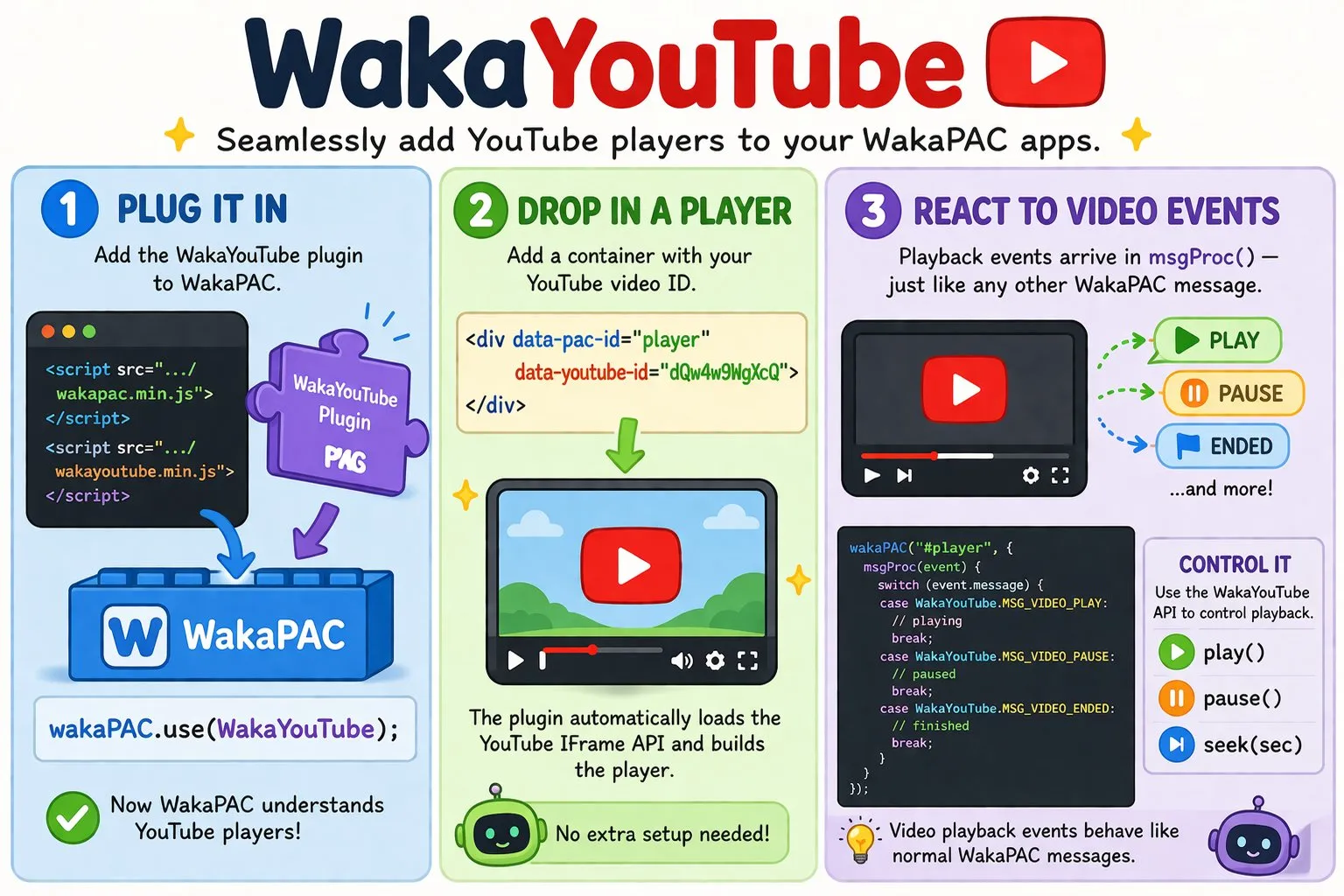
WakaYouTube integrates with WakaPAC as a plugin, bridging the YouTube IFrame Player API into the WakaPAC message model. Playback events and state changes arrive in msgProc as messages — the same dispatch table as clicks, keypresses, and timers.
On this page:
Getting Started
Register WakaYouTube with WakaPAC once, before creating any components. The plugin activates automatically for components whose root element is either a <waka-youtube> custom element, or a <div> carrying a data-youtube-id attribute. The YouTube IFrame API script is injected automatically on first use — you do not need to add it yourself.
<script src="https://cdn.jsdelivr.net/gh/quellabs/wakapac@main/wakapac.min.js"></script>
<script src="https://cdn.jsdelivr.net/gh/quellabs/wakapac@main/plugins/wakayoutube.min.js"></script>

<script>
    wakaPAC.use(WakaYouTube);
</script>
Mark your container with a data-youtube-id attribute holding the YouTube video ID.
Custom element
Use <waka-youtube> as the container element. The plugin detects the tag name and activates automatically. Supply data-youtube-id to identify the video:
<waka-youtube data-pac-id="player" data-youtube-id="dQw4w9WgXcQ"></waka-youtube>Attribute-based (classic)
Mark a <div> with a data-youtube-id attribute. The YouTube IFrame API populates the container with its player DOM (including the iframe) once initialized. The container element itself is not replaced.
<div data-pac-id="player" data-youtube-id="dQw4w9WgXcQ"></div>The Basics
Once registered, YouTube playback events arrive in msgProc. Control playback through the WakaYouTube API.
wakaPAC('#player', {
    msgProc(event) {
        switch (event.message) {
            case WakaYouTube.MSG_VIDEO_LOADED:
                console.log('Duration:', event.detail.duration);
                // Safe to call play() from here
                WakaYouTube.play(this.pacId);
                break;

            case WakaYouTube.MSG_VIDEO_PLAY:
                this.playing = true;
                break;

            case WakaYouTube.MSG_VIDEO_PAUSE:
                this.playing = false;
                break;

            case WakaYouTube.MSG_VIDEO_ENDED:
                this.playing = false;
                break;

            case WakaYouTube.MSG_VIDEO_ERROR:
                console.error('Playback error:', event.wParam, event.detail.message);
                break;
        }
    }
});
Plugin Options
Pass options to wakaPAC.use() to set page-wide defaults for all YouTube players:
wakaPAC.use(WakaYouTube, {
    controls: 0,   // Show native YouTube control bar; 0 = hidden, 1 = visible (default: 0)
    rel:      0    // Show related videos at end of playback; 0 = off, 1 = on (default: 0)
});
Override defaults for a specific player by passing a youtube config object as the third argument to wakaPAC():
wakaPAC('#player', { msgProc(event) { /* ... */ } }, {
    youtube: { controls: 1 }
});
The enablejsapi parameter is always forced to 1 regardless of configuration — the plugin cannot function without it.
Messages
The plugin delivers message types to msgProc as playback events occur. All message constants are available on the WakaYouTube object after wakaPAC.use(WakaYouTube) has been called.
Playback Started (MSG_VIDEO_PLAY)
Fired when playback begins, including after a pause, seek, or buffering recovery. When recovering from buffering, MSG_VIDEO_CANPLAY fires immediately before this message.
| Parameter | Type | Description |
|---|---|---|
wParam |
number | Always 0. |
lParam |
number | Always 0. |
Playback Paused (MSG_VIDEO_PAUSE)
Fired when playback is paused.
| Parameter | Type | Description |
|---|---|---|
wParam |
number | Always 0. |
lParam |
number | Always 0. |
Playback Ended (MSG_VIDEO_ENDED)
Fired when playback reaches the end of the video.
| Parameter | Type | Description |
|---|---|---|
wParam |
number | Always 0. |
lParam |
number | Always 0. |
Seek Dispatched (MSG_VIDEO_SEEK)
Fired immediately after a seek is requested. Because the YouTube IFrame API provides no seek-completion event, this fires at the moment WakaYouTube.seek() is called rather than when the player has landed on the new position.
| Parameter | Type | Description |
|---|---|---|
wParam |
number | The requested playback position in whole milliseconds (truncated, not rounded). |
lParam |
number | Always 0. |
detail.currentTime |
number | The requested playback position in seconds, with full sub-second precision. |
Metadata Loaded (MSG_VIDEO_LOADED)
Fired once per video load, on the first transition into playing or cued state. This is the earliest point at which duration is valid and WakaYouTube.play() can be called reliably. If the player transitions through a cued state before playing, this fires at cue time rather than at play time.
| Parameter | Type | Description |
|---|---|---|
wParam |
number | Always 0. |
lParam |
number | Always 0. |
detail.duration |
number | Total duration in seconds. |
Volume Changed (MSG_VIDEO_VOLUME_CHANGE)
Fired when volume or muted state is changed via WakaYouTube.setVolume() or WakaYouTube.setMuted(). Both properties are included regardless of which changed.
| Parameter | Type | Description |
|---|---|---|
wParam |
number | Current volume level (0–100). |
lParam |
number | Muted state: 1 if muted, 0 if not. |
detail.volume |
number | Current volume level (0–100). |
detail.muted |
boolean | Current muted state. |
Playback Stalled (MSG_VIDEO_WAITING)
Fired when the player enters a buffering state. Playback resumes automatically once enough data is available, at which point MSG_VIDEO_CANPLAY fires followed by MSG_VIDEO_PLAY.
| Parameter | Type | Description |
|---|---|---|
wParam |
number | Always 0. |
lParam |
number | Always 0. |
Playback Ready (MSG_VIDEO_CANPLAY)
Fired when buffering resolves and playback is about to resume. Always fires immediately before MSG_VIDEO_PLAY when recovering from a buffering state. Use both messages to drive a buffering indicator:
case WakaYouTube.MSG_VIDEO_WAITING:
    this.buffering = true;
    break;

case WakaYouTube.MSG_VIDEO_CANPLAY:
    this.buffering = false;
break;| Parameter | Type | Description |
|---|---|---|
wParam |
number | Always 0. |
lParam |
number | Always 0. |
Time Update (MSG_VIDEO_TIMEUPDATE)
Fired continuously during playback at up to ~60 Hz via requestAnimationFrame. The browser throttles this when the tab is hidden. Use this message to drive a progress bar or time display in a companion controls component.
case WakaYouTube.MSG_VIDEO_TIMEUPDATE:
    this.progressMs = event.wParam;              // integer milliseconds, cheap to read
    this.currentTime = event.detail.currentTime; // fractional seconds, full precision
break;| Parameter | Type | Description |
|---|---|---|
wParam |
number | Current playback position in whole milliseconds (truncated, not rounded). Convenient for integer comparisons and progress bar calculations. |
lParam |
number | Always 0. |
detail.currentTime |
number | Current playback position in seconds, with full sub-second precision. |
Playback Error (MSG_VIDEO_ERROR)
Fired when the YouTube player reports an error, or when the IFrame API script fails to load. event.wParam carries the YouTube error code for quick filtering:
case WakaYouTube.MSG_VIDEO_ERROR:
    switch (event.wParam) {
        case 2:
            this.error = 'Invalid video ID';
            break;
        case 100:
            this.error = 'Video not found or has been removed';
            break;
        case 101:
        case 150:
            this.error = 'Embedding not allowed for this video';
            break;
        default:
            this.error = event.detail.message;
            break;
    }
break;| Parameter | Type | Description |
|---|---|---|
wParam |
number | YouTube error code: 2 (invalid parameter), 5 (HTML5 error), 100 (not found), 101 / 150 (embedding not allowed), or 0 for infrastructure errors such as the API script failing to load. |
lParam |
number | Always 0. |
detail.message |
string | Human-readable description of the error. |
Reactive Properties
WakaYouTube injects a single property onto the component abstraction, set when metadata loads and stable thereafter. Because the video component has no template of its own, it is most useful when read from a companion controls component in response to MSG_VIDEO_LOADED.
| Property | Type | Description |
|---|---|---|
duration |
number | NaN until MSG_VIDEO_LOADED fires, then the total duration in seconds. |
API
All API methods take pacId as their first argument. Methods that target a pacId not registered as a YouTube component are silently ignored.
WakaYouTube.play(pacId)
Starts playback. Call this after MSG_VIDEO_LOADED has fired — the player is not ready to accept commands before then.
| Parameter | Type | Description |
|---|---|---|
pacId | string | The data-pac-id of the target component. |
Returns void | ||
WakaYouTube.pause(pacId)
Pauses playback.
| Parameter | Type | Description |
|---|---|---|
pacId | string | The data-pac-id of the target component. |
Returns void | ||
WakaYouTube.seek(pacId, time)
Seeks to a position in seconds. The time is clamped to [0, duration]. MSG_VIDEO_SEEK fires immediately with the requested position — the player seeks asynchronously.
| Parameter | Type | Description |
|---|---|---|
pacId | string | The data-pac-id of the target component. |
time | number | Target position in seconds. Clamped to [0, duration]. |
Returns void | ||
WakaYouTube.setVolume(pacId, volume)
Sets the volume level. MSG_VIDEO_VOLUME_CHANGE fires after the change.
| Parameter | Type | Description |
|---|---|---|
pacId | string | The data-pac-id of the target component. |
volume | number | Volume level from 0 (silent) to 100 (full). Values outside this range are clamped. |
Returns void | ||
WakaYouTube.setMuted(pacId, muted)
Sets the muted state. MSG_VIDEO_VOLUME_CHANGE fires after the change.
| Parameter | Type | Description |
|---|---|---|
pacId | string | The data-pac-id of the target component. |
muted | boolean | true to mute, false to unmute. |
Returns void | ||
Best Practices
- Register once: Call
wakaPAC.use(WakaYouTube)once before creating any components. - Wait for MSG_VIDEO_LOADED: Do not call
play()or readdurationbefore this message fires — the player is not ready to accept commands until then. - Drive progress bars with MSG_VIDEO_TIMEUPDATE: Use
event.wParam(milliseconds) for cheap integer comparisons orevent.detail.currentTimefor full precision. The message fires at ~60 Hz in visible tabs and is throttled by the browser in hidden tabs. - Use MSG_VIDEO_WAITING / MSG_VIDEO_CANPLAY for buffering indicators: These fire reliably on network conditions. Do not rely on the absence of
MSG_VIDEO_TIMEUPDATEas a buffering signal. - Use wParam for error codes: Quick filtering on
event.wParamagainst YouTube's error code constants is cleaner than inspectingevent.detail.message. - Embedding must be allowed: Not all YouTube videos permit embedding. Errors
101and150indicate the video owner has disabled embedding — there is no workaround. - Test on a real server: The YouTube IFrame API blocks embedding on
file://origins. Always test viahttp://localhostor a real domain. - No manual cleanup needed: The plugin cancels the
requestAnimationFrameloop and destroys theYT.Playerinstance automatically when the component is destroyed.