
Partials
Partials are reusable HTML template fragments. Define a piece of markup once and inject it anywhere in your templates using {{> name}} syntax. Partials participate fully in WakaPAC's binding and interpolation system — any bindings or expressions inside a partial work exactly as if you had written the markup inline.
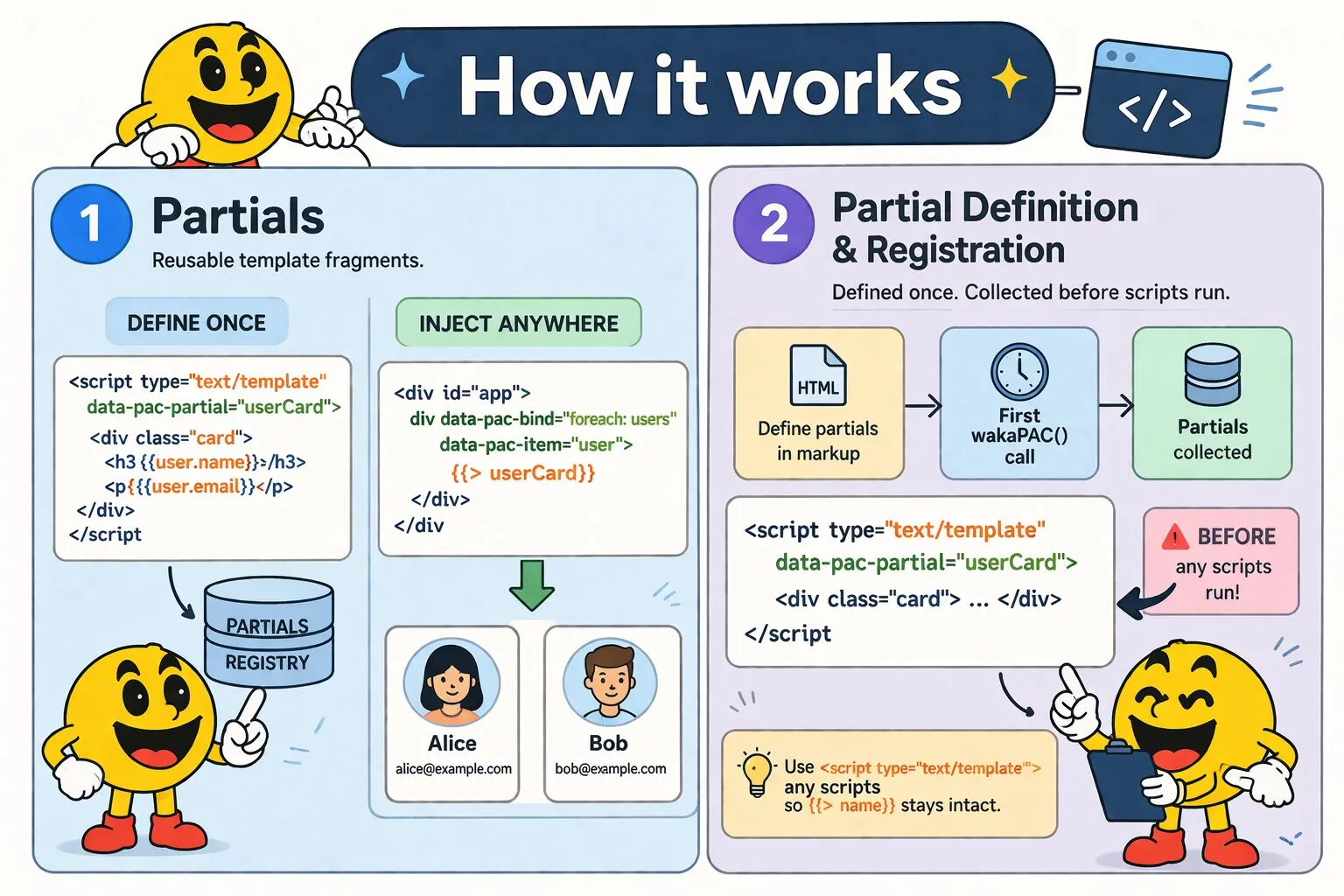
Defining Partials
Partials are defined as <script type="text/template"> elements with a data-pac-partial attribute. Place them anywhere in the document — typically at the bottom of <body> or grouped together near your WakaPAC containers.
<script type="text/template" data-pac-partial="userCard">
    <div class="card">
        <h3>{{user.name}}</h3>
        <p>{{user.email}}</p>
    </div>
</script>
Using <script type="text/template"> ensures the browser treats the content as opaque text. This preserves the {{> name}} injection syntax exactly as written — other element types would cause the browser to entity-encode the > character before WakaPAC can process it.
wakaPAC() call. Define all <script type="text/template" data-pac-partial> elements in the HTML before any scripts run.
Injecting Partials
Inject a partial anywhere in a template using {{> name}}:
<div id="app">
    <div data-pac-bind="foreach: users" data-pac-item="user">
        {{> userCard}}
    </div>
</div>

<script>
    wakaPAC('#app', {
        users: [
            { name: 'Alice', email: 'alice@example.com' },
            { name: 'Bob',   email: 'bob@example.com'   }
        ]
    });
</script>
Partials are expanded before WakaPAC's binding scan runs, so the injected markup is indistinguishable from markup written directly in the template.
Scope
Partials always resolve expressions against the root abstraction, consistent with how WakaPAC handles all expressions. Inside a foreach loop, the loop's data-pac-item variable is available to the partial just as it is to any inline markup:
<script type="text/template" data-pac-partial="taskRow">
    <tr>
        <td>{{task.title}}</td>
        <td data-pac-bind="class: {done: task.completed}">{{task.completed ? 'Done' : 'Pending'}}</td>
        <td><button data-pac-bind="click: removeTask">Remove</button></td>
    </tr>
</script>

<table id="app">
    <tbody data-pac-bind="foreach: tasks" data-pac-item="task">
        {{> taskRow}}
    </tbody>
</table>

<script>
    wakaPAC('#app', {
        tasks: [
            { title: 'Buy groceries', completed: false },
            { title: 'Write tests',   completed: true  }
        ],
        removeTask(event, task, index) {
            this.tasks.splice(index, 1);
        }
    });
</script>
Click handlers inside partials behave identically to inline click handlers — they receive (event, item, index) when inside a foreach and route to the root abstraction.
Parameter Passing
By default a partial resolves all expressions against the root abstraction, which means its property paths are hardcoded to whatever names you write inside it. When the same partial needs to render different objects — for example a card that should show an author in one place and a recipient in another — you can pass a root argument:
{{> userCard author}}
{{> userCard recipient}}
Inside the partial, write $. as a placeholder wherever you would normally write the object path. WakaPAC substitutes $. with the supplied root before the binding scan runs:
<script type="text/template" data-pac-partial="userCard">
    <div class="card">
        <img data-pac-bind="attr.src: $.avatar">
        <span data-pac-bind="text: $.name"></span>
        <span data-pac-bind="text: $.email"></span>
    </div>
</script>

<div id="app">
    <h4>Author</h4>
    {{> userCard author}}

    <h4>Recipient</h4>
    {{> userCard recipient}}
</div>

<script>
    wakaPAC('#app', {
        author:    { name: 'Alice', email: 'alice@example.com', avatar: '/img/alice.jpg' },
        recipient: { name: 'Bob',   email: 'bob@example.com',   avatar: '/img/bob.jpg'   }
    });
</script>
The substitution is purely textual and happens before binding runs, so the expanded markup is identical to writing author.avatar and author.name directly. There is no runtime overhead.
Dot paths are supported as the root argument, so nested objects work without any extra ceremony:
{{> userCard order.customer}}
{{> userCard team.lead}}
Omitting the argument leaves the partial unchanged — {{> userCard}} behaves exactly as before, and a partial written without $. placeholders is unaffected by the feature entirely.
Nested Partials
Partials can reference other partials using the same {{> name}} syntax:
<script type="text/template" data-pac-partial="avatar">
    <img class="avatar" data-pac-bind="src: user.avatarUrl, alt: user.name">
</script>

<script type="text/template" data-pac-partial="userCard">
    <div class="card">
        {{> avatar}}
        <div class="card-body">
            <h3>{{user.name}}</h3>
            <p>{{user.email}}</p>
        </div>
    </div>
</script>
WakaPAC expands nested partials recursively before binding runs. Nesting is supported up to 10 levels deep — beyond that, expansion stops and a console warning is issued (which typically indicates a circular reference).
Bindings Inside Partials
Any WakaPAC binding works inside a partial. The following example uses visible, class, and click bindings inside a partial:
<script type="text/template" data-pac-partial="notification">
    <div data-pac-bind="visible: notification.show, class: {error: notification.isError, success: !notification.isError}">
        {{notification.message}}
        <button data-pac-bind="click: dismissNotification">×</button>
    </div>
</script>

<div id="app">
    {{> notification}}

    <button data-pac-bind="click: showSuccess">Show success</button>
    <button data-pac-bind="click: showError">Show error</button>
</div>

<script>
    wakaPAC('#app', {
        notification: { show: false, message: '', isError: false },

        showSuccess() {
            this.notification = { show: true, message: 'Saved successfully.', isError: false };
        },

        showError() {
            this.notification = { show: true, message: 'Something went wrong.', isError: true };
        },

        dismissNotification() {
            this.notification.show = false;
        }
    });
</script>
Best Practices
Granularity
Extract a partial when the same markup appears in two or more places, or when a self-contained UI element (a card, a row, a form field group) becomes large enough to clutter the main template. Avoid splitting markup so finely that the partial name conveys no more information than the markup itself would.
Naming
Use nouns that describe the UI element being rendered: userCard, taskRow, paginationBar. Avoid generic names like item or template that give no indication of what the partial renders.
Placement
Group all partial definitions together in one place — either just before the closing </body> tag or in a dedicated section clearly marked with a comment. This makes it easy to find and maintain them.
<!-- Partial templates -->
<script type="text/template" data-pac-partial="userCard">...</script>
<script type="text/template" data-pac-partial="taskRow">...</script>
<script type="text/template" data-pac-partial="notification">...</script>

<script src="wakapac.js"></script>
<script>
    wakaPAC('#app', { ... });
</script>
Duplicate names
If two data-pac-partial elements share the same name, only the first definition is used and a console warning is issued. Partial names must be unique within the document.