
WakaD3D
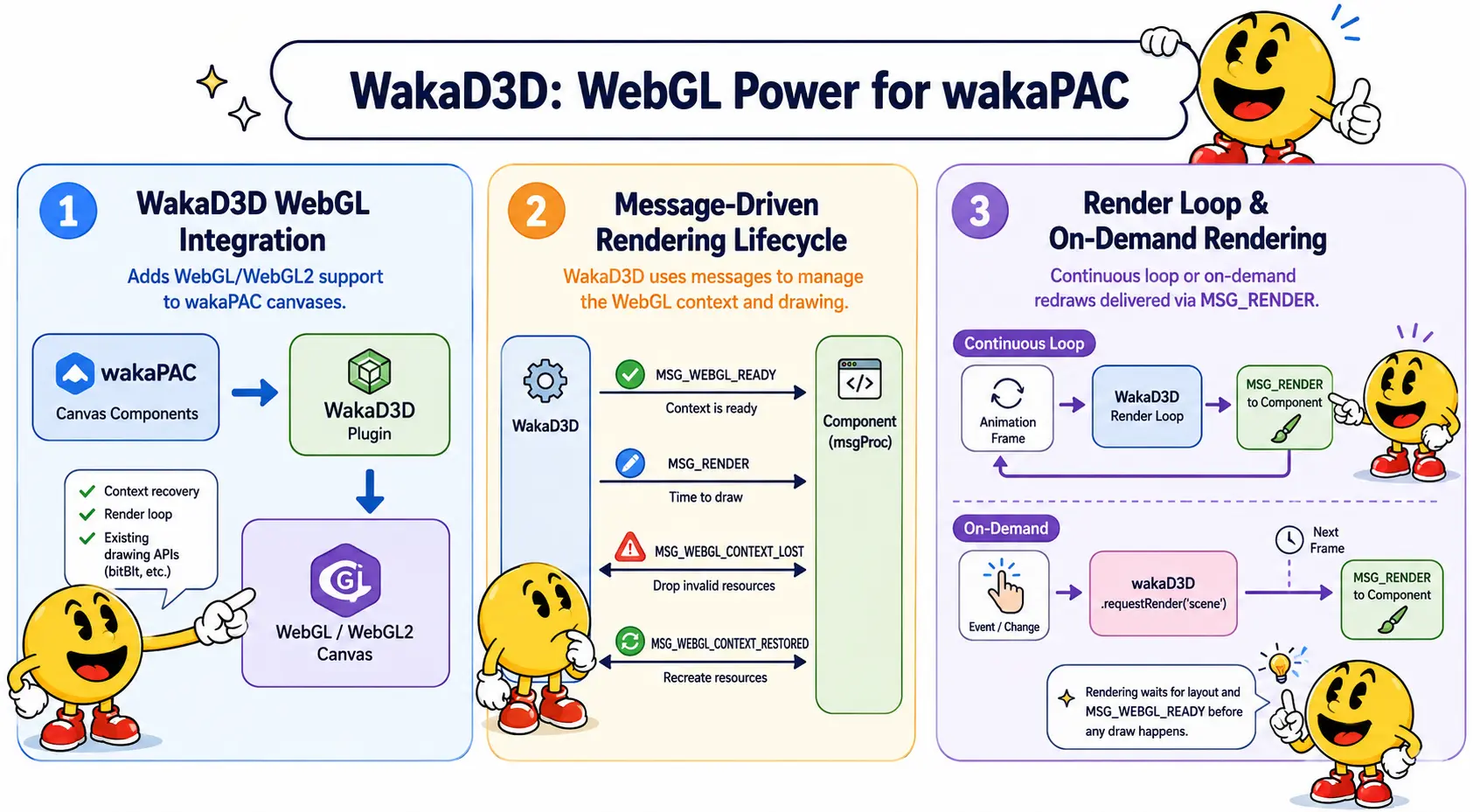
WakaD3D adds WebGL and WebGL2 support to wakaPAC canvas components. It handles the parts that a 3D canvas needs and a normal 2D canvas doesn't: recovering from a lost graphics context, driving a redraw loop, and providing its own way to copy pixels onto a WebGL canvas as a texture.
On this page:
Getting Started
Include the script after wakaPAC and register the plugin using the instance:
<script src="https://cdn.jsdelivr.net/gh/quellabs/wakapac@main/wakapac.min.js"></script>
<script src="https://cdn.jsdelivr.net/gh/quellabs/wakapac@main/plugins/wakad3d.min.js"></script>

<script>
    wakaPAC.use(wakaD3D); // must be called before any wakaPAC() calls
</script>
Once registered, WakaD3D (constructor) and wakaD3D (singleton instance) are available globally. Some of what this page describes is wakaPAC core functions (getDC(), createCompatibleDC()) that this plugin makes work with a WebGL context, but WakaD3D also provides its own requestRender() and bitBlt() - triggering an on-demand redraw and copying pixels onto a WebGL destination are this plugin's job, not core's.
Basic Usage
Mark a canvas as WebGL in markup with data-pac-context, then read the GL context off the "ready" message instead of calling getDC() yourself:
<canvas data-pac-id="scene" data-pac-context="webgl2"></canvas>wakaPAC('#scene', {
gl: null,
program: null,
msgProc(event) {
switch (event.message) {
case wakaD3D.MSG_WEBGL_READY:
// event.detail.glContext is ready to use - compile shaders,
// upload buffers, etc. here
this.gl = event.detail.glContext;
this.program = createShaderProgram(this.gl);
break;
case wakaD3D.MSG_WEBGL_RENDER:
drawScene(this.gl, this.program);
break;
case wakaD3D.MSG_WEBGL_CONTEXT_LOST:
// All GL resource handles are now invalid - forget them
this.program = null;
break;
case wakaD3D.MSG_WEBGL_CONTEXT_RESTORED:
// A fresh context exists - recreate everything
this.gl = event.detail.glContext;
this.program = createShaderProgram(this.gl);
break;
}
}
}, { renderLoop: true });Usage
Marking a Canvas as WebGL
A canvas becomes a WakaD3D canvas by setting data-pac-context to webgl or webgl2. Any other value - or no attribute at all - is left as an ordinary 2D canvas that WakaD3D ignores completely.
<canvas data-pac-id="scene" data-pac-context="webgl2"></canvas>Context creation attributes (alpha, antialias, preserveDrawingBuffer, and so on) are passed through to canvas.getContext() via the dcAttributes component option:
wakaPAC('#scene', {
    /* ... */
}, {
    dcAttributes: { preserveDrawingBuffer: true }
});
The Render Loop
A WebGL canvas needs to be redrawn repeatedly, and WakaD3D can do that for you in one of two ways.
Continuous - the canvas redraws on every animation frame, forever, which is what you want for a game loop or a constantly animating scene. Turn it on with the renderLoop component option:
wakaPAC('#scene', { /* ... */ }, { renderLoop: true });On demand - the canvas redraws once, the next time the browser is ready to paint, and then stops again. This suits a static or mostly-static scene that only needs to change when something happens (data updates, a user interaction). Call wakaD3D.requestRender() whenever the scene needs to change:
wakaD3D.requestRender('scene');Either way, WakaD3D delivers the redraw as a wakaD3D.MSG_WEBGL_RENDER message to the component's msgProc() - a separate message from MSG_PAINT, which is reserved for 2D canvases. Calling requestRender() multiple times before the next frame is safe; only one MSG_WEBGL_RENDER is sent.
Rendering is held back until the canvas has been laid out for the first time and MSG_WEBGL_READY has fired - there is no point asking a component to draw before it has a context to draw with.
Context Loss and Restore
A WebGL context can be lost at any moment for reasons outside your control - the GPU driver resets, the browser reclaims memory, a laptop switches graphics adapters. When that happens every GL resource you created (buffers, textures, programs, framebuffers) becomes invalid, and there is nothing you can do about it except notice and rebuild.
WakaD3D detects this automatically and pauses the render loop for that canvas, since drawing to a lost context just produces errors. It sends MSG_WEBGL_CONTEXT_LOST so the component can drop its now-invalid handles. If and when the browser creates a replacement context, WakaD3D sends MSG_WEBGL_CONTEXT_RESTORED with the new context and resumes the render loop automatically. The component is responsible for recreating everything it needs in response to that message - shaders, buffers, textures - since none of it survived the loss.
Texture Blitting
wakaPAC's bitBlt() and stretchBlt() functions copy pixels between 2D canvases only. For a WebGL destination, WakaD3D provides its own bitBlt() instead - the source canvas is uploaded as a texture bound to whichever texture unit is currently active:
gl.bindTexture(gl.TEXTURE_2D, myTexture);
wakaD3D.bitBlt(glDestDC, someSrcDC);
// uploads someSrcDC's canvas via texImage2D onto the currently bound texture
Unlike wakaPAC.bitBlt(), there are no dx/dy/cx/cy/sx/sy parameters - texImage2D always uploads the whole source canvas, so a partial-region or scaled copy isn't meaningful for a WebGL destination and the parameters simply don't exist.
API
wakaD3D.requestRender(pacId)
Schedules a single MSG_WEBGL_RENDER for a WakaD3D-managed canvas on the next animation frame. Use this to trigger an on-demand redraw on a canvas that is not running a continuous renderLoop. Safe to call repeatedly before the frame fires - only one repaint is scheduled. Withheld until the canvas has fired MSG_WEBGL_READY, same as the continuous render loop.
| Parameter | Type | Description |
|---|---|---|
pacId | string | data-pac-id of the canvas component |
Returns void | ||
The next two functions are wakaPAC core functions that WakaD3D teaches to work with a WebGL canvas; bitBlt() after them is WakaD3D's own function, not core's.
wakaPAC.getDC(pacId)
Returns the WebGL/WebGL2 context for a canvas component, matching whatever data-pac-context was set to. You will not normally need to call this yourself - the context is delivered directly on MSG_WEBGL_READY and MSG_WEBGL_CONTEXT_RESTORED.
| Parameter | Type | Description |
|---|---|---|
pacId | string | data-pac-id of the canvas component |
Returns WebGLRenderingContext | WebGL2RenderingContext | null | ||
wakaPAC.createCompatibleDC(pacId)
Creates an off-screen WebGL context sized to match the canvas's current backing store, for rendering to a texture or preparing content off-screen before blitting it onto the visible canvas. The component owns the returned context and should recreate it in response to MSG_SIZE after a resize.
| Parameter | Type | Description |
|---|---|---|
pacId | string | data-pac-id of the canvas component |
Returns WebGLRenderingContext | WebGL2RenderingContext | null | ||
wakaD3D.bitBlt(destDC, srcDC)
Copies the source canvas onto a WebGL destination as a texture bound to the currently active texture unit. The caller must bind the target texture before calling this. There are no size or offset arguments - texImage2D always uploads the whole source canvas, so a partial-region or scaled copy isn't meaningful for a WebGL destination.
| Parameter | Type | Description |
|---|---|---|
destDC | RenderingContext | A WebGL/WebGL2 context, with the target texture already bound |
srcDC | RenderingContext | Context of the source canvas to copy from |
Returns void | ||
Messages
WakaD3D sends four message types, all to the owning component only - none are broadcast globally.
Render (MSG_WEBGL_RENDER)
Sent once per animation frame the canvas is redrawn, whether that comes from renderLoop: true or a single wakaD3D.requestRender() call. This is where the actual drawing happens.
case wakaD3D.MSG_WEBGL_RENDER: {
    drawScene(this.gl, this.program);
    break;
}
Message Parameters
| Parameter | Type | Description |
|---|---|---|
wParam | number | Always 0 |
lParam | number | Always 0 |
event.detail | - | None |
WebGL Ready (MSG_WEBGL_READY)
Sent once, the first time a canvas has been laid out and its GL context is valid. This is the point to compile shaders, upload buffers, and otherwise set up GPU resources - MSG_WEBGL_RENDER is not delivered before this message fires.
case wakaD3D.MSG_WEBGL_READY: {
    this.gl = event.detail.glContext;
    this.program = createShaderProgram(this.gl);
    break;
}
Message Parameters
| Parameter | Type | Description |
|---|---|---|
wParam | number | Always 0 |
lParam | number | Always 0 |
event.detail | object | { glContext } - the canvas's WebGL/WebGL2 context |
WebGL Context Lost (MSG_WEBGL_CONTEXT_LOST)
Sent when the browser has lost the WebGL context for this canvas. Every GL resource handle the component holds - buffers, textures, framebuffers, programs - is invalid from this point on. The render loop, if any, is paused automatically; there is no need to stop it manually.
case wakaD3D.MSG_WEBGL_CONTEXT_LOST: {
    // Forget every GL handle - none of them are valid any more
    this.program = null;
    this.buffers = null;
    break;
}
Message Parameters
| Parameter | Type | Description |
|---|---|---|
wParam | number | Always 0 |
lParam | number | Always 0 |
event.detail | - | None |
WebGL Context Restored (MSG_WEBGL_CONTEXT_RESTORED)
Sent when the browser has created a brand-new WebGL context to replace a lost one. The render loop resumes automatically right after this message. The component must recreate everything it needs to draw - nothing survives a context loss.
case wakaD3D.MSG_WEBGL_CONTEXT_RESTORED: {
    this.gl = event.detail.glContext;
    this.program = createShaderProgram(this.gl);
    break;
}
Message Parameters
| Parameter | Type | Description |
|---|---|---|
wParam | number | Always 0 |
lParam | number | Always 0 |
event.detail | object | { glContext } - the new WebGL/WebGL2 context |
Notes
getDC()andcreateCompatibleDC()are already generic in wakaPAC and need no help from this plugin;requestRender()is provided by WakaD3D itself rather than core, since triggering an on-demand redraw is this plugin's job, the same as the continuous render loop.- A 2D canvas and a WebGL canvas use different repaint mechanisms -
invalidateRect()for 2D,wakaD3D.requestRender()for WebGL. CallinginvalidateRect()on a WebGL canvas is silently ineffective — no warning is logged. - To copy a WebGL canvas's own rendered output elsewhere, create the context with
preserveDrawingBuffer: trueviadcAttributes- without it the drawing buffer may already be cleared by the time you try to read from it.
Implementation Notes
- The render loop is one
requestAnimationFramehandle per canvas, since each canvas paints independently. It has three states internally: not running, paused (context lost, so as not to draw into an invalid context), and active -_resumeLoop()only restarts a loop that was paused, never one that was stopped for good because the component was destroyed. - The "ready" signal is derived from the canvas's first
MSG_SIZE- layout has to have happened at least once before a GL context is meaningful to draw into, soMSG_WEBGL_READYwaits for that rather than firing the instant the component is created. - Context loss handling calls
preventDefault()on the browser'swebglcontextlostevent, which is required - without it the browser will not attempt to restore the context afterwards. wakaD3D.bitBlt()is a standalone function on the plugin, not a handler registered withwakaPAC.bitBlt()/stretchBlt()- it simply uploads the source canvas viatexImage2Donto whichever texture is currently bound.requestRender()tracks its own pending state per canvas rather than relying onrequestAnimationFrameto collapse repeated calls - separate calls schedule separate callbacks, so without that flag, calling it twice before a frame fires would dispatchMSG_WEBGL_RENDERtwice.
Best Practices
- Register before creating components - call
wakaPAC.use(wakaD3D)before anywakaPAC()calls. Note: pass the instancewakaD3D, not the constructorWakaD3D. - Set up GPU resources on
MSG_WEBGL_READY, not ininit()- the context isn't guaranteed to exist until the canvas has been laid out. - Always handle context loss and restore - it is rare in practice but not exotic (GPU driver resets, backgrounded tabs, low-memory conditions on mobile). A component that only sets up its GL resources once will silently stop drawing after a context loss.
- Use
renderLoop: truefor continuously animating scenes,wakaD3D.requestRender()for everything else - a continuous loop that is not needed wastes battery and GPU time for no visual benefit. - Set
preserveDrawingBuffer: trueonly if you need it - it disables an optimisation the browser otherwise applies, so leave it off unless you are reading back or blitting from the canvas's own output.